Search Your Apple Account Purchase History on iPhone - MacRumors
Skip to Content

Search Your Apple Account Purchase History on iPhone

by

In an age of digital ubiquity, knowing how to easily keep track of your online transactions is crucial, especially as an Apple user who frequently downloads apps, music, movies, and more from various Apple services.
apple account%402x
Your Apple Account purchase history is a comprehensive log of all the content you've bought using your account, not just on your iPhone, but across all your Apple devices. Knowing how to access this information on your device can give you valuable insights into your digital spending habits, help you manage your subscriptions, or even assist in troubleshooting or disputing unauthorized purchases.

So whether you're trying to keep a budget, ensure that your family's purchases are appropriate, or simply curious about when you bought that app or movie, here's how to view your Apple Account purchase history on an iPhone or iPad logged into your account.

View Purchase History in Settings

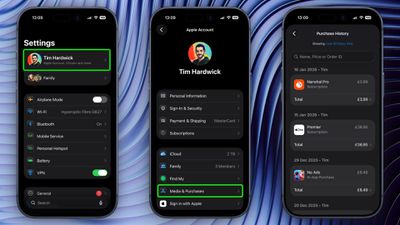
  1. Open the Settings app and tap your Apple Account banner at the top.
  2. Tap Media & Purchases.
  3. Tap View Account in the popup and authenticate with Face ID or Touch ID.
  4. Scroll down and tap Purchase History.

settings

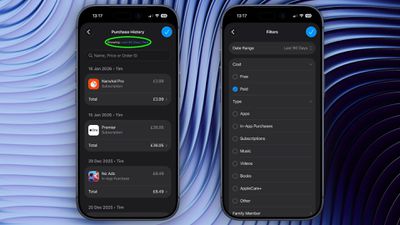
You are now viewing the purchase history for this Apple Account across all the devices tied to the account. If you are looking for a specific purchase, you can use the search field at the top to enter a name, price, or order ID.
view apple account purchase history1
If you tap the blue text next to "Showing:" you can also filter the history by date range, price, and purchase type.

View Purchase History in App Store

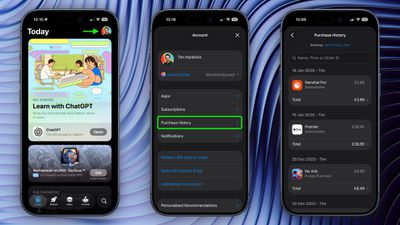
In iOS 17.4 and iPadOS 17.4 or later, you can access the same purchase history a little bit faster via the App Store app on iPhone and iPad.
app store
Simply tap your account profile in the top-right corner, then tap Purchase History and authenticate with Face ID or Touch ID when prompted.


Top Rated Comments

Crowbot Avatar
8 weeks ago
I would love to see this extended to hardware purchases too. Some of this info is available on the Apple ID site but I'd like to see a comprehensive list on the phone.
Score: 2 Votes (Like | Disagree)
maflynn Avatar
8 weeks ago
Thanks for this information, Sometimes trying to do your due diligence on purchases and subscriptions, it can be daunting to find
Score: 2 Votes (Like | Disagree)
8 weeks ago
Good article. Have used it in the past. Useful. However I feel that the search feature could be improved.
Score: 1 Votes (Like | Disagree)
8 weeks ago
Sadly I cannot find a way to search every year all at once. I could only search a single year at a time for a specific app. Maybe I'm missing something.
Score: 1 Votes (Like | Disagree)

Popular Stories

iOS 26

iOS 26.4 Adds Two New Features to CarPlay

Tuesday March 24, 2026 1:55 pm PDT by
iOS 26.4 was released today, and it includes a couple of new features for CarPlay: an Ambient Music widget and support for voice-based chatbot apps. To update your iPhone 11 or newer to iOS 26.4, open the Settings app and tap on General → Software Update. CarPlay will automatically offer the new features so long as the iPhone connected to your vehicle is running iOS 26.4 or later....
Apple Business hero

Apple Unveils 'Apple Business' All-in-One Platform

Tuesday March 24, 2026 8:53 am PDT by
Apple today announced Apple Business, a new all-in-one platform that unifies device management, productivity tools, and customer outreach features. The service is designed to be a consolidated replacement for several of Apple's existing business-focused offerings, including Apple Business Essentials, Apple Business Manager, and Apple Business Connect. It provides organizations with a single...
AirPods Pro Firmware Feature

Apple Releases New Firmware for AirPods Pro 3, AirPods Pro 2 and AirPods 4

Tuesday March 24, 2026 12:31 pm PDT by
Apple today released new firmware for the AirPods Pro 2, AirPods Pro 3, and the AirPods 4. The firmware has a version number of 8B39, up from 8B34 on the AirPods Pro 3, 8B28 on the AirPods Pro 2, and 8B21 on the AirPods 4. There is no word on what's included in the firmware, but Apple has a support document with limited notes. Most updates are limited to bug fixes and performance...