Secure Your Instagram Account With Two-Factor Authentication - MacRumors
Skip to Content

Secure Your Instagram Account With Two-Factor Authentication

by

With social media account hacking becoming increasingly more widespread, users would do well to make sure they're taking every security measure available to them. That goes doubly for frequenters of Facebook-owned Instagram, where account hijacking in particular is a recurring problem.

Instagram Feature 2
One of the best ways to protect any online account is by using two-factor authentication (2FA). 2FA offers hardened security during login attempts by requesting that the user provides an extra piece of information only they would know, such as a randomly generated code from a third-party.

Instagram has supported two-factor authentication for some time, but it was tied to a phone number and required users to receive text messages, which has proven to be insecure and left some Instagram users vulnerable to SIM hacking. More recently, Instagram added non SMS-based two-factor authentication to the app with support for third-party authenticator apps.

With 2FA enabled, you'll be the only person who can access your Instagram account from another device, regardless of whether someone learns your password as the result of a hack or a phishing scam, so it's well worth taking the time to enable the feature. This article shows you how. Note that you'll need to download an authenticator app to follow the steps below – we'll be using Google Authenticator, but Authy is another tried and tested option that works equally well.

How to Protect Your Instagram Account With 2FA

  1. Launch the Instagram app on your iPhone and log in to your account if you aren't already.

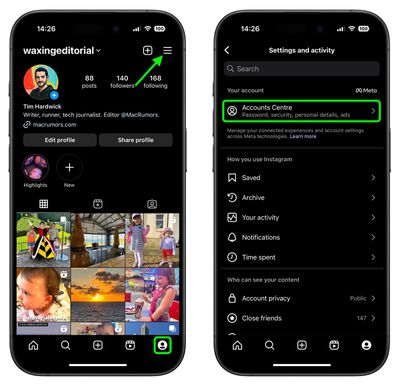
  2. Tap the Profile icon in the bottom-right corner, then tap the More (three lines) icon in the top-right corner of your profile.
  3. Tap Accounts Center.
    instagram

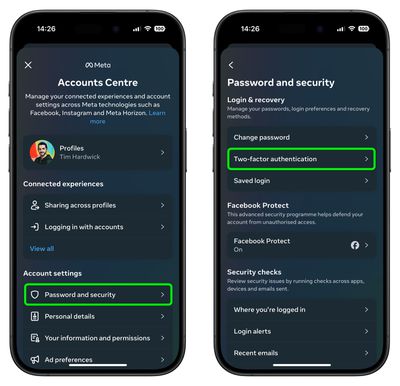
  4. Under "Account settings," tap Password and security.
  5. Tap Two-factor authentication.
  6. Tap Get started at the bottom.
    instagram

As you follow the on-screen instructions for setting up two-factor authentication on Instagram, you'll be asked to choose one of two security methods: Authentication app or Text Message. For the best security, choose Authentication. After you've turned on two-factor authentication, you'll be able to see login requests and remove trusted devices.

And that's it – 2FA is now enabled for your Instagram account. Note that once you've authenticated a trusted device in this way, you won’t have to do it every time you launch the app, but your account will remain protected.


Top Rated Comments

97 months ago
Science Rules!
Score: 2 Votes (Like | Disagree)
97 months ago
Since we are having a conversation about sim hacking, this timely article came out today.

https://motherboard.vice.com/en_us/article/5984zn/listen-to-sim-jacking-account-ransom-instagram-email-tmobile
Score: 1 Votes (Like | Disagree)
97 months ago
So basically as trivial as getting into someone else's car with a key, provided one finds a way to get the dealership to give them a duplicate key for someone else's car.
Not at analogous at all. A dealership actually has some protections in place like ID checks. I'm also not sure what dealership will mail me a key to someones car if I just call and give them my name and number. Cell phone companies port numbers almost at will because historically people complained that porting was hard. ATT is currently in a lawsuit with a person who lost 200M of bitcoin because they ported out his number. Social engineering it not the only way though. From this article:

https://www.wired.com/2016/06/hey-stop-using-texts-two-factor-authentication/

Tactics like social-engineering or strong-arming the phone company to subvert two-factor comprise only a fraction of SMS vulnerabilities. Fake cell phone towers known as IMSI catchers or "stingrays" can intercept text messages, too. And the security community has recently been calling attention to weaknesses in SS7 ('https://www.wired.com/2016/04/the-critical-hole-at-the-heart-of-cell-phone-infrastructure/'), the protocol that allows telecom networks to communicate with each other. Hackers can exploit SS7 to spoof a change to a user's phone number, intercepting their calls or text messages. "Any network can tell any other network 'your subscriber’s here now,' and until your phone says otherwise, every call and text is diverted to this other network," says Karsten Nohl, the chief scientist at Security Research Labs, who recently demonstrated the attack for 60 Minutes. "If there’s an attacker, they get all your text messages. it’s completely trust-based...It’s so simple it’s almost embarrassing to call it a hack."
That was 2 years ago, and the attacks have only gotten easier to pull off. I know someone who makes their living on IG, and this was one of their biggest fears. Finally adding a secure 2FA method is a big deal.
Score: 1 Votes (Like | Disagree)
97 months ago
Trivial how?
There is lots of information online, but this describes the easy social engineerings ones.

https://krebsonsecurity.com/2018/08/reddit-breach-highlights-limits-of-sms-based-authentication/
Score: 1 Votes (Like | Disagree)
97 months ago
Science Rules!
Score: 1 Votes (Like | Disagree)
97 months ago
Science Rules!
Score: 1 Votes (Like | Disagree)

Popular Stories

iOS 26

iOS 26.4 Adds Two New Features to CarPlay

Tuesday March 24, 2026 1:55 pm PDT by
iOS 26.4 was released today, and it includes a couple of new features for CarPlay: an Ambient Music widget and support for voice-based chatbot apps. To update your iPhone 11 or newer to iOS 26.4, open the Settings app and tap on General → Software Update. CarPlay will automatically offer the new features so long as the iPhone connected to your vehicle is running iOS 26.4 or later....
Apple Business hero

Apple Unveils 'Apple Business' All-in-One Platform

Tuesday March 24, 2026 8:53 am PDT by
Apple today announced Apple Business, a new all-in-one platform that unifies device management, productivity tools, and customer outreach features. The service is designed to be a consolidated replacement for several of Apple's existing business-focused offerings, including Apple Business Essentials, Apple Business Manager, and Apple Business Connect. It provides organizations with a single...
AirPods Pro Firmware Feature

Apple Releases New Firmware for AirPods Pro 3, AirPods Pro 2 and AirPods 4

Tuesday March 24, 2026 12:31 pm PDT by
Apple today released new firmware for the AirPods Pro 2, AirPods Pro 3, and the AirPods 4. The firmware has a version number of 8B39, up from 8B34 on the AirPods Pro 3, 8B28 on the AirPods Pro 2, and 8B21 on the AirPods 4. There is no word on what's included in the firmware, but Apple has a support document with limited notes. Most updates are limited to bug fixes and performance...