How to See Content Downloaded for Offline Reading in Apple News+ - MacRumors
Skip to Content

How to See Content Downloaded for Offline Reading in Apple News+

by

With an Apple News+ subscription, you can download magazines for offline reading, but Apple doesn't provide an easy way to see what's downloaded and what's not. You can tell on an individual magazine basis by checking to see if a download icon (cloud and arrow) is available, but there's no section in ‌Apple News‌+ for managing offline content.

You can, however, still check to see what's downloaded, though you'll need to turn off your WiFi and LTE to do so.

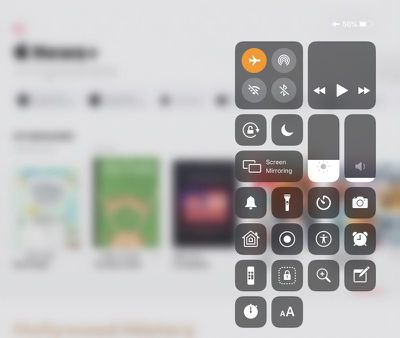
  1. Open up the Control Center on your iPhone or iPad.
  2. Tap on the Airplane Mode icon to disable WiFi and your cellular connection if using an LTE ‌iPad‌. applenewsairplanemode
  3. Open up the ‌Apple News‌ app.
  4. Tap on the ‌Apple News‌+ section.
  5. Let it load.

When the ‌Apple News‌+ section is done loading whatever content is available, you'll see a list of all of the magazines that have been downloaded for offline reading.
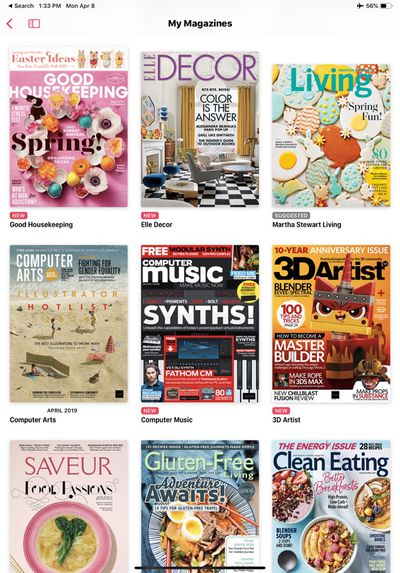
applenewsofflinemagazines
You can tap on any one of the magazines that you've downloaded to read it, and to download more, simply turn WiFi and LTE back on.

For more on ‌Apple News‌+, make sure to check out our dedicated ‌Apple News‌+ guide. ‌Apple News‌ users can follow MacRumors on ‌Apple News‌ using this link.

Top Rated Comments

antiprotest Avatar
91 months ago
It's like an interface designed by a high school intern. Confusing. Cumbersome. You cannot enforce the same font preferences across channels. You cannot even sort channels alphabetically. It seems it is not designed by anyone who would use the app. But don't expect more from Apple. This is how it is now. Just live with it. I still like Apple more than the alternatives.
Score: 3 Votes (Like | Disagree)
91 months ago
It's like an interface designed by a high school intern. Confusing. Cumbersome. You cannot enforce the same font preferences across channels. You cannot even sort channels alphabetically. It seems it is not designed by anyone who would use the app. But don't expect more from Apple. This is how it is now. Just live with it. I still like Apple more than the alternatives.
It’s what happens when you combine a free app with paid content. A paid news plus needs to be its own app. The tabs at bottom should be newspapers, mags, etc. And no ads.
Score: 1 Votes (Like | Disagree)
DempaX Avatar
91 months ago
News+ in Beta+
Score: 1 Votes (Like | Disagree)
91 months ago
I was just looking at many of the News and Magazine articles. Pretty much everything that was free will soon be $10 per month to read from every source :eek: If you read from 5 different sources you will end up paying $50 per month or $600 per year to read what used to be read for free :eek:o_O
What? It’s $10 for all inclusive.
Score: 1 Votes (Like | Disagree)

Popular Stories

iOS 26

iOS 26.4 Adds Two New Features to CarPlay

Tuesday March 24, 2026 1:55 pm PDT by
iOS 26.4 was released today, and it includes a couple of new features for CarPlay: an Ambient Music widget and support for voice-based chatbot apps. To update your iPhone 11 or newer to iOS 26.4, open the Settings app and tap on General → Software Update. CarPlay will automatically offer the new features so long as the iPhone connected to your vehicle is running iOS 26.4 or later....
Apple Business hero

Apple Unveils 'Apple Business' All-in-One Platform

Tuesday March 24, 2026 8:53 am PDT by
Apple today announced Apple Business, a new all-in-one platform that unifies device management, productivity tools, and customer outreach features. The service is designed to be a consolidated replacement for several of Apple's existing business-focused offerings, including Apple Business Essentials, Apple Business Manager, and Apple Business Connect. It provides organizations with a single...
AirPods Pro Firmware Feature

Apple Releases New Firmware for AirPods Pro 3, AirPods Pro 2 and AirPods 4

Tuesday March 24, 2026 12:31 pm PDT by
Apple today released new firmware for the AirPods Pro 2, AirPods Pro 3, and the AirPods 4. The firmware has a version number of 8B39, up from 8B34 on the AirPods Pro 3, 8B28 on the AirPods Pro 2, and 8B21 on the AirPods 4. There is no word on what's included in the firmware, but Apple has a support document with limited notes. Most updates are limited to bug fixes and performance...