How to Select Camera Aspect Ratio on iPhone 11 and iPhone 11 Pro - MacRumors
Skip to Content

How to Select Camera Aspect Ratio on iPhone 11 and iPhone 11 Pro

by

Apple has redesigned the native Camera app on the iPhone 11 and iPhone 11 Pro to make space for the various additional shooting options available in its new flagship phones, and one particularly welcome change is the introduction of different aspect ratio shooting modes.
how to change aspect ratio iphone 11 4
As it exists on earlier iPhones, the Camera app offers only a single 1:1 aspect ratio shooting mode called Square, for taking Instagram-style shots, meaning users can only select different ratios later in the editing mode of the Photos app.

However, on iPhone 11, iPhone 11 Pro, and iPhone 11 Pro Max, users can choose between three aspect ratio options when shooting in the Camera app: 1:1, 4:3, and 16:9. To get to the different shooting modes, follow these steps.

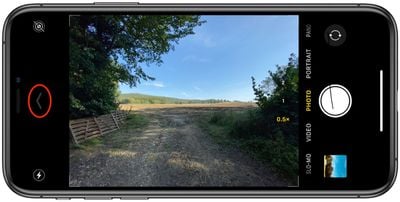
  1. Launch the Camera app, then tap the chevron at the top of the viewfinder (or to the side of it, if you're shooting in landscape) to reveal the hidden drawer.
    how to change aspect ratio iphone 11 1

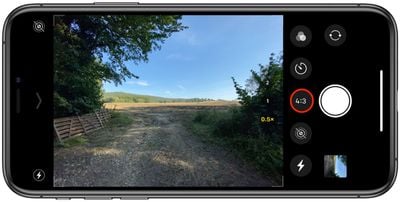
  2. Tap the 4:3 button in the toolset that appears directly below (or to the side of) the viewfinder.
    how to change aspect ratio iphone 11 2

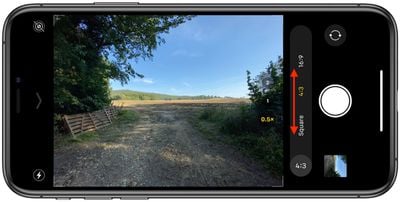
  3. Select your preferred aspect ratio from the expanded 4:3 button menu.
    how to change aspect ratio iphone 11 3

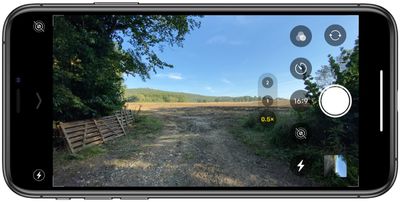
  4. Proceed to take your shot.
    how to change aspect ratio iphone 11 4

Note that the 1:1 and 16:9 ratios are non-destructive. In other words, you can re-crop them in the editing window if you later decide you want to return to the typical 4:3 frame.


Related Forum: iPhone

Top Rated Comments

squizzler Avatar
85 months ago
Surely, older models could easily have this feature with a little software update.
Score: 7 Votes (Like | Disagree)
HiRez Avatar
85 months ago
This is great but why the heck is there not a 3:2 option (or less needed but still handy 5:4)? This has been the standard for 35mm and APS sensors for decades, and many standard photo/frame sizes align with those (for example 4x6 and 36x24 are 3:2 aspects, 8x10 is 5:4). An ultra wide option like 2:1 would also be great.
Score: 3 Votes (Like | Disagree)
85 months ago

Apple is starting to turn into Android manufacturers where newer phones get software features that older ones don’t for seemingly no reason

I understand if the feature ties into hardware, like how the XR didn’t get the 2x button, but this has 0% anything to do with hardware
When the Google Pixel 3 was released with the awesome Night Sight, this was made available to all previous models via a software update...
Score: 2 Votes (Like | Disagree)
81 months ago

This is great but why the heck is there not a 3:2 option (or less needed but still handy 5:4)? This has been the standard for 35mm and APS sensors for decades, and many standard photo/frame sizes align with those (for example 4x6 and 36x24 are 3:2 aspects, 8x10 is 5:4). An ultra wide option like 2:1 would also be great.
I'm still going through the capabilities and found that going to PHOTO, select image, EDIT and then select the ROTATE/CROP button. At the top of the screen on the upper right is an icon for size adjustment: Freeform; SQUARE; 9:16; 8:10; 5:7; 3:4; 3:5; 2:3 and gives you the aspect ratio that you want.
Score: 1 Votes (Like | Disagree)
SoN1NjA Avatar
85 months ago

Surely, older models could easily have this feature with a little software update.
Apple is starting to turn into Android manufacturers where newer phones get software features that older ones don’t for seemingly no reason

I understand if the feature ties into hardware, like how the XR didn’t get the 2x button, but this has 0% anything to do with hardware
Score: 1 Votes (Like | Disagree)

Popular Stories

iOS 26

iOS 26.4 Adds Two New Features to CarPlay

Tuesday March 24, 2026 1:55 pm PDT by
iOS 26.4 was released today, and it includes a couple of new features for CarPlay: an Ambient Music widget and support for voice-based chatbot apps. To update your iPhone 11 or newer to iOS 26.4, open the Settings app and tap on General → Software Update. CarPlay will automatically offer the new features so long as the iPhone connected to your vehicle is running iOS 26.4 or later....
Apple Business hero

Apple Unveils 'Apple Business' All-in-One Platform

Tuesday March 24, 2026 8:53 am PDT by
Apple today announced Apple Business, a new all-in-one platform that unifies device management, productivity tools, and customer outreach features. The service is designed to be a consolidated replacement for several of Apple's existing business-focused offerings, including Apple Business Essentials, Apple Business Manager, and Apple Business Connect. It provides organizations with a single...
AirPods Pro Firmware Feature

Apple Releases New Firmware for AirPods Pro 3, AirPods Pro 2 and AirPods 4

Tuesday March 24, 2026 12:31 pm PDT by
Apple today released new firmware for the AirPods Pro 2, AirPods Pro 3, and the AirPods 4. The firmware has a version number of 8B39, up from 8B34 on the AirPods Pro 3, 8B28 on the AirPods Pro 2, and 8B21 on the AirPods 4. There is no word on what's included in the firmware, but Apple has a support document with limited notes. Most updates are limited to bug fixes and performance...