How to Send Funny Exploding Images Over iMessage - MacRumors
Skip to Content

How to Send Funny Exploding Images Over iMessage

by

In the Messages app on iPhone and iPad, Apple includes a bunch of screen effects that add fireworks, confetti, and more to the whole screen when you send an iMessage to someone.

messages
Because it's not obvious how to access these iMessage screen effects, they're often overlooked, which is a shame because they can surprise recipients, make them smile, or even laugh out loud – if you use the right approach.

Here we're going to highlight one screen effect in particular that – when combined with an isolated subject from an image – can easily produce amusing results. Keep reading to learn how it's done.

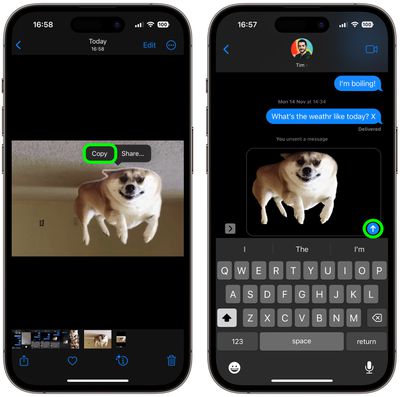
  1. First, open the Photos app and select an image from your library containing a well-defined subject – the funnier the better.
  2. Press and hold on the subject until it ripples and a white glow flows around its outline, then tap Copy in the popup menu that appears.
    iMessages

  3. Now open the Messages app, and in new or existing conversation, press and hold your finger in the input field, then tap the Paste option that pops up.
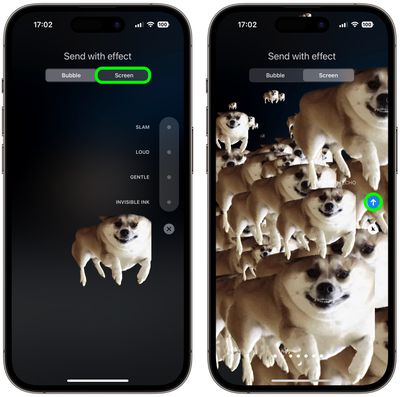
  4. Next, press and hold down the Send button until the "Send with effect" screen appears.
  5. Tap the Screen tab at the top, and the first effect that's selected is called Echo – this is what you want. Enjoy the preview, then hit the Send button.
    messages

Congratulations, you've just sent an exploding iMessage that should hopefully amuse your friends. Here's another tip: If you're short of funny pictures, you can also easily lift subjects from images on the web instead. Click the link to see how it's done.


Popular Stories

iOS 26

iOS 26.4 Adds Two New Features to CarPlay

Tuesday March 24, 2026 1:55 pm PDT by
iOS 26.4 was released today, and it includes a couple of new features for CarPlay: an Ambient Music widget and support for voice-based chatbot apps. To update your iPhone 11 or newer to iOS 26.4, open the Settings app and tap on General → Software Update. CarPlay will automatically offer the new features so long as the iPhone connected to your vehicle is running iOS 26.4 or later....
Apple Business hero

Apple Unveils 'Apple Business' All-in-One Platform

Tuesday March 24, 2026 8:53 am PDT by
Apple today announced Apple Business, a new all-in-one platform that unifies device management, productivity tools, and customer outreach features. The service is designed to be a consolidated replacement for several of Apple's existing business-focused offerings, including Apple Business Essentials, Apple Business Manager, and Apple Business Connect. It provides organizations with a single...
AirPods Pro Firmware Feature

Apple Releases New Firmware for AirPods Pro 3, AirPods Pro 2 and AirPods 4

Tuesday March 24, 2026 12:31 pm PDT by
Apple today released new firmware for the AirPods Pro 2, AirPods Pro 3, and the AirPods 4. The firmware has a version number of 8B39, up from 8B34 on the AirPods Pro 3, 8B28 on the AirPods Pro 2, and 8B21 on the AirPods 4. There is no word on what's included in the firmware, but Apple has a support document with limited notes. Most updates are limited to bug fixes and performance...