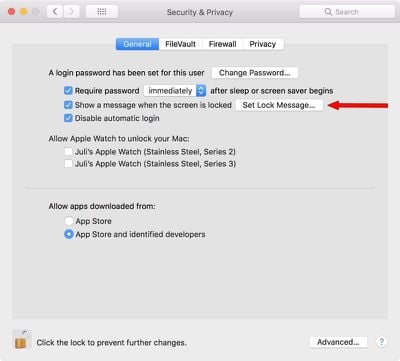
You can set a custom message to appear on the lock screen of your Mac, which is super useful if you ever misplace or lose your Mac. It lets people see who the Mac belongs to as soon as it's opened up, and there's no question about ownership.

You will need an administrator account to create a lock screen message on your Mac, but it's super easy to do.

  1. Click on the "" icon in the menu bar.
  2. Select System Preferences.
  3. Choose Security & Privacy.
  4. Select the "General" tab.
  5. Click on the lock icon at the bottom of the window.
  6. Enter your admin name and password. setlockscreenmessage
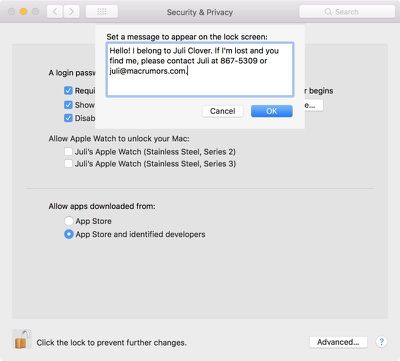
  7. Choose "Set Lock Message..."
  8. Enter your desired message. lockscreenmessageinput

It's useful to add contact details here, like your email address and phone number or the email address and phone number of someone who can easily get in touch with you in an emergency situation.
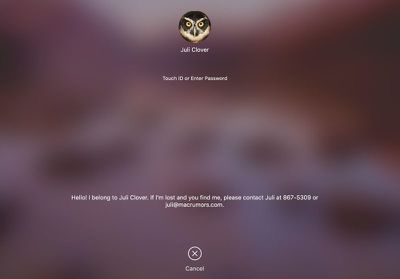
lockscreenmessage

What the lock screen message looks like when your Mac is locked.

If you misplace or Mac or have it stolen, this puts your contact information front and center as soon as your Mac is opened up, so whoever has it can see who it belongs to even before you activate Lost Mode using iCloud. It's also potentially useful in an emergency if someone needs to know who you are and how to get in contact with a loved one.

I'm personally always paranoid about losing my MacBook or having it taken at some location like an airport security lane, so this is a nice way to have instantly identifiable info readily available.


Top Rated Comments

Peapod Avatar
103 months ago
Juli, you stole Jenny's number!
Score: 11 Votes (Like | Disagree)
tigres Avatar
103 months ago
I don't know who you are. I don't know what you want. If you're looking for ransom, I can tell you I don't have money... but what I do have are a very particular set of skills. Skills I have acquired over a very long career. Skills that make me a nightmare for people like you. If you let my MacBook Pro 15" go now, that will be the end of it - I will not look for you, I will not pursue you... but if you don't, I will look for you, I will find you... and I will kill you
Score: 9 Votes (Like | Disagree)
PBG4 Dude Avatar
103 months ago
You know times are lean when rumor sites start making their own content!

Just kidding, I’ve been loving the new tips and tricks articles you’ve been releasing. :-)
Score: 5 Votes (Like | Disagree)
keysofanxiety Avatar
103 months ago
I don't know who you are. I don't know what you want. If you're looking for ransom, I can tell you I don't have money... but what I do have are a very particular set of skills. Skills I have acquired over a very long career. Skills that make me a nightmare for people like you. If you let my MacBook Pro 15" go now, that will be the end of it - I will not look for you, I will not pursue you... but if you don't, I will look for you, I will find you... and I will kill you
Wouldn't work I'm afraid. There's a character limit.


Attachment Image
Score: 5 Votes (Like | Disagree)
jclo Avatar
103 months ago
Yea, she was bragging with her watches. :D

My point was, don't give people too much information, especially thieves. What I spoke of earlier happens a lot more than people realize.

I know Juli meant well but, it is a bad idea, in my opinion.
I personally started using this feature after I was in an airport security line and a woman grabbed my laptop. I saw her and got it back without proving ownership, but if I'd needed to, this would have been an easy way since my name is right there.

This is a valid criticism, though, and some people may not want to use the lock screen message for this reason, but I do think people should know the option is there.

You can also use a Google Voice number and an email with non-identifying info, which will provide reasonable security. I just used a standard phone number and my own email address as an example here. Less identifying contact information is absolutely a valid way to implement this without giving anything away.
Score: 4 Votes (Like | Disagree)
Kabeyun Avatar
103 months ago
Juli, you stole Jenny's number!
The second I saw that I knew I’d be beaten to the punch. Well done!

For those under 40, here’s a dose of 80s goodness:

Score: 4 Votes (Like | Disagree)

Popular Stories

Apple Logo Zoomed

Tim Cook Teases Plans for Apple's Upcoming 50th Anniversary

Thursday February 5, 2026 12:54 pm PST by
Apple turns 50 this year, and its CEO Tim Cook has promised to celebrate the milestone. The big day falls on April 1, 2026. "I've been unusually reflective lately about Apple because we have been working on what do we do to mark this moment," Cook told employees today, according to Bloomberg's Mark Gurman. "When you really stop and pause and think about the last 50 years, it makes your heart ...
wwdc sans text feature

Apple Rumored to Announce New Product on February 19

Thursday February 5, 2026 12:22 pm PST by
Apple plans to announce the iPhone 17e on Thursday, February 19, according to Macwelt, the German equivalent of Macworld. The report, citing industry sources, is available in English on Macworld. Apple announced the iPhone 16e on Wednesday, February 19 last year, so the iPhone 17e would be unveiled exactly one year later if this rumor is accurate. It is quite uncommon for Apple to unveil...
Finder Siri Feature

Why Apple's iOS 26.4 Siri Upgrade Will Be Bigger Than Originally Promised

Friday February 6, 2026 3:06 pm PST by
In the iOS 26.4 update that's coming this spring, Apple will introduce a new version of Siri that's going to overhaul how we interact with the personal assistant and what it's able to do. The iOS 26.4 version of Siri won't work like ChatGPT or Claude, but it will rely on large language models (LLMs) and has been updated from the ground up. Upgraded Architecture The next-generation...
iOS 26

iOS 26.3 and iOS 26.4 Will Add These New Features to Your iPhone

Tuesday February 3, 2026 7:47 am PST by
While the iOS 26.3 Release Candidate is now available ahead of a public release, the first iOS 26.4 beta is likely still at least a week away. Following beta testing, iOS 26.4 will likely be released to the general public in March or April. Below, we have recapped known or rumored iOS 26.3 and iOS 26.4 features so far. iOS 26.3 iPhone to Android Transfer Tool iOS 26.3 makes it easier...
iphone 17 pro dark blue 1

iPhone 18 Pro Max Rumored to Deliver Next-Level Battery Life

Friday February 6, 2026 5:14 am PST by
The iPhone 18 Pro Max will feature a bigger battery for continued best-in-class battery life, according to a known Weibo leaker. Citing supply chain information, the Weibo user known as "Digital Chat Station" said that the iPhone 18 Pro Max will have a battery capacity of 5,100 to 5,200 mAh. Combined with the efficiency improvements of the A20 Pro chip, made with TSMC's 2nm process, the...