
In iOS 26.2, released in December 2025, Apple has added a new optional feature that provides the Reminders app with a more urgent notification system. When you need to ensure you don't miss an important task, you can now set an alarm that works just like your morning wake-up call, with a snooze button and slide-to-stop slider.
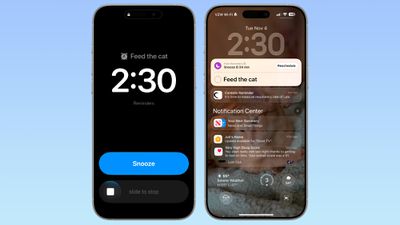
ios 26 2 alarm reminders
The feature distinguishes Reminder alarms from standard Clock alarms by applying a distinctive blue color to the snooze button, allowing you to easily tell which type of alarm is going off. You can also choose to see a Complete button instead of a Snooze button on the alarm screen that marks the reminder as completed.

Enable Alarms for Reminders

Before you can use alarms with reminders, you need to grant the Reminders app permission to access iPhone alarms.

  1. Open the Settings app on your iPhone.
  2. Swipe to the bottom and tap Apps ➝ Reminders.
  3. In the "Allow Reminders to Access" section, toggle on the switch next to Alarms.

settings

Create a Reminder With an Alarm

Once you've enabled alarm access, creating an urgent reminder is straightforward.

  1. Open the Reminders app.
  2. Create a new reminder or tap an existing one.
  3. Tap the info button (ⓘ) next to the reminder.
  4. Turn on Time and select when you want to be alerted.

  5. Turn on the Urgent switch to enable an alarm.

When the designated time arrives, your iPhone will sound an alarm. You'll see a snooze option and a slide-to-stop control on your screen. If you choose to stop or snooze the alarm, a notification appears with options to complete the reminder or reschedule it. Note that tapping to complete the reminder opens the Reminders app, where you'll need to tap again to mark it as done. Alarms will activate even when a Focus is on or your device is muted.

Show a 'Complete' Button on Reminder Alarms

You can streamline your alarm-reminder by replacing the snooze option with a Complete button that immediately marks the reminder as done.

  1. Open the Settings app on your iPhone.
  2. Swipe to the bottom and tap Apps ➝ Reminders.
  3. In the "Urgent Reminders" section, toggle on the switch next to Complete for Alarm.

reminders alarm complete

With this setting enabled, you can instantly complete reminders without opening the app, which is handy for quick tasks you finish on the spot.


Top Rated Comments

JaydenA Avatar
12 weeks ago
Shouldn't need a reminder. Most cats would never forget to remind their hooman of the need for noms.
Score: 6 Votes (Like | Disagree)
airwalk331 Avatar
12 weeks ago
Finally! I’ve missed too many reminders because Reminders is just not as “alarm-y” as I’d like.
Score: 4 Votes (Like | Disagree)
aries81 Avatar
12 weeks ago

Finally! I’ve missed too many reminders because Reminders is just not as “alarm-y” as I’d like.
This!

A welcome addition indeed.
Score: 2 Votes (Like | Disagree)
adrianlondon Avatar
5 days ago at 08:00 am

Anybody know how you tell Siri to mark a reminder as “urgent” to include this high-powered alarm?

[edit: oops, see this has already been asked. I wish I could say I was surprised at this lack of basic support from Siri...]
Prompted by this, I did another test (iOS 26.3 latest beta).

Siri ignored the word "urgent" completely, despite hearing it (I have transcript for my Siri requests turned on*). So, no "urgent" text in the reminder name, and the urgent toggle left off.

* I like to check how stupid Siri is every now and again for personal entertainment.
Score: 2 Votes (Like | Disagree)
svish Avatar
12 weeks ago
Very happy to see this. Have missed some reminders in the past. This should definitely ensure that nothing will be missed.
Score: 1 Votes (Like | Disagree)
hagar Avatar
12 weeks ago
Focus modes are a confusing mess. The most unlike-Apple feature ever created.

And now these new features arrive that completely overwrite them.
Score: 1 Votes (Like | Disagree)

Popular Stories

Apple Logo Zoomed

Tim Cook Teases Plans for Apple's Upcoming 50th Anniversary

Thursday February 5, 2026 12:54 pm PST by
Apple turns 50 this year, and its CEO Tim Cook has promised to celebrate the milestone. The big day falls on April 1, 2026. "I've been unusually reflective lately about Apple because we have been working on what do we do to mark this moment," Cook told employees today, according to Bloomberg's Mark Gurman. "When you really stop and pause and think about the last 50 years, it makes your heart ...
wwdc sans text feature

Apple Rumored to Announce New Product on February 19

Thursday February 5, 2026 12:22 pm PST by
Apple plans to announce the iPhone 17e on Thursday, February 19, according to Macwelt, the German equivalent of Macworld. The report, citing industry sources, is available in English on Macworld. Apple announced the iPhone 16e on Wednesday, February 19 last year, so the iPhone 17e would be unveiled exactly one year later if this rumor is accurate. It is quite uncommon for Apple to unveil...
Finder Siri Feature

Why Apple's iOS 26.4 Siri Upgrade Will Be Bigger Than Originally Promised

Friday February 6, 2026 3:06 pm PST by
In the iOS 26.4 update that's coming this spring, Apple will introduce a new version of Siri that's going to overhaul how we interact with the personal assistant and what it's able to do. The iOS 26.4 version of Siri won't work like ChatGPT or Claude, but it will rely on large language models (LLMs) and has been updated from the ground up. Upgraded Architecture The next-generation...
iOS 26

iOS 26.3 and iOS 26.4 Will Add These New Features to Your iPhone

Tuesday February 3, 2026 7:47 am PST by
While the iOS 26.3 Release Candidate is now available ahead of a public release, the first iOS 26.4 beta is likely still at least a week away. Following beta testing, iOS 26.4 will likely be released to the general public in March or April. Below, we have recapped known or rumored iOS 26.3 and iOS 26.4 features so far. iOS 26.3 iPhone to Android Transfer Tool iOS 26.3 makes it easier...
iphone 17 pro dark blue 1

iPhone 18 Pro Max Rumored to Deliver Next-Level Battery Life

Friday February 6, 2026 5:14 am PST by
The iPhone 18 Pro Max will feature a bigger battery for continued best-in-class battery life, according to a known Weibo leaker. Citing supply chain information, the Weibo user known as "Digital Chat Station" said that the iPhone 18 Pro Max will have a battery capacity of 5,100 to 5,200 mAh. Combined with the efficiency improvements of the A20 Pro chip, made with TSMC's 2nm process, the...















