
iPhone 15 Pro: How to Set a Default Camera Focal Length - MacRumors
Skip to Content

iPhone 15 Pro: How to Set a Default Camera Focal Length

by

On iPhone 15 Pro models, Apple has introduced three focal length options for shooting with the main camera. This article explains what the options are, and how to set a preferred default focal length for taking photos.
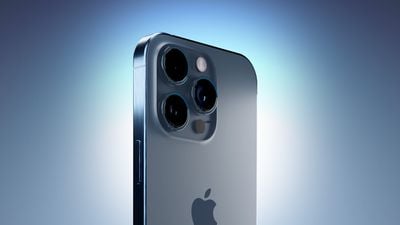
iPhone 15 Blue Three Quarters Perspective Camera Closeup Feature
To take advantage of the enhanced camera system on the iPhone 15 Pro and iPhone 15 Pro Max, Apple has added three different focal length options for the main camera's optical zoom. To the standard default 1x (24mm) mode, Apple has added 1.2x (28mm), and 1.5x (35mm) settings.

iPhone 15 Pro users can choose from these focal lengths when taking photos, simply by tapping the 1x button in the Camera app. However, for technical reasons, these focal length options aren't available when shooting video, and the Camera offers a zoom ring instead.
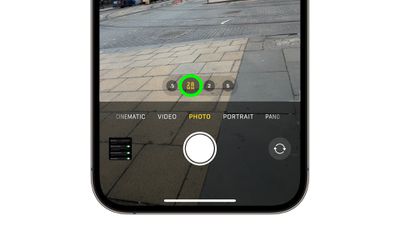
iphone 15 focal length presets
Apple has made these particular focal lengths available to photography enthusiasts by using computational processing to crop the 48-megapixel image that the new larger sensor can capture, so it always delivers a high-resolution 24MP image. In addition, Apple has added an option to change the default optical zoom setting, which is handy if you're working with a specific focal length. The following steps show you how it's done.

  1. Open the Settings app.
  2. Scroll down and tap Camera.
  3. Tap Main Camera.
  4. Under "Default Lens," select from Default to 24mm - 1x, Default to 28mm - 1.2, and Default to 35mm - 1.5x.
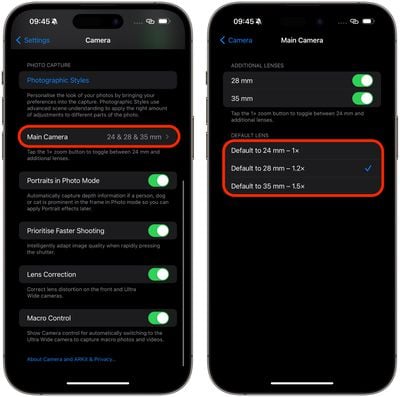
settings

That's all you have to do. The next time you shoot, you won't have to set the focal length before you start shooting – your preferred option will already be selected.


Popular Stories

iOS 26

iOS 26.4 Adds Two New Features to CarPlay

Tuesday March 24, 2026 1:55 pm PDT by
iOS 26.4 was released today, and it includes a couple of new features for CarPlay: an Ambient Music widget and support for voice-based chatbot apps. To update your iPhone 11 or newer to iOS 26.4, open the Settings app and tap on General → Software Update. CarPlay will automatically offer the new features so long as the iPhone connected to your vehicle is running iOS 26.4 or later....
Apple Business hero

Apple Unveils 'Apple Business' All-in-One Platform

Tuesday March 24, 2026 8:53 am PDT by
Apple today announced Apple Business, a new all-in-one platform that unifies device management, productivity tools, and customer outreach features. The service is designed to be a consolidated replacement for several of Apple's existing business-focused offerings, including Apple Business Essentials, Apple Business Manager, and Apple Business Connect. It provides organizations with a single...
AirPods Pro Firmware Feature

Apple Releases New Firmware for AirPods Pro 3, AirPods Pro 2 and AirPods 4

Tuesday March 24, 2026 12:31 pm PDT by
Apple today released new firmware for the AirPods Pro 2, AirPods Pro 3, and the AirPods 4. The firmware has a version number of 8B39, up from 8B34 on the AirPods Pro 3, 8B28 on the AirPods Pro 2, and 8B21 on the AirPods 4. There is no word on what's included in the firmware, but Apple has a support document with limited notes. Most updates are limited to bug fixes and performance...















