iOS 15: How to Set Leaving and Arrival Times for Driving Directions in Apple Maps - MacRumors
Skip to Content

iOS 15: How to Set Leaving and Arrival Times for Driving Directions in Apple Maps

by

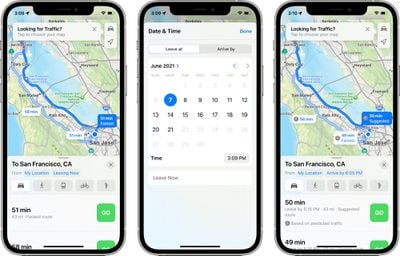
Apple Maps received several notable improvements in iOS 15, including new details in cities, an interactive globe, and enhanced driving directions. It also gained a feature that has long been available in rival map apps – the ability to set leaving and arrival times for driving directions.
arrive by maps
This is a feature that's long been available for Google Maps, and one that's really useful if you have a journey planned in the near future and you want to know how long it's going to take to get there or when you need to leave in order to arrive at a particular time.

Until now, there was no way to get estimated travel times in advance of a trip using the ‌‌Apple Maps‌‌ app. In previous versions of iOS, leaving and arrival time input was limited to directions for public transportation, but Apple has thankfully now expanded the option to driving, putting it on a more level playing field with Google Maps in the battle for users.

The following steps explain how to make use of the new leaving and arrival times on iPhones and iPads running iOS 15 and iPadOS 15 or later.

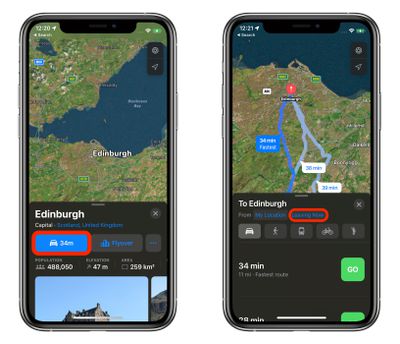
  1. In ‌Apple Maps‌' search field, enter your destination and tap Search.
  2. Tap the Driving directions button.
  3. Tap Leaving Now.
    maps

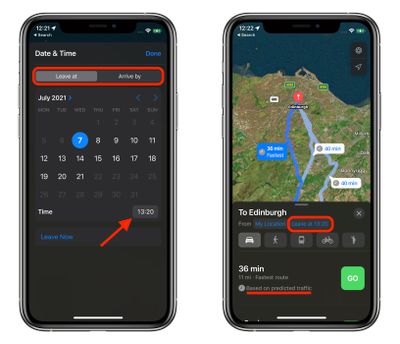
  4. Using the Leave at and Arrive by tabs, select a time and date.
  5. Tap Done.
    maps

‌Apple Maps‌ will show you several directions and how long it will take you to get to your destination based on predicted traffic for the time and date you selected.


Related Forum: iOS 15

Top Rated Comments

62 months ago
I'm still waiting for "ADD A STOP". It's so strange that you cannot do this in Apple Maps yet. Apple has really been catching up the past couple of years, but until that feature is added, I'll be sticking with Google.
Score: 10 Votes (Like | Disagree)
62 months ago
I agree that Google maps is far, far superior to Apple maps. I used to use Apple maps all the time, trying to improve its use. All too often app ends up embarrassingly wrong! Recent events made me switch to Google maps permanently, avoiding lots of roadworks.
Score: 8 Votes (Like | Disagree)
62 months ago
I only use Google Maps as pretty much a yellow pages these days. I find Apple Maps has come a long way in route guidance, especially with transit directions. Also, find Apple Maps much nicer to look at.
Score: 3 Votes (Like | Disagree)
62 months ago
Calendar on Mac has this feature. I get a notification when it’s time to leave. Very convenient.
Score: 2 Votes (Like | Disagree)
62 months ago

Huh?

I’m still waiting for Apple Maps to tell me the arrival time of my destination when I choose my preferred route in transit. It’ll only tell me the time the route will take but it does NOT include the walking time at all.
Maybe you are really fast walker? :D
Score: 2 Votes (Like | Disagree)
62 months ago
This is going to be very useful. I’m glad Apple is adding it.
Score: 2 Votes (Like | Disagree)

Popular Stories

iOS 26

iOS 26.4 Adds Two New Features to CarPlay

Tuesday March 24, 2026 1:55 pm PDT by
iOS 26.4 was released today, and it includes a couple of new features for CarPlay: an Ambient Music widget and support for voice-based chatbot apps. To update your iPhone 11 or newer to iOS 26.4, open the Settings app and tap on General → Software Update. CarPlay will automatically offer the new features so long as the iPhone connected to your vehicle is running iOS 26.4 or later....
Apple Business hero

Apple Unveils 'Apple Business' All-in-One Platform

Tuesday March 24, 2026 8:53 am PDT by
Apple today announced Apple Business, a new all-in-one platform that unifies device management, productivity tools, and customer outreach features. The service is designed to be a consolidated replacement for several of Apple's existing business-focused offerings, including Apple Business Essentials, Apple Business Manager, and Apple Business Connect. It provides organizations with a single...
AirPods Pro Firmware Feature

Apple Releases New Firmware for AirPods Pro 3, AirPods Pro 2 and AirPods 4

Tuesday March 24, 2026 12:31 pm PDT by
Apple today released new firmware for the AirPods Pro 2, AirPods Pro 3, and the AirPods 4. The firmware has a version number of 8B39, up from 8B34 on the AirPods Pro 3, 8B28 on the AirPods Pro 2, and 8B21 on the AirPods 4. There is no word on what's included in the firmware, but Apple has a support document with limited notes. Most updates are limited to bug fixes and performance...