How to Set Up Medical ID on Your iPhone - MacRumors
Skip to Content

How to Set Up Medical ID on Your iPhone

by

ios10 medical id custom e1521017583630Medical ID is a built-in feature of your iPhone's Health app that gives ambulance crews and other emergency first responders fast access to potentially life-saving information about any allergies or medical conditions you have, even if your iPhone is locked.

Even if you don't suffer from any health conditions, it's still worth enabling Medical ID, because it can also provide other vital information about you to emergency services, such as your blood type and who to contact in an emergency. This article shows you how to set up Medical ID in iOS 11.

How to Set Up Your Medical ID in iOS 11

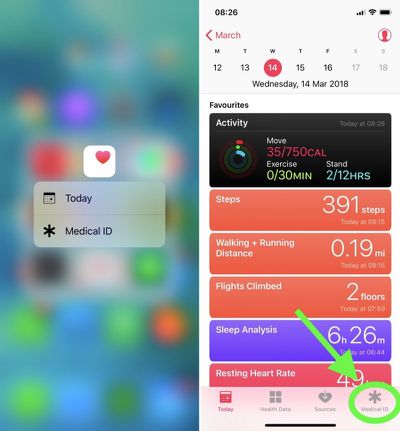
  1. Launch the Health app on your iPhone. (If you're using an iPhone 6s or later, firmly press the Health app icon to jump straight to the Medical ID via 3D Touch and skip the next step.)
    medical id health app

  2. Tap Medical ID at the bottom of the screen.

  3. If you're in the U.S., you can opt to register as an organ donor with Donate Life America by tapping the option at the bottom of the Medical ID screen. If you don't want to register, or you're outside the U.S., simply skip this step.

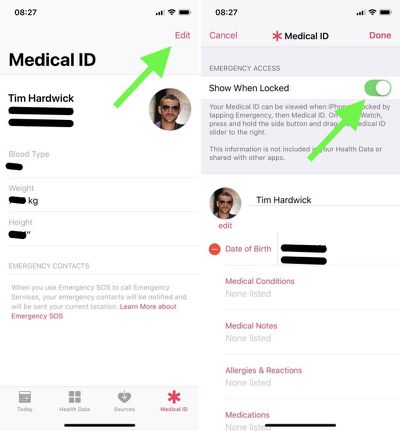
  4. Tap the Edit button at the top right of the screen.
    apple medical id edit

  5. Under Emergency Access, toggle the Show When Locked switch to the On position. Make sure you perform this step, otherwise emergency services won't be able to access your Medical ID.

  6. Start adding information to your Medical ID card. Apart from your name and date of birth, the other types of information you can add in this section include medical conditions and medical notes, allergies and reactions, medications, blood type, organ donor status, weight, and height. (Note that information added to your Medical ID isn't included in your Health Data or shared with other apps.)

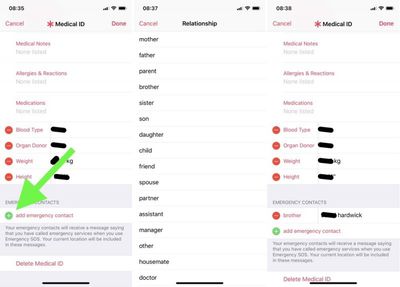
  7. Under Emergency Contacts, tap the green plus sign to add someone from your Contacts list. (You can add several people, but bear in mind that if you use the Emergency SOS feature on your iPhone's lock screen, all emergency contacts receive a message alerting them of the SOS and your location.)
    apple medical id emergency contact

  8. For each emergency contact you add, select an option from the list that best describes your relationship to that person, e.g. "father" or "doctor".

  9. Tap Done in the top right of the screen when you're finished.
If you decide against keeping a Medical ID record, the Edit mode includes a Delete Medical ID option at the very bottom of the screen.

Accessing Medical ID on a Locked iPhone 8 or Earlier

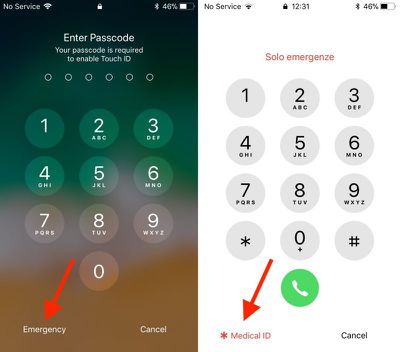
  1. Press the Home button on the iPhone to activate the passcode screen.

  2. Tap Emergency in the bottom left corner of the passcode screen.

  3. Tap Medical ID in the bottom left corner of the Emergency keypad screen.
medical ID lock screen access
Note: If the Apple handset doesn't have a Home button, swipe up with your finger from the bottom of the screen to trigger the passcode screen, or use the alternative method for accessing Medical ID below.

Accessing Medical ID on a Locked iPhone X or Later

  1. Simultaneously press and hold the Side (power) button on the right and the Volume Up button on the left of the handset.

  2. Swipe rightwards across the Medical ID slider.

You can also access the Medical ID on Apple Watch: Press and hold the side button and drag the Medical ID slider to the right.


Tag: Health
Related Forum: iOS 11

Top Rated Comments

kemperman Avatar
112 months ago
As a Paramedic, I can confidently say, NOT ENOUGH PEOPLE DO THIS. If you are unconscious and you have an iPhone, the first thing I will do when trying to ascertain a history, is find out if you have the medical ID set up. It needs to be something you can't skip during setup if Apple are serious about their health ambitions
Score: 7 Votes (Like | Disagree)
112 months ago
It’s not intuitive at all to access the medical ID on an iPhone 10.
Score: 2 Votes (Like | Disagree)
RootBeerMan Avatar
112 months ago
Glad to see this posted. I frankly had no idea it even existed. It was easy to set up and I did it immediately. Now to get everyone else in the family on board!
Score: 1 Votes (Like | Disagree)
112 months ago
Do yourself, and your loved ones, a favor. Do this with them. Make sure they use a picture so that ID information can be matched to the right person it situations so warranted. Tell them this replaces In Case of Emergency (ICE) which no longer applies. And tell the to not get so crazy about making this information "public" - when was the last time their phone was out of their possession (other than at home...).
Score: 1 Votes (Like | Disagree)
112 months ago
I could be wrong but I believe the universal donor blood type is O+ (NOT O-).
Generally, it is O Negative in the civilian world. From what I've heard, the military uses O Positive, as it is more common and the risks of an Rh reaction is not as risky for men, rather than fertile women and men (historically) are more likely going to be the recipients in the military... a factor that may change with more and more women being in forward locations.

When I was working as an emergency nurse in a trauma center, we would use O Negative for emergencies with no time to crossmatch. By knowing the blood type in advance, we can possibly reduce the time to crossmatch, but we still crossmatch before administering blood. I haven't observed the process, but they essentially mix patient blood with donor blood in the lab and look for reactions before releasing the unit to be administered.

When I have donated blood, I let them know that my blood type is AB Negative. This is one of the rarest blood types (there are rarer types but most people don't know about them). When I was donating blood during the height of the battles in Afganistan and Iraq, the nurses in the mobile donation bus called for a courier to rush my blood and the blood of another AB Negative donor in the bus at the same time, saying it would be in a cargo plane and probably in the Middle East in about 24 hours (we're an hour away from Travis AFB). Despite the military using O Positive for unmatched, they still prefer to give crossmatched blood if available.
Score: 1 Votes (Like | Disagree)
112 months ago
Not sure paramedics seeing your blood type on your phone is going to do anything.
We used to write it on our kit in Afghanistan but were later told we would get the generic type (o-) until a test could be done as they wouldn’t trust it to be right.
Score: 1 Votes (Like | Disagree)

Popular Stories

iPhone Duo Trio

Here's What Apple's Apps Look Like on the iPhone Duo

Tuesday October 20, 2026 11:12 am PDT by
With just three days to go until the iPhone Duo is released, Apple is getting ready for the launch. Behind the scenes, the App Store now has screenshots of Apple's built-in apps running on the Duo. We've seen some apps in marketing materials, but images of the ones we haven't seen give us an idea of what it will be like using the iPhone Duo day to day. Many apps are shown in landscape...
Apple Creator Studio iWork suite

Apple Pulls Keynote, Pages and Numbers From App Store [Update: Back]

Thursday October 22, 2026 11:01 am PDT by
Apple has temporarily removed Keynote, Pages, and Numbers from the App Store, just after releasing an update that added iPhone Duo support and a new Intelligent Assistant. It is not clear if the apps were removed intentionally, or if it is a bug. Apple has not said when the apps will be reinstated, but if it was in error, they should return soon. Update: The Mac versions are back without...
M5 MacBook Pro

RIP, MacBook Ultra

Monday October 19, 2026 9:37 am PDT by
Apple today sent out invites for an experience in Los Angeles on Wednesday, October 28, and the "Pro and tell" tagline on the invitation likely means that the rumored MacBook models with touch-enabled OLED displays will stick with MacBook Pro branding instead of the once-rumored "MacBook Ultra" name. The long-rumored "iPhone Ultra" ended up being named iPhone Duo, so speculation that Apple...
Latest Stories
iPhone Duo Launch Begins as First Orders Reach Customers
3 hours ago
1Password for Agents Keeps Your Passwords Hidden From AI
4 hours ago
iPhone Duo 24 Hours Later: Your Questions Answered
5 hours ago
Apple's iWork Apps Get 'Intelligent Assistant' and iPhone Duo Support
6 hours ago
Apple is Apparently Considering a Slightly Larger iPhone Duo
6 hours ago
Giant iPhone Duo Displays Coming to Four Apple Stores
7 hours ago
Apple Pulls Keynote, Pages and Numbers From App Store [Update: Back]
8 hours ago
Apple Updates More Apps With iPhone Duo Support
8 hours ago
Apple Will Label Apps 'Made for iPhone Duo' in App Store
11 hours ago
Amazon Takes $49 Off iPad With Prices Starting at $399.99
12 hours ago
F1 on Apple TV Now Available in Dolby Atmos
12 hours ago
Apple Reveals More Than 50 Apps That Will Be Updated for iPhone Duo
13 hours ago
Apple Blocks Certificates That Could Help Attackers Fake Websites
14 hours ago
Giant iPhone Duo Installations Spotted at Apple Fifth Avenue
15 hours ago
iPhone Duo 2 Prototypes Include Under-Display Face ID
15 hours ago
Tesla App Gains iPad and iPhone Duo Support
19 hours ago
Apple Reportedly Boosts iPhone Duo Orders by 44%
19 hours ago
Fortnite Returning to Australian App Store After Court Ruling
20 hours ago
Apple Ordered to Open iPhone to Rival App Stores in Australia
20 hours ago
Apple Suppliers Face Hurdles Cutting Circuit Board Emissions
20 hours ago
Things Updated for iPhone Duo With Adaptive Layout
21 hours ago
Simplicity and Siri AI Are HomeView's Killer Features, Apple Says
21 hours ago
iPhone Duo Reviewers Really Miss Face ID
1 day ago
Does the iPhone Duo Run Hot? Here's What Reviews Found
1 day ago
Apple Music's New Look is Now Live on Apple's Website
1 day ago
Anthropic Launches Claude Duet, a Proactive AI Agent
1 day ago
What 32,000 Folds Did to the iPhone Duo's Hinge
1 day ago
iPhone Duo's Hidden FaceTime Camera Takes 'Trash' Photos
1 day ago
iPhone Duo Has 'Edge Light' Feature That Debuted on Macs Last Year
1 day ago
Apple Support App Updated for iPhone Duo's Larger Display
1 day ago