
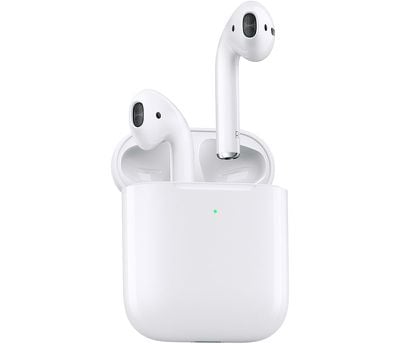
Apple in March 2019 debuted second-generation AirPods, featuring several updates over the original massively popular wireless earbuds of the same name. Then, in October 2019, Apple launched the AirPods Pro, a higher-end version of its existing AirPods with a unique design, noise cancellation technology, better sound, and a more expensive $249 price tag.

If you've just received a version of AirPods earbuds, you'll be raring to use them to listen to music, take phone calls, use Siri, and more. Keep reading to learn how to set up and connect them to your devices.
airpods2

Update Your Software

As mentioned, Apple's second-generation AirPods include new features not seen in the previous model, and AirPods Pro have additional features of their own, but to use them you'll need to make sure your devices are running the latest software.

On iOS devices:

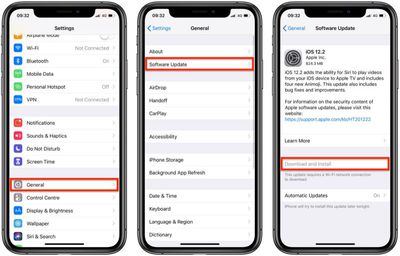
If you want to use your new AirPods with an iPhone, iPad, or iPod touch, make sure you're running iOS 12.2 or later. If you've got AirPods Pro, make sure you're running iOS 13.2 or later or iPadOS 13.2 or later.
software update ios 12
To check that your device's software is up to date, launch the Settings app and then select General -> Software Update, and download any available updates if necessary.

On Mac:

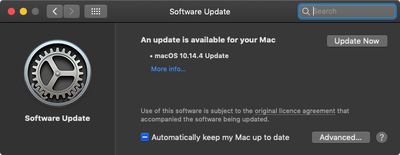
To use second-generation AirPods with your Mac, it needs to be running macOS 10.14.4 or later. For AirPods Pro, you need to be running macOS 10.15.1 or later. To check that your machine is up to date with the latest software, select System Preferences... from the Apple () menu in the top-left corner of the screen, and then click Software Update in the preferences window.
macos mojave software update
If your Mac finds an update is available, click the Update Now button to download the software and allow the software to install when prompted.

Set Up New AirPods on iPhone, iPad, and iPod touch

Before you can begin using your new AirPods with your iOS devices, there are a few quick steps you need to perform.

  1. Unlock your ‌iPhone‌, ‌iPad‌, or iPod touch. If your device is already unlocked, navigate to the Home screen.
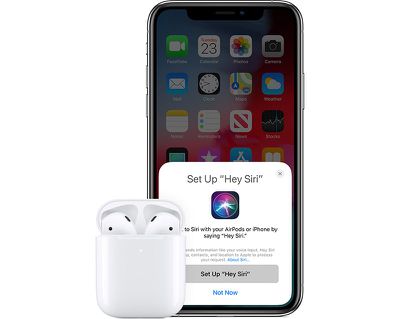
  2. Bring the AirPods or AirPods Pro case – with the AirPods inside – close to your device and open the case lid.
    airpods2heysiri

  3. Wait for the setup animation to appear on your device's screen.
  4. Tap Connect, then tap Done.
  5. If you haven't set up "Hey ‌Siri‌" already on your device, you'll be guided through the setup.
And that's all there is to it. Your AirPods or AirPods Pro should now pair seamlessly with your device whenever you go to use them. Note that if you're signed in to iCloud, your AirPods or AirPods Pro will be set up automatically with any of your supported devices that are signed in to ‌iCloud‌ with the same Apple ID.

Connect New AirPods to Your Mac

If you've set up your AirPods or AirPods Pro with your ‌iPhone‌, ‌iPad‌, or iPod touch and your Mac is signed in to ‌iCloud‌ with the same ‌Apple ID‌, then your AirPods should be ready to use with your Mac. In that case, all you you need to do is put your AirPods in your ears, click the Bluetooth icon in your Mac's menu bar, select your AirPods or AirPods Pro from the dropdown list, and click Connect.
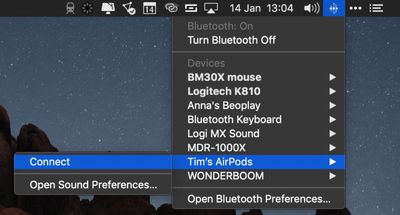
how to pair airpods with your mac
If you don't see your AirPods in the Bluetooth menu, check out our dedicated how-to article on how to pair AirPods manually with your Mac and customize the gesture controls.

Connect New AirPods to Android Devices

You can use AirPods and AirPods Pro with Android smartphones and other devices. You won't be able to use "Hey ‌Siri‌" but you can use them to listen and talk. Check out our special guideo learn how to use AirPods on Android, as well as the benefits, the downsides, and how well AirPods work on non-Apple devices.


Related Roundups: AirPods 4, AirPods Pro 3
Related Forum: AirPods

Top Rated Comments

Leehowell1983 Avatar
90 months ago
Does anyone know if I need to delete my old AirPods before pairing my new ones?
No i have connected both at the same time. It switches between them when u put them in
[doublepost=1553599010][/doublepost]
Yeah just tested, needs the latest version of watchOS. Guess that means release must be today.
5.2 is out

Attachment Image
Score: 1 Votes (Like | Disagree)
Sheza Avatar
90 months ago
Do we have to unpair our first gen AirPods??
Score: 1 Votes (Like | Disagree)
justabrake Avatar
90 months ago
I had ordered these because I walk by water sometime works great holds very well

Attachment Image
Score: 1 Votes (Like | Disagree)
c.leonard66h Avatar
90 months ago
Can't use new AirPods on Apple Watch yet. As requires watchOS 5.2 which isn't yet publicly available.
Score: 1 Votes (Like | Disagree)
pcmike Avatar
90 months ago
It would be great if we could pick these up today at the Apple store...
Score: 1 Votes (Like | Disagree)
iConnected Avatar
90 months ago
Ya, my local store just finally has availability. Going to pick them up now.
Cool. Very pleased with mine. Am sure you will be too. :)
Score: 1 Votes (Like | Disagree)

Popular Stories

Apple Logo Zoomed

Tim Cook Teases Plans for Apple's Upcoming 50th Anniversary

Thursday February 5, 2026 12:54 pm PST by
Apple turns 50 this year, and its CEO Tim Cook has promised to celebrate the milestone. The big day falls on April 1, 2026. "I've been unusually reflective lately about Apple because we have been working on what do we do to mark this moment," Cook told employees today, according to Bloomberg's Mark Gurman. "When you really stop and pause and think about the last 50 years, it makes your heart ...
wwdc sans text feature

Apple Rumored to Announce New Product on February 19

Thursday February 5, 2026 12:22 pm PST by
Apple plans to announce the iPhone 17e on Thursday, February 19, according to Macwelt, the German equivalent of Macworld. The report, citing industry sources, is available in English on Macworld. Apple announced the iPhone 16e on Wednesday, February 19 last year, so the iPhone 17e would be unveiled exactly one year later if this rumor is accurate. It is quite uncommon for Apple to unveil...
Finder Siri Feature

Why Apple's iOS 26.4 Siri Upgrade Will Be Bigger Than Originally Promised

Friday February 6, 2026 3:06 pm PST by
In the iOS 26.4 update that's coming this spring, Apple will introduce a new version of Siri that's going to overhaul how we interact with the personal assistant and what it's able to do. The iOS 26.4 version of Siri won't work like ChatGPT or Claude, but it will rely on large language models (LLMs) and has been updated from the ground up. Upgraded Architecture The next-generation...
iOS 26

iOS 26.3 and iOS 26.4 Will Add These New Features to Your iPhone

Tuesday February 3, 2026 7:47 am PST by
While the iOS 26.3 Release Candidate is now available ahead of a public release, the first iOS 26.4 beta is likely still at least a week away. Following beta testing, iOS 26.4 will likely be released to the general public in March or April. Below, we have recapped known or rumored iOS 26.3 and iOS 26.4 features so far. iOS 26.3 iPhone to Android Transfer Tool iOS 26.3 makes it easier...
maxresdefault

Apple Shows Off a Key Reason to Upgrade to the iPhone 17

Saturday February 7, 2026 9:26 am PST by
Apple today shared an ad that shows how the upgraded Center Stage front camera on the latest iPhones improves the process of taking a group selfie. "Watch how the new front facing camera on iPhone 17 Pro takes group selfies that automatically expand and rotate as more people come into frame," says Apple. While the ad is focused on the iPhone 17 Pro and iPhone 17 Pro Max, the regular iPhone...















