

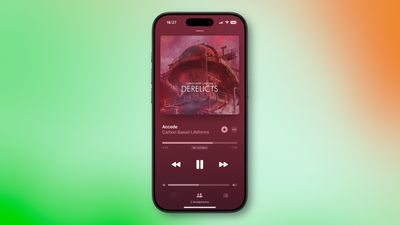
Apple's Audio Sharing feature on iPhone and iPad lets you share your device's Bluetooth audio with a second pair of wireless headphones, allowing two of you to listen to the same music together while running, or enjoy a movie on a plane without disturbing those around you, for example. Keep reading to learn how it works.
Device Compatibility
To get started with Audio Sharing in iOS 18 or later, first make sure that the headphones and the iPhone/iPad that you plan to use are compatible with the feature.
According to Apple, Audio Sharing is supported by the following devices:
- iPhone models:
- iPhone 8 or later
- iPhone SE (2nd generation) or later
- iPad models:
- iPad (5th generation or later)
- iPad mini (5th generation or later)
- iPad Air (3rd generation or later)
- iPad Pro 10.5-inch
- iPad Pro 11-inch (all generations)
- iPad Pro 12.9-inch (2nd generation or later)
Next, you'll need one of the following compatible wireless headphones:
- AirPods (all models)
- AirPods Pro (all models)
- AirPods Max
- Beats Fit Pro
- Beats Flex
- Beats Solo Pro
- Beats Solo3 Wireless
- Beats Studio3 Wireless
- BeatsX
- Powerbeats
- Powerbeats Pro
- Powerbeats3 Wireless
How to Use Audio Sharing on iPhone and iPad
Depending on the headphone model, there may be minor differences in the setup process of sharing audio, but they shouldn't diverge too much from the way of doing it with AirPods, which goes like this.
- With your AirPods connected and in your ears, start playing audio on your iPhone or iPad.
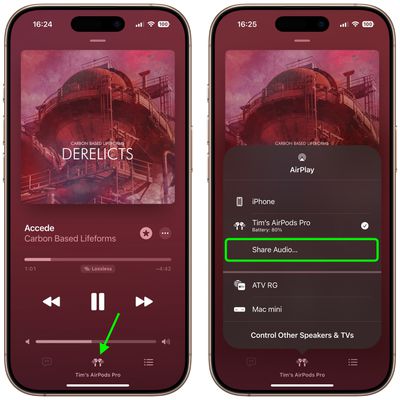
- If you have the Music app open and showing the media playback controls, tap your AirPods at the bottom of the screen. Alternatively, swipe down for Control Center, then in the audio playback controls panel, tap the icon in the top-right corner representing your connected AirPods.
- Tap Share Audio... below the playback controls.

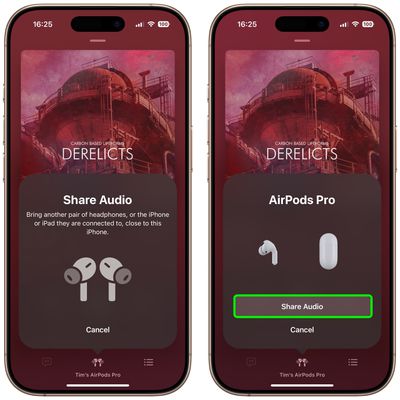
- You should see a prompt on your device's screen offering to Share Audio. Now, bring your friend's AirPods, inside their case, close to your device, and flip the lid open.
- When your friend's AirPods are detected, tap Share Audio.
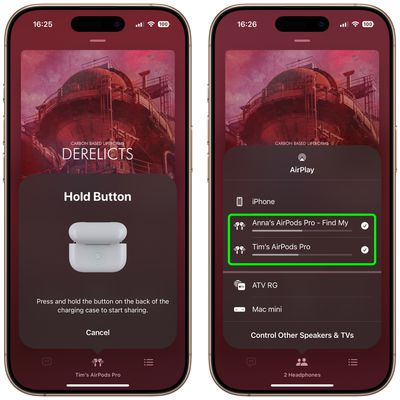
- Hold the button on the back of the AirPods charging case if requested.
- When you've successfully connected, the iPhone or iPad hosting the audio controls the volume level on both pairs of headphones, but both people listening can also use any headphone controls they may have to change volume independently.
Pro Tip: If you have an Apple TV 4K running tvOS 14 and later, you can also Share Audio over two pairs of wireless headphones. You'll find similar options to those described above in the Apple TV Control Center.





















Top Rated Comments
1) Connect the second device to the Mac (it could be AirPods or something else)
2) Create a new entry of type "Multi-Output Device" and add your desired headphones to it
3) Name it and choose the new "Device" as your audio output in control center
4) Enjoy!
You can string together as many connected devices as your Mac supports and experiment with the clock source and drift correction settings. Nota bene: AirPods in particular will disconnect the new "Device" for everybody if someone takes them out of their ears so make sure everybody is suited up before you hit play.
It isn't perfect but it allowed us to enjoy some movies together on the plane!
Beats Solo 4
Beats Studio Pro
Beats Studio Buds +
Powerbeats Pro 2
The original Beats Studio Buds DO NOT support Audio Sharing. I’ve seen conflicting info on whether the Solo Buds support Audio Sharing.
https://support.apple.com/guide/beats/share-audio-on-iphone-or-ipad-devbb3350239/1.0/web/1.0
Audio Sharing has increased it's capabilities by leaps and bounds, while still being instantly familiar - it's the best audio sharing we've ever created. Audio sharing in iOS 18 was built from the ground up for Apple Intelligence, creating a magical new experience never before seen in Audio. Audio sharing in iOS 18 is light years ahead of any other audio, we think you are going to love it.