iOS 15.1: How to Share Your Screen on a FaceTime Call - MacRumors
Skip to Content

iOS 15.1: How to Share Your Screen on a FaceTime Call

by

In iOS 15.1, Apple has brought several enhancements to FaceTime, which means you can do more than just ‌‌FaceTime‌‌ call your friends and family.


Thanks to a new screen sharing feature called SharePlay, you can now share your screen with other people on a call, which is great for choosing a movie, browsing through a photo album, or anything else that's enhanced by group discussion.

Here's how the new screen sharing feature works:

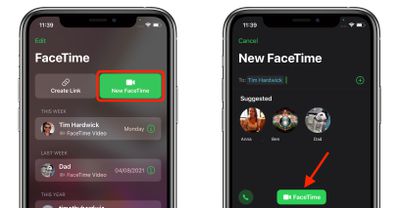
  1. Launch FaceTime on your iPhone or iPad.
  2. Tap New FaceTime and add the contacts that you want to share your screen with, then tap the FaceTime button. Alternately, select a recent contact to initiate a video call.
    FaceTime

  3. When the call has connected, tap the SharePlay button at the top-right corner of the screen in the new control panel.
  4. Tap Share My Screen in the dropdown. After a three-second countdown, screen sharing should initialize.
    FaceTime

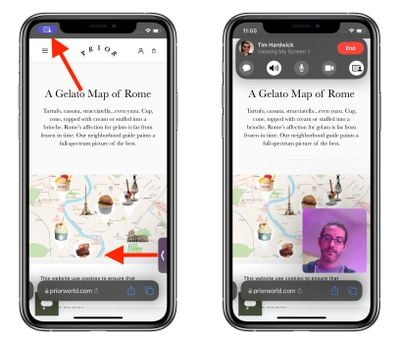
Once ‌FaceTime‌ screen sharing has started, you can navigate to any app that you want to share with the callers. A sharing icon will remain in the top-left corner of the screen to indicate that ‌FaceTime‌ screen sharing is active, and you can tap it to reveal the ‌FaceTime‌ control panel.

FaceTime
You can swipe away the active caller's face for more screen space, and swipe them back into view just as easily. If you're viewing someone else's shared screen, you'll see their name just below the top-left icon, alongside buttons to send them a message, Love what they're sharing, or share it with someone else.

If you like, you can also listen to music or watch movies and TV together using the SharePlay interface. You can stream movies or TV shows and everyone on the call will see the same synced playback and controls. For more on what's new with ‌FaceTime‌ in iOS 15, we have a dedicated guide that highlights all of the available features.

Related Forum: iOS 15

Top Rated Comments

b11051973 Avatar
60 months ago
I look forward to this. Will be very helpful since I'm tech support for family members that are hundreds of miles away.
Score: 23 Votes (Like | Disagree)
60 months ago
cutting mom-tech-support from 4 hours to 10 minutes.
Score: 14 Votes (Like | Disagree)
TheYayAreaLiving 🎗️ Avatar
60 months ago
It looks pretty neat. This one is definitely going to be very useful.
Score: 4 Votes (Like | Disagree)
60 months ago
This will be very useful when having to help family members.
Score: 3 Votes (Like | Disagree)
60 months ago
This is going to be such a useful feature.
Score: 3 Votes (Like | Disagree)
60 months ago

So if I'm sharing, for example, my Netflix app, can they tap on a movie to watch, or do they have to ask me to tap for them?

In other words, are they able to just view my screen, or can they interact with it themselves?
They can view your screen only not interact
Score: 2 Votes (Like | Disagree)

Popular Stories

imac video apple feature

Apple Released Yet Another New Product Today

Friday March 20, 2026 2:39 pm PDT by
Apple has unveiled a whopping nine new products so far this March, including an iPhone 17e, iPad Air models with the M4 chip, MacBook Air models with the M5 chip, MacBook Pro models with M5 Pro and M5 Max chips, the all-new MacBook Neo, an updated Studio Display, a higher-end Studio Display XDR, AirPods Max 2, and now the Nike Powerbeats Pro 2. iPhone 17e features the same overall design as...
iOS 26

iOS 26.4 Adds Two New Features to CarPlay

Tuesday March 24, 2026 1:55 pm PDT by
iOS 26.4 was released today, and it includes a couple of new features for CarPlay: an Ambient Music widget and support for voice-based chatbot apps. To update your iPhone 11 or newer to iOS 26.4, open the Settings app and tap on General → Software Update. CarPlay will automatically offer the new features so long as the iPhone connected to your vehicle is running iOS 26.4 or later....
HomePod mini and Apple TV Sage

New Apple TV and HomePod Mini Remain 'Ready' to Launch

Sunday March 22, 2026 6:33 am PDT by
Apple has unveiled nine new products this month, but the wait continues for the next-generation Apple TV 4K and HomePod mini models. In his Power On newsletter today, Bloomberg's Mark Gurman said new versions of the Apple TV and HomePod mini have been "ready" since last year, but he reiterated that Apple has held off on releasing them until the more personalized version of Siri and other...