

Apple in October 2020 launched Apple One, a new series of services bundles that will let Apple device customers purchase several services together in one package instead of separately, saving money for those who use multiple Apple service products.
Apple One Bundle include services like Apple Music, Apple Arcade, Apple News+, Apple TV+, and more, depending on the tier you choose. Here's how the Individual, Family, and Premier tiers stack up:
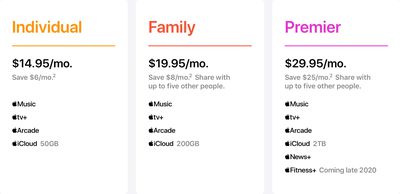
- Individual: Apple Music, Apple TV+, Apple Arcade, and 50GB of iCloud storage for $14.95 per month
- Family: Apple Music, Apple TV+, Apple Arcade, and 200GB of iCloud storage for $19.95 per month, can be shared among up to six family members
- Premier: Apple Music, Apple TV+, Apple Arcade, Apple News+, Apple Fitness+, and 2TB of iCloud storage for $29.95 per month, can be shared among up to six family members
Apple One's Individual tier offers savings of $6 per month, while the Family plan offers savings of over $8 per month, and the Premier plan offers a savings of over $25 per month, compared to standard monthly pricing. Apple One includes a 30-day free trial for any services that customers do not already have.
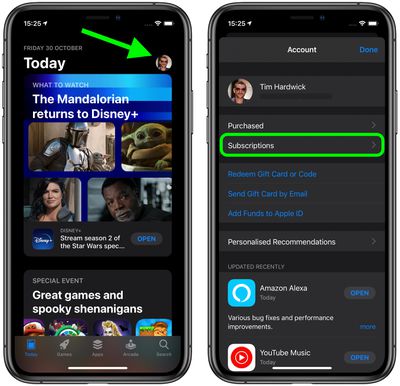
How to Sign Up for Apple One on iOS Devices (Method 1)
- Launch the App Store on your iPhone or iPad.
- Tap your profile picture in the top-right corner of the screen.
- Tap Subscriptions.

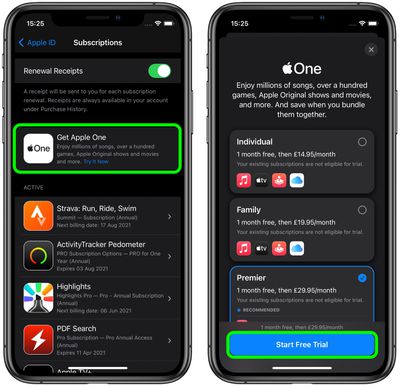
- Tap the Get Apple One banner.
- Select your preferred plan, then tap Start Free Trial.
How to Sign Up for Apple One on iOS Devices (Method 2)
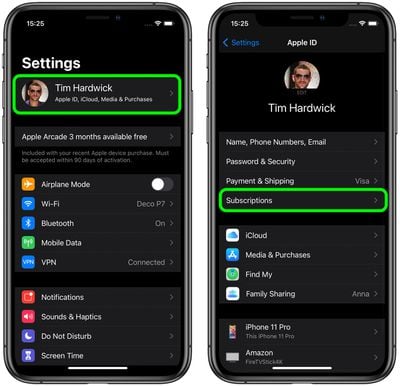
- Launch the Settings app on your iPhone or iPad.
- Tap your Apple ID name banner at the top.
- Tap Subscriptions.
- Tap the Get Apple One banner.
- Select your preferred plan, then tap Start Free Trial.
Note that if you are already subscribed to an iCloud storage plan, you'll need to make sure that you're seeing the proper amount of storage, particularly if you use different Apple IDs for iCloud and your iTunes/App Store payments.
Some users are seeing their Apple One iCloud storage amounts being added on top of the existing iCloud plans they already pay for. Given how it works, you may want to cancel or adjust your iCloud plan accordingly. Users with different iCloud and iTunes/App Store accounts should see a prompt that will allow them to assign their Apple One iCloud storage amount to their existing Apple ID they use for iCloud and automatically cancel their previous standalone subscription.
Apart from iCloud, if you already pay for any other services included in your chosen Apple One tier, they will be automatically migrated to your Apple One bundle once the Apple One free trial period is over. You'll have to continue paying separately for those individual services during your Apple One trial period, but once your Apple One trial ends and converts to a paid subscription, those standalone subscriptions will be folded into your Apple One subscription and you should be refunded for any pre-paid time remaining on the individual subscriptions.
Bear in mind that while Apple's new Apple One series of services is available in over 100 countries and regions, the top Premier tier is limited to the United States, the United Kingdom, Australia, and Canada, since Apple News+ is only available in those countries.




















