

In iOS 17.4, which is now available, a new feature enables Siri to read incoming messages to you in the language(s) of your choosing. Keep reading to learn how it works.
Previously in iOS 17, Siri's interaction with Messages was limited to one option – the ability for Siri to automatically send your dictated messages without asking you to confirm them first.
In iOS 17.4, however, Siri can also read messages to you in another language different to the primary language that Siri listens to and responds in. It's a neat option to have if you are bilingual or you're learning a new language.
Thanks to the new setting, you can choose from any of the following languages:
- Arabic
- Chinese (Cantonese - Hong Kong)
- Chinese (Mandarin - China mainland)
- Chinese (Mandarin - Taiwan)
- Danish
- Dutch (Netherlands)
- Finnish
- French (Canada)
- French (France)
- German (Germany)
- Hebrew
- Italian (Italy)
- Japanese
- Korean
- Malay
- Norwegian Bokmål
- Portuguese (Brazil)
- Russian
- Spanish (Mexico)
- Spanish (Spain)
- Thai
- Turkish
Note that you aren't limited to just one language - you can choose several if you prefer. Here's how to enable the setting on iPhones running iOS 17.4 or later (if you haven't updated yet, go to Settings and select General ➝ Software Update).
- Open the Settings app.
- Tap Siri & Search
- Tap Messaging with Siri.
- Under "Read Messages," tap Add Language....
- Select a language to add and wait for it to download.
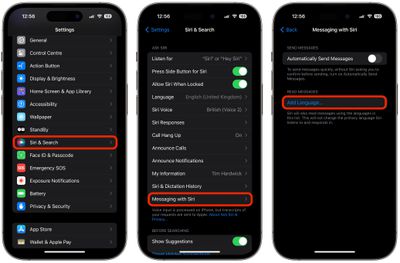
Most languages only take a minute or so to download, depending on your internet connection. Once the language is installed, tap it in the list and you can choose from any optional varieties and voices where available. Note that you can add more than one language to the list, simply by tapping Add Language... again.
Removing a Language
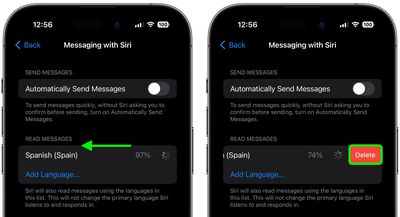
Removing a language from Siri's list is easy. Simply swipe leftwards across the language, then tap the red Delete button that appears.


















![Apple Pulls Keynote, Pages and Numbers From App Store [Update: Back]](https://images.macrumors.com/t/Okb7kitB_gNr6qe5Pex9nQIysD8=/112x112/article-new/2026/01/Apple-Creator-Studio-iWork-suite.jpg)
























