Auto-Populate iPhone Home Screen With Your Most Used Apps - MacRumors
Skip to Content

Auto-Populate iPhone Home Screen With Your Most Used Apps

by

Do you find yourself frequently scrolling through multiple Home Screen pages on your iPhone to get to the apps you access most often? If so, chances are you've already filled up the first page with some of your favorite apps. But what if you could automatically make all of your most-used apps appear on page one? With the Siri Suggestions widget, you can.
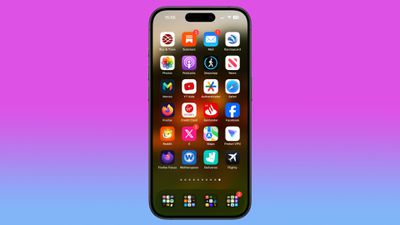
siri suggested apps iphone home screen
The Siri Suggestions widget intelligently recommends apps based on your usage patterns. By populating your Home Screen with multiple instances of this widget, you can ensure that the apps you need most are always just a tap away. Read on to learn how it's done.

  1. With your iPhone unlocked, swipe to a Home Screen page with at least two free rows available.
  2. Press and hold the empty space on the Home Screen until the apps start to jiggle.
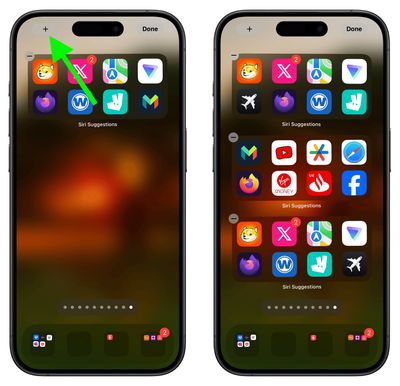
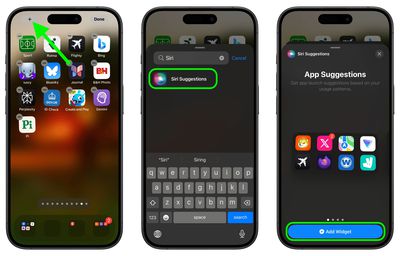
  3. Tap the "+" button in the top-left corner of the screen to access the widget gallery.
  4. Search for "Siri Suggestions" in the widget gallery or scroll through the list to find it.
  5. Tap the Siri Suggestions widget option, then choose the first option showing two rows of apps by tapping Add Widget.
    siri suggestions

  6. Drag the widget to a fresh new page containing no other apps.
  7. Add another instance of the Siri Suggestions widget by tapping the "+" button in the top-left corner of the screen again, then selecting it in the widget gallery, just like you did for the first one.
  8. Add a third Siri Suggestions widget in the same way.
    siri suggestions

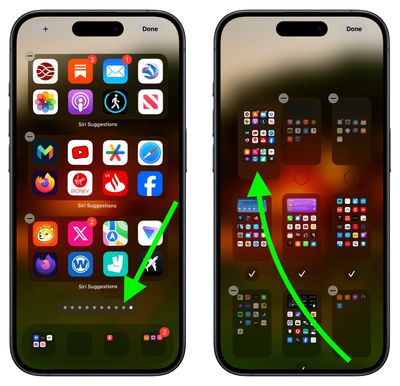
  9. Next, tap the row of dots representing your ‌Home Screen‌ pages.
  10. In the ‌Home Screen‌ grid that appears, touch and drag the page of widgets you just made and move it so that it's the first Home Screen page (the one you see when you unlock your iPhone). The others will move to make way in response to your drag action.
  11. Tap Done in the top-right corner of the screen when you're happy with the new arrangement, then tap Done again to exit jiggle mode.
    Home Screen pages

Don't worry if the widgets first show the same suggested apps as each other – this will correct itself when you swipe away from the page and return to it. That's all there is to it. By following the above steps, you will have quick access to your most-used apps, even if your habits change, ensuring your Home Screen is both dynamic and tailored to your needs.


Top Rated Comments

Apple Mac Daz Avatar
24 months ago
No thx I arrange my apps thats convenient for me, having it auto change would be confusing when you don’t know where your apps are
Score: 30 Votes (Like | Disagree)
24 months ago
Destroy muscle memory with these 8 simple steps!

Static layout for most used apps seems best.

Swipe down and search for everything else. Every time I see someone hunting around for an app on their phone I tell them “swipe down…search”. It’s very quick and easy after you know about the action.
Score: 29 Votes (Like | Disagree)
vegetassj4 Avatar
24 months ago
I have mine set to make random suggestions. This way I am sure to use all of the useless apps I have downlaoded over the years. oooooh...Pocket Frogs....


Score: 9 Votes (Like | Disagree)
Radeon85 Avatar
24 months ago
Looks like an absolute mess to me, I have 325 apps all organised into 21 folders over 1.5 screens and it looks far cleaner than that.

If you want to quickly access your most used apps, then just pull the screen down to show the top 8 siri suggestions.
Score: 8 Votes (Like | Disagree)
24 months ago
What would Steve Jobs say? I'm sure it would not be printable. Life's too short to waste time doing all this.
Score: 6 Votes (Like | Disagree)
Abazigal Avatar
24 months ago
I have been using this setup since widgets came to iOS with iOS 14? 1 stack of 3 medium widgets, plus two rows of Siri widgets. Hide everything else (meaning only 1 homescreen) and if I want to find some other app, either spotlight or App Library.

There does seem to be some intelligence here. For example, Siri will know when I am at a supermarket and surface the loyalty app I use to earn points and make payment. It’s not very consistent though.
Score: 6 Votes (Like | Disagree)

Popular Stories

Dynamic Island iPhone 18 Pro Feature

11 Reasons to Wait for the iPhone 18 Pro

Monday May 11, 2026 9:01 am PDT by
We're only four months out from the launch of Apple's premium next-generation smartphone lineup, and while we're not expecting a sea change in terms of functionality, there are still several enhancements rumored to be coming to the iPhone 18 Pro and iPhone 18 Pro Max. One thing worth noting is that Apple is reportedly planning a major change to its iPhone release cycle this year, adopting a...
iOS 26

iOS 26.5 Features: Everything New in iOS 26.5

Monday May 11, 2026 5:09 pm PDT by
Apple released iOS 26.5 after a few months of beta testing, and while it doesn't have the Siri features we were hoping for since those are being held until iOS 27, there are a handful of useful changes worth knowing about. Subscribe to the MacRumors YouTube channel for more videos. End-to-End Encryption for RCS Support for end-to-end encryption (E2EE) for RCS messages between iPhone and...
General Apps Reddit Feature

Reddit Starts Blocking Mobile Website, Pushing Users to App Instead

Monday May 11, 2026 6:10 am PDT by
Social network Reddit recently began blocking mobile visitors to its website while pushing them to download the official Reddit app, and it's fair to say that the move is not going down well with users. If you visit reddit.com on your iPhone today, you may see a new popup that can't be dismissed, asking you to "get the app to keep using Reddit." A Reddit spokesperson told Ars Technica...