
In iOS 17 and later, Apple includes an accessibility setting that makes the haptic feedback feature activate faster than in previous versions of its mobile operating system. If you fondly hearken back for the days of 3D Touch, you might just prefer it.
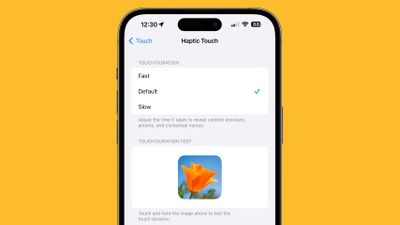
haptic touch ios 17 fast
As many iPhone users might remember, ‌3D Touch‌ was an interactive haptic feature that Apple introduced in 2015 with the ‌iPhone‌ 6s. When the iPhone XR was released in 2018, Apple kiboshed 3D Touch‌ to the dismay of some users, and instead implemented the simplified ‌Haptic Touch, which offers less functionality‌.

‌3D Touch‌ supported multiple levels of pressure for different interactions depending on how hard you pressed, with Apple implementing "Peek and Pop" gestures. In contrast, ‌Haptic Touch‌ supports just a single level of pressure for the long press gesture.

‌Haptic Touch‌ has always worked slower than ‌3D Touch‌ because of the two levels of pressure that ‌3D Touch‌ allowed for. The first ‌3D Touch‌ pressure level activated quickly when pressing on the display, so those who became used to ‌3D Touch‌ may have found the ‌Haptic Touch‌ replacement to be too sluggish.

The good news is that setting ‌Haptic Touch‌ to the Fast option makes a noticeable difference in how quick haptic menus pop up under the finger when an icon or on-screen element is long pressed. The speed brings ‌Haptic Touch‌ interactions closer to 3D Touch interactions. Here's how to enable it on iPhones running iOS 17 and newer.

  1. Open the Settings app and tap Accessibility.
  2. Under "Physical and Motor," tap Touch.
  3. Tap Haptic Touch.
  4. Select from Fast, Default, and Slow. Note that when you select a speed, you can test it using the flower image on the same screen.
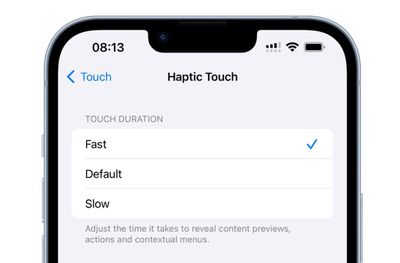
haptic touch faster ios 17

It's still not entirely clear why Apple got rid of ‌3D Touch. Some have argued that it suffered from a lack of discoverability, similar to the Apple Watch's Force Touch functionality, which suffered the same fate. Others have speculated that Apple eliminated it in order to bring gesture parity to the ‌iPhone‌ and the iPad. Either way, the change allowed Apple to remove the capacitive layer that used to be integrated into every ‌‌iPhone‌‌ display.

Top Rated Comments

foobarbaz Avatar
9 months ago
This is my favorite tip. It may only save milliseconds, but it makes it feel so much more responsive.
Score: 5 Votes (Like | Disagree)
UltimaKilo Avatar
9 months ago
Great tip! However, I really don’t use it much. Getting rid of 3D Touch was such a bummer, I still miss it today.
Score: 4 Votes (Like | Disagree)
hokuspokus Avatar
9 months ago
Didn't know of this. Thank you.

I feel like when iOS 26 comes out, there will be a lot of users changing things in the Accessibility settings to make their iPhone/iPad less hard to actually use.
Score: 3 Votes (Like | Disagree)
TechWhisperer Avatar
9 months ago
Still ain’t fast enough.
Score: 2 Votes (Like | Disagree)
svish Avatar
9 months ago
Have set it to 'Fast' for my iPhones ever since 3D touch was removed years ago.
Score: 2 Votes (Like | Disagree)
OlliFlamme Avatar
8 months ago
[LIST=1]
* Open the Settings app, pull down and search "Haptic Touch"
* Tap the top result
* Select from Fast, Default, and Slow.
Score: 2 Votes (Like | Disagree)

Popular Stories

Apple Logo Zoomed

Tim Cook Teases Plans for Apple's Upcoming 50th Anniversary

Thursday February 5, 2026 12:54 pm PST by
Apple turns 50 this year, and its CEO Tim Cook has promised to celebrate the milestone. The big day falls on April 1, 2026. "I've been unusually reflective lately about Apple because we have been working on what do we do to mark this moment," Cook told employees today, according to Bloomberg's Mark Gurman. "When you really stop and pause and think about the last 50 years, it makes your heart ...
wwdc sans text feature

Apple Rumored to Announce New Product on February 19

Thursday February 5, 2026 12:22 pm PST by
Apple plans to announce the iPhone 17e on Thursday, February 19, according to Macwelt, the German equivalent of Macworld. The report, citing industry sources, is available in English on Macworld. Apple announced the iPhone 16e on Wednesday, February 19 last year, so the iPhone 17e would be unveiled exactly one year later if this rumor is accurate. It is quite uncommon for Apple to unveil...
Finder Siri Feature

Why Apple's iOS 26.4 Siri Upgrade Will Be Bigger Than Originally Promised

Friday February 6, 2026 3:06 pm PST by
In the iOS 26.4 update that's coming this spring, Apple will introduce a new version of Siri that's going to overhaul how we interact with the personal assistant and what it's able to do. The iOS 26.4 version of Siri won't work like ChatGPT or Claude, but it will rely on large language models (LLMs) and has been updated from the ground up. Upgraded Architecture The next-generation...
iOS 26

iOS 26.3 and iOS 26.4 Will Add These New Features to Your iPhone

Tuesday February 3, 2026 7:47 am PST by
While the iOS 26.3 Release Candidate is now available ahead of a public release, the first iOS 26.4 beta is likely still at least a week away. Following beta testing, iOS 26.4 will likely be released to the general public in March or April. Below, we have recapped known or rumored iOS 26.3 and iOS 26.4 features so far. iOS 26.3 iPhone to Android Transfer Tool iOS 26.3 makes it easier...
iphone 17 pro dark blue 1

iPhone 18 Pro Max Rumored to Deliver Next-Level Battery Life

Friday February 6, 2026 5:14 am PST by
The iPhone 18 Pro Max will feature a bigger battery for continued best-in-class battery life, according to a known Weibo leaker. Citing supply chain information, the Weibo user known as "Digital Chat Station" said that the iPhone 18 Pro Max will have a battery capacity of 5,100 to 5,200 mAh. Combined with the efficiency improvements of the A20 Pro chip, made with TSMC's 2nm process, the...

















