How to Start Workouts In Apple Fitness+ - MacRumors
Skip to Content

How to Start Workouts In Apple Fitness+

by

Apple Fitness+ is Apple's latest subscription service, offering home workout options for Apple Watch users across a range of different fitness categories like yoga, cycling, running, core, and more.


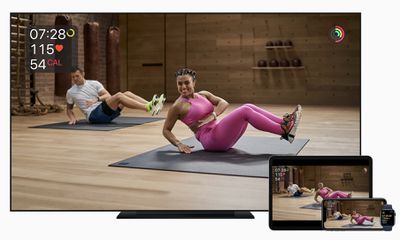
The Fitness+ service is designed to work with an Apple Watch, with videos able to be watched on iPhone, iPad, and Apple TV. Starting a workout is simple, with instructions below.
fitness plus

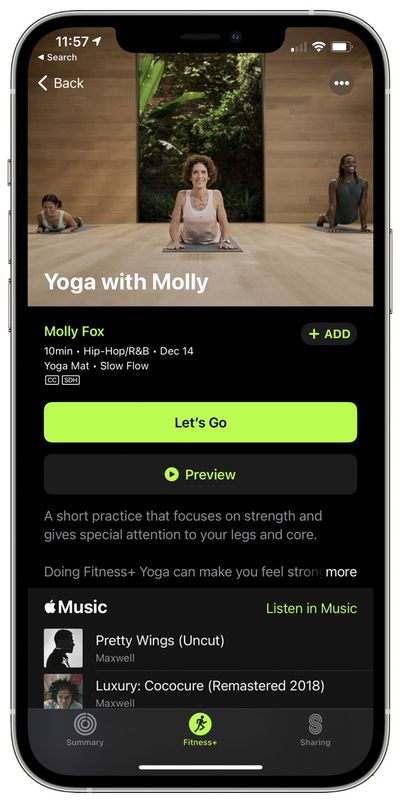
  1. On iPhone, ‌iPad‌, or ‌Apple TV‌, open up the Fitness app and choose the Fitness+ tab. It's installed automatically on iPhone and ‌Apple TV‌, and must be downloaded on ‌iPad‌.
  2. Find a workout that you want to do.
  3. Tap the workout. apple fitness plus workout
  4. Tap on the "Let's Go" button on iPhone, ‌iPad‌, or ‌Apple TV‌, or tap on preview first to see what the workout includes.
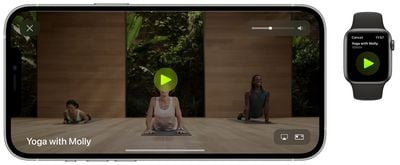
  5. From there, you'll see the workout start on your linked Apple Watch. Tap on the play button on the Apple Watch to launch the workout on your device. apple fitness plus start workout
Note that if this is the first time you're using the ‌Apple TV‌ with your Apple Watch for Fitness+, you will need to tap on the "connect" option and follow the steps. If you're signed into the same Apple ID on all of your devices, starting a workout should be a seamless process, with the Apple Watch metrics showing up right on your device's screen as well as on the wrist.
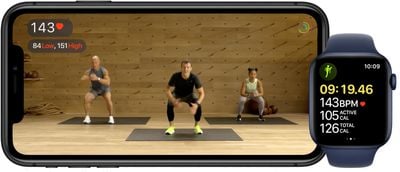
applefitnesswatchandiphone
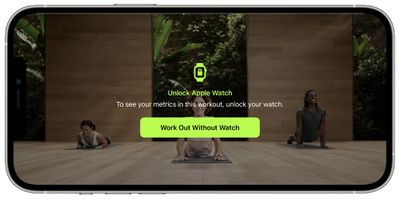
Note that you can choose to do a workout even if your Apple Watch is not available, you just won't see the metrics on the screen. This only works for iPhone and ‌iPad‌, with the ‌Apple TV‌ requiring an Apple Watch.

fitness plus workout without watch
The workout time elapsed, your heart rate, active calories burned, and total calories burned are displayed on the screen, as are any activity milestones that are met.

At the conclusion of a workout, you'll see a complete overview of active and total calories burned, heart rate, and activity ring progress, which can be shared if desired.
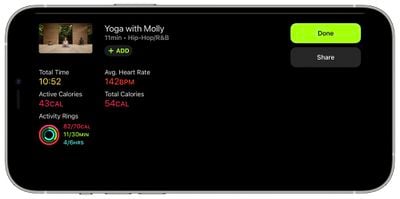
apple fitness workout end metrics
The workout is also then listed in the Fitness app with a specific photo and the title of the workout.
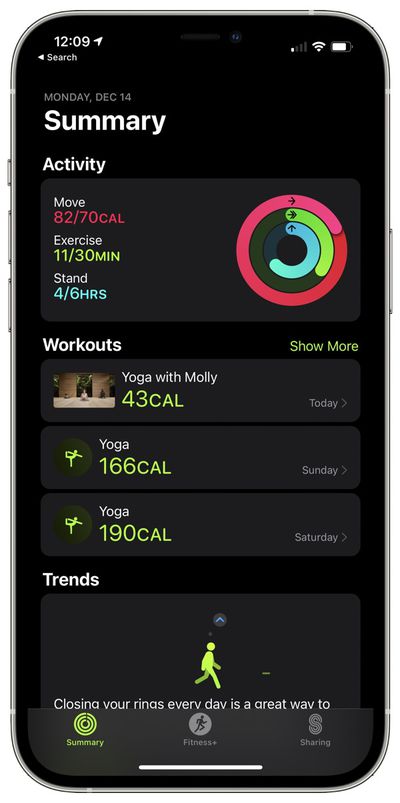
apple fitness plus workout list
Using Fitness+ requires an Apple Watch Series 3 or later with watchOS 7.2 installed along with an iPhone 6s or later with iOS 14.3 or later. It can also be used with the 2014 iPad Air 2 with iPadOS 14.3 or later, and the ‌Apple TV‌ 4K or ‌Apple TV‌ HD with tvOS 14.3 or later.

Top Rated Comments

Apple_Robert Avatar
69 months ago
I appreciate the informative MR articles. However, a video based on how to get started in Fitness+ without Dan doing one of the routines, is a video that is sorely lacking in depth of content. :D

Get with the Fitness+ program, Dan. :P
Score: 5 Votes (Like | Disagree)
69 months ago

-biggest grumbling point? Music selection. I love my metal, maybe a bit of 80s rockers... Don’t bother with hip hop, or most of the seems all ‘rock’ at least on treadmill is neutered. Nickelback, System of a Down, Green Day - all stuff I skip on Apple Music.
It'd be a neat trick if they could replace the music with different genres for different audiences to avoid alienating folk. Can't say I've watched any of the vids, but just looking at the genres would be enough to put me off, I'm sure the tech is there with key matching / beat matching etc. & it's not like apple don't have access to a huge library to test it on. Just think of it as a pick 'n' mix - pick your instructor, your class, your music & you're off.
Score: 2 Votes (Like | Disagree)
69 months ago
From a middle aged guy who never steps in to a gym, or use any other video motivators when I use my treadmill, I find this has some pluses and a few negatives.

-Treadmill instructors will motivate to push to new bests. I’m used to just plopping the treadmill on 10kph, 4% incline for ten minutes at a blank wall, but there gets to be some real push up some inclines and straightaways.
-I really like the exercise countdown, heart rate, where I rank with other users, and progress shown on my rings.
-Worked really well with my iPad, but given the noise from the machine, likely best to use some headphones. I’d expect a phone to be a challenge.

dislikes:
-limited videos right now.
-biggest grumbling point? Music selection. I love my metal, maybe a bit of 80s rockers... Don’t bother with hip hop, or most of the seems all ‘rock’ at least on treadmill is neutered. Nickelback, System of a Down, Green Day - all stuff I skip on Apple Music.
Score: 2 Votes (Like | Disagree)
69 months ago


Oh wait...they are trying to get you to BUY a watch. Silly me...I thought they were worried about my health.
Yup, silly you. It's your doctor that's paid to worry about your health, not Apple. They DO want to sell you a Watch.
Score: 2 Votes (Like | Disagree)
AngstyKylo Avatar
69 months ago

Huh. Why wouldn't they make this stuff also good for people that don't have a watch? They could show a 15sec timer at the beginning, any time you tap a button for it, and at the end of the workout and you just count your own heart rate and type it in. Maybe people can't count that high anymore.

Oh wait...they are trying to get you to BUY a watch. Silly me...I thought they were worried about my health.
As a medical professional, anything that gets people to be more active in a safe way is definitely a positive. I wish Apple had done this a few years back when they first released the watches. The instructors decked out in Nike and Apple gear is kind of hilarious when you're not supposed to be the product or 'influenced' but is pretty much the way the fitness industry is.
Score: 1 Votes (Like | Disagree)
69 months ago

I can’t find the fitness app on my ipad nor in the store. Any ideas?
You need to upgrade to iOS 14.3
Score: 1 Votes (Like | Disagree)

Popular Stories

iOS 26

iOS 26.4 Adds Two New Features to CarPlay

Tuesday March 24, 2026 1:55 pm PDT by
iOS 26.4 was released today, and it includes a couple of new features for CarPlay: an Ambient Music widget and support for voice-based chatbot apps. To update your iPhone 11 or newer to iOS 26.4, open the Settings app and tap on General → Software Update. CarPlay will automatically offer the new features so long as the iPhone connected to your vehicle is running iOS 26.4 or later....
Apple Business hero

Apple Unveils 'Apple Business' All-in-One Platform

Tuesday March 24, 2026 8:53 am PDT by
Apple today announced Apple Business, a new all-in-one platform that unifies device management, productivity tools, and customer outreach features. The service is designed to be a consolidated replacement for several of Apple's existing business-focused offerings, including Apple Business Essentials, Apple Business Manager, and Apple Business Connect. It provides organizations with a single...
AirPods Pro Firmware Feature

Apple Releases New Firmware for AirPods Pro 3, AirPods Pro 2 and AirPods 4

Tuesday March 24, 2026 12:31 pm PDT by
Apple today released new firmware for the AirPods Pro 2, AirPods Pro 3, and the AirPods 4. The firmware has a version number of 8B39, up from 8B34 on the AirPods Pro 3, 8B28 on the AirPods Pro 2, and 8B21 on the AirPods 4. There is no word on what's included in the firmware, but Apple has a support document with limited notes. Most updates are limited to bug fixes and performance...