

Apple in 2020 issued an update for AirPods, AirPods Pro, AirPods Max, and some Beats-branded headphones that allows them to automatically switch between your iPhone, iPad, and Mac depending on which device you want to listen to.
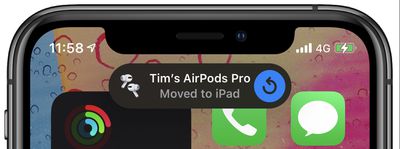
Say you're listening to another device with your AirPods but you want to listen to your iPhone instead. If you start playing music, a podcast, or other audio on your iPhone, the AirPods will switch to iPhone automatically. They can also switch to iPhone when you make or answer a call on your iPhone.
You can see that Apple intended this feature to be convenient, but it can also be highly annoying. Say for instance you're enjoying listening to something on your iPhone, and then a family member picks up your iPad in the same room and starts watching a video on it. Whether you like it or not, your AirPods will connect to the iPad and you'll be treated to the audio of the video that they're viewing.
Fortunately, Apple had the foresight to make automatic device switching an option for its earphones and headphones, rather than a locked-in necessity. All you have to do is turn off the feature by following the steps outlined below.
How to stop AirPods Switching to Other Devices
- Make sure your AirPods or AirPods Pro are connected to your iPhone.
- Launch the Settings app.
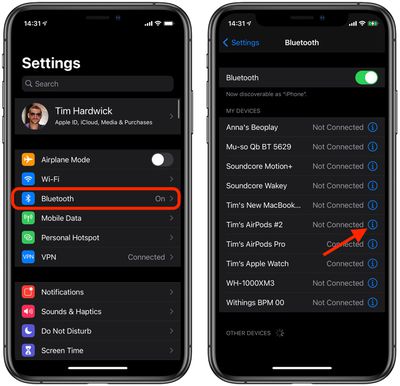
- Tap the name of your AirPods just below your Apple ID. Alternatively, tap Bluetooth, then tap the encircled info (i) button next to your AirPods in the list.

- Tap Connect to This iPhone.
- Select When Last Connected to This iPhone.
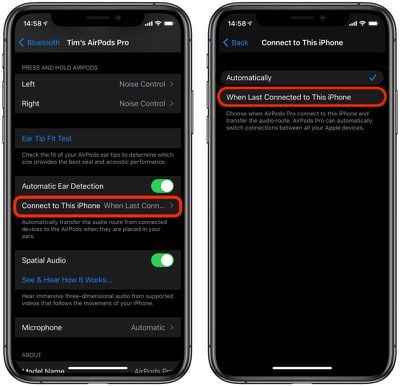
The Automatically option shown in the last screenshot above makes your AirPods search for active playback on a device and connect to it. This is the source of frustration for many users who experience their AirPods switching between devices, so if you're experiencing the same thing, then the option When Last Connected to This iPhone is what you want.
With the latter option selected, your AirPods will automatically try to connect to the last connected device. In other words, if you last listened to something on your iPhone using your AirPods and then wear them again at a later time, they'll attempt to connect to your iPhone.




















