How to Stop Receiving Beta Updates for macOS Mojave - MacRumors
Skip to Content

How to Stop Receiving Beta Updates for macOS Mojave

by

If you signed up to test an early beta version of macOS Mojave, it's very likely that your system hasn't been updated to the final official release. Before your Mac can be updated to the latest stable version of Apple's new desktop operating system, you'll need to manually opt out of the beta program. This article shows you how.
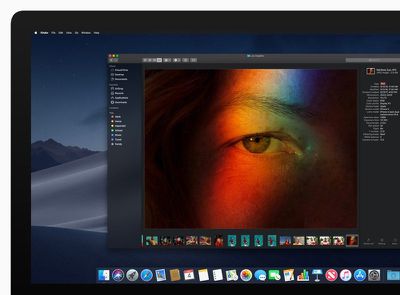
macosmojavedarkmode
Note that after following the simple steps below, you'll stop receiving future beta updates for Mojave and will only be invited to install stable updates that are shipped to the general public.

  1. Launch the Mac App Store on your Mac ( -> App Store... from the menu bar).
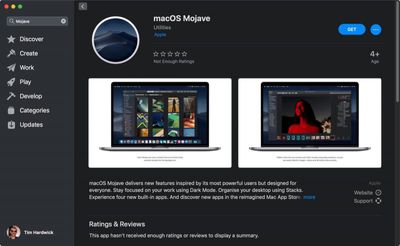
  2. Type "Mojave" in the App Store search field to locate the public release of macOS, otherwise it won't show up for you.
  3. Click View on the result for Mojave.
    install mojave

  4. Click the Get button.
  5. You'll be switched to the Software Update pane in System Preferences. Click Download to download Mojave when prompted, and wait for the download to complete in the Update pane, but don't start the installation procedure just yet.
    stop receiving beta macos mojave03

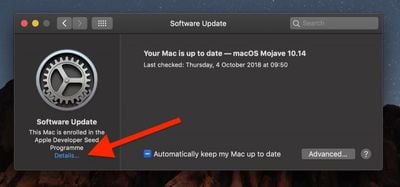
  6. Click Details... at the bottom left of the pane.
    stop receiving beta macos mojave02

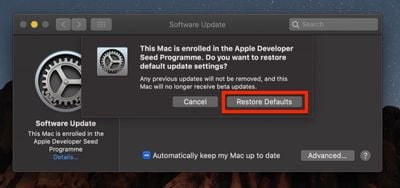
  7. Click Restore Defaults.
  8. Enter your admin password when prompted and click Unlock.
Now that you've successfully opted out of the beta program, you're free to start the installation procedure for MacOS Mojave 10.14 that you just downloaded from the Mac App Store.

Related Forum: macOS Mojave

Top Rated Comments

jonnysods Avatar
98 months ago
I left the program. I'll take healthier releases now as I'm enjoying the stability. I reformatted my mbp Monday and she's running like a charm now.
Score: 2 Votes (Like | Disagree)
InnocenceMyth Avatar
98 months ago
I believe the beta participants were upgraded to the GM version a week before the public release. Why would this article say that they were likely never upgraded at all?
Score: 1 Votes (Like | Disagree)

Popular Stories

iOS 26

iOS 26.4 Adds Two New Features to CarPlay

Tuesday March 24, 2026 1:55 pm PDT by
iOS 26.4 was released today, and it includes a couple of new features for CarPlay: an Ambient Music widget and support for voice-based chatbot apps. To update your iPhone 11 or newer to iOS 26.4, open the Settings app and tap on General → Software Update. CarPlay will automatically offer the new features so long as the iPhone connected to your vehicle is running iOS 26.4 or later....
Apple Business hero

Apple Unveils 'Apple Business' All-in-One Platform

Tuesday March 24, 2026 8:53 am PDT by
Apple today announced Apple Business, a new all-in-one platform that unifies device management, productivity tools, and customer outreach features. The service is designed to be a consolidated replacement for several of Apple's existing business-focused offerings, including Apple Business Essentials, Apple Business Manager, and Apple Business Connect. It provides organizations with a single...
AirPods Pro Firmware Feature

Apple Releases New Firmware for AirPods Pro 3, AirPods Pro 2 and AirPods 4

Tuesday March 24, 2026 12:31 pm PDT by
Apple today released new firmware for the AirPods Pro 2, AirPods Pro 3, and the AirPods 4. The firmware has a version number of 8B39, up from 8B34 on the AirPods Pro 3, 8B28 on the AirPods Pro 2, and 8B21 on the AirPods 4. There is no word on what's included in the firmware, but Apple has a support document with limited notes. Most updates are limited to bug fixes and performance...