

Back in January, we reported on an issue where some Mac users found that their computer automatically upgraded itself from macOS Monterey or Ventura to the latest macOS Sonoma release, even with the Automatic Updates option disabled in System Settings.
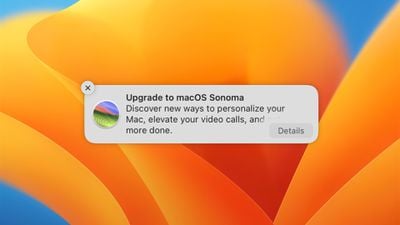
In many cases, it seems that users inadvertently triggered the Sonoma upgrade simply by dismissing a notification alerting them that the software update was available.
Annoyingly, macOS appears to be interpreting the action of clicking the X button to dismiss the notification as a green light to update to Sonoma, regardless of whether the user wants to or not.
Apple has no way of knowing why someone chooses to remain on an older version or whether it's a convenient time to update. Therefore, this behavior is likely to be a bug, rather than Apple deliberately force-updating people's Macs. Fortunately, there is a way to avoid the notifications from appearing until Apple fixes it.
If you've already had to roll back to Monterey/Ventura from a backup because of the bug, or if you are worried that you may become the next unsuspecting Sonoma user, Jeff Johnson has shared a simple way to turn off "Upgrade to macOS Sonoma" notifications. Here's how it works.
- Launch the Terminal app. You can find it in the Applications/Utilities folder. This will open a Terminal window with a command prompt.
- Enter the following command: defaults write com.apple.SoftwareUpdate MajorOSUserNotificationDate -date "2025-02-07 23:22:47 +0000"
- Hit Enter.
As Johnson, notes, the exact date given is not significant, just as long as it is some time in the future. The important thing is that once you've inputted the Terminal command, you won't get update notifications until the date rolls around.
While this is an annoying issue, it's worth noting that Sonoma has been out since September, and has since received several updates to fix bugs and introduce promised additional features. So if you have no reason to stay on an older version, it is worth upgrading, if only for the security vulnerabilities that Apple has stamped out since its release.
















































