
Stop Videos From Looping in the Photos App - MacRumors
Skip to Content

Stop Videos From Looping in the Photos App

by

Have you noticed your iPhone videos keep playing on repeat in the Photos app? In iOS 18.2 and later, the stock Photos app automatically replays videos until you manually pause them – a feature that might be fine at first but can quickly become annoying, especially with longer clips.
icloud photos
The auto-loop feature can be fun for short clips or when showing someone a quick video, but it forces you to take action to stop each video rather than letting it end naturally. It can be disruptive when you're browsing through multiple short clips in your library, and proves particularly annoying when viewing longer content where you likely don't want to see the same three-minute video play twice in a row.

Fortunately, Apple provides a simple toggle to disable the behavior:

  1. Open the Settings app on your iPhone or iPad.
  2. Scroll down and tap through to Apps ➝ Photos.
  3. Scroll until you find the Loop Videos option.
  4. Toggle the switch to the OFF position.
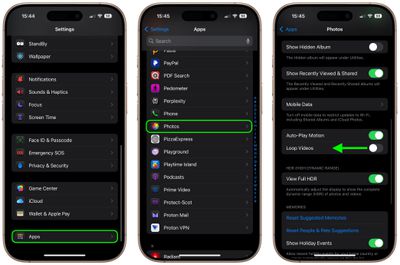
stop auto looping videos photos app

That's all you need to do. Videos in your Photos app will now play once and then stop automatically. No more endless replays.

If you prefer videos not to play automatically at all when you open them, there's a related setting you can adjust. In the same Settings menu, toggle off the Auto-Play Motion option, and videos will stay still until you manually press the play button.


Top Rated Comments

13 months ago
Oh, thank Kier. I hated that auto repeat.
Score: 5 Votes (Like | Disagree)
Veinticinco Avatar
13 months ago
Add this to the growing iOS list of "things that really should be default/opt-in as opposed to opt-out".
Score: 3 Votes (Like | Disagree)
mansplains Avatar
13 months ago
Really wish all app settings would be in-app. Third parties do this, while Apple crams most options in the settings app. Is it really too much to add a gear icon? Why do we need to jump around apps to tweak one thing?
Score: 2 Votes (Like | Disagree)
13 months ago
I love that auto loop!
Score: 2 Votes (Like | Disagree)
13 months ago
This will be off by default in the next update.
Score: 2 Votes (Like | Disagree)
DigitalAR Avatar
13 months ago
I’ve always thought that Apple doing this every iOS update, you know, slowly modifying the photos app slightly worse and calling it revolutionary is a prime example of how the customer never truly owns the device and how Apple doesn’t actually care for the consumer as much as they care about profits. And I mean that because they have to compete against other smartphone rivals and changing it makes it seem new, although we all know that the prime photos app was at its most wonderful numerous iOS iterations ago.
Score: 2 Votes (Like | Disagree)

Popular Stories

iOS 26

iOS 26.4 Adds Two New Features to CarPlay

Tuesday March 24, 2026 1:55 pm PDT by
iOS 26.4 was released today, and it includes a couple of new features for CarPlay: an Ambient Music widget and support for voice-based chatbot apps. To update your iPhone 11 or newer to iOS 26.4, open the Settings app and tap on General → Software Update. CarPlay will automatically offer the new features so long as the iPhone connected to your vehicle is running iOS 26.4 or later....
Apple Business hero

Apple Unveils 'Apple Business' All-in-One Platform

Tuesday March 24, 2026 8:53 am PDT by
Apple today announced Apple Business, a new all-in-one platform that unifies device management, productivity tools, and customer outreach features. The service is designed to be a consolidated replacement for several of Apple's existing business-focused offerings, including Apple Business Essentials, Apple Business Manager, and Apple Business Connect. It provides organizations with a single...
AirPods Pro Firmware Feature

Apple Releases New Firmware for AirPods Pro 3, AirPods Pro 2 and AirPods 4

Tuesday March 24, 2026 12:31 pm PDT by
Apple today released new firmware for the AirPods Pro 2, AirPods Pro 3, and the AirPods 4. The firmware has a version number of 8B39, up from 8B34 on the AirPods Pro 3, 8B28 on the AirPods Pro 2, and 8B21 on the AirPods 4. There is no word on what's included in the firmware, but Apple has a support document with limited notes. Most updates are limited to bug fixes and performance...















