iOS 16: How to Style Your iPhone's Lock Screen Picture - MacRumors
Skip to Content

iOS 16: How to Style Your iPhone's Lock Screen Picture

by

In iOS 16, Apple has added multiple options to customize the iPhone Lock Screen, including the ability to apply different styles or "looks" to your chosen wallpaper picture. This article explains how it's done.
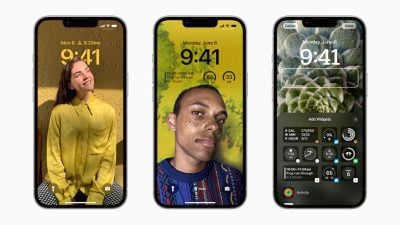
ios 16 lock screen customization
With the Lock Screen in iOS 16, Apple set out to give iPhone users the ability to create something that looks slick like a magazine cover, but in a way that's simple and fun to make.

To achieve this, iOS 16 uses machine learning to analyze Lock Screen pictures, and provides you with a selection of "looks" to choose from. However, the end result is more compelling than just laying a filter over a photo, as looks are intelligently generated specifically to style the chosen picture.

The following steps guide you through the process of choosing and applying a look to a new photo-based Lock Screen in iOS 16.

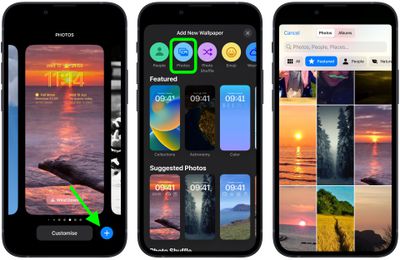
  1. Unlock your iPhone with Face ID or Touch ID, then press and hold the Lock Screen.
  2. Tap the blue + button, or swipe leftwards all the way to the end and then tap Add New.
  3. Tap the Photos button in the top row of options.
  4. Choose a picture from your Photos library to use.
    Lock Screen

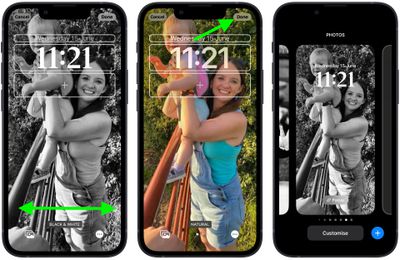
  5. Swipe left and right in the Lock Screen editor to preview the auto-generated looks that are available for this picture.
  6. When you've settled on the look you want, tap Done.
  7. Tap the Lock Screen you just created to activate it.
    Lock Screen

Note that you can customize the current Lock Screen at any time by invoking the gallery view from the Lock Screen with a long press, or by going into Settings -> Wallpaper & Lock Screens.


Related Forum: iOS 16

Popular Stories

iOS 26

iOS 26.4 Adds Two New Features to CarPlay

Tuesday March 24, 2026 1:55 pm PDT by
iOS 26.4 was released today, and it includes a couple of new features for CarPlay: an Ambient Music widget and support for voice-based chatbot apps. To update your iPhone 11 or newer to iOS 26.4, open the Settings app and tap on General → Software Update. CarPlay will automatically offer the new features so long as the iPhone connected to your vehicle is running iOS 26.4 or later....
Apple Business hero

Apple Unveils 'Apple Business' All-in-One Platform

Tuesday March 24, 2026 8:53 am PDT by
Apple today announced Apple Business, a new all-in-one platform that unifies device management, productivity tools, and customer outreach features. The service is designed to be a consolidated replacement for several of Apple's existing business-focused offerings, including Apple Business Essentials, Apple Business Manager, and Apple Business Connect. It provides organizations with a single...
AirPods Pro Firmware Feature

Apple Releases New Firmware for AirPods Pro 3, AirPods Pro 2 and AirPods 4

Tuesday March 24, 2026 12:31 pm PDT by
Apple today released new firmware for the AirPods Pro 2, AirPods Pro 3, and the AirPods 4. The firmware has a version number of 8B39, up from 8B34 on the AirPods Pro 3, 8B28 on the AirPods Pro 2, and 8B21 on the AirPods 4. There is no word on what's included in the firmware, but Apple has a support document with limited notes. Most updates are limited to bug fixes and performance...