How to Subscribe to Calendars on iPhone and iPad - MacRumors
Skip to Content

How to Subscribe to Calendars on iPhone and iPad

by

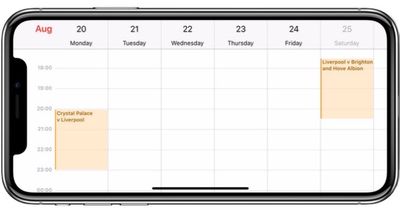
Calendar subscriptions offer a convenient way for you to stay up to date with everything from national holidays to the match fixtures for your favorite sports team. In this article, we'll show you how to subscribe to a public calendar on your iPhone or iPad – all you need in advance is the web address of the calendar (ics) file.
calendar iphone x
Note that if you want a calendar subscription to sync across all devices signed into your iCloud account, you'll need to subscribe to it on your Mac. To do so, open the Calendar app in macOS and select File -> New Calendar Subscription, enter the URL of the calendar to subscribe to, and then select iCloud in the Location menu.

How to Subscribe to a Calendar in iOS 11

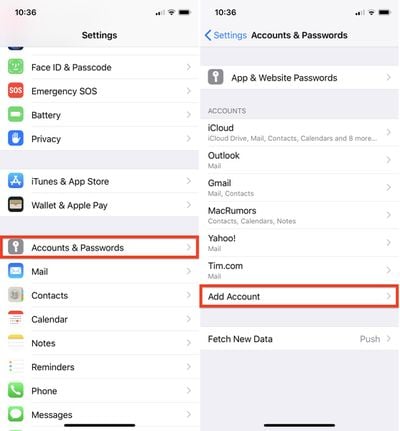
  1. Launch the Settings app on your iPhone or iPad.
  2. Tap Accounts & Passwords.
  3. Under the Accounts section, tap Add Account.
    how to subscribe calendar ios

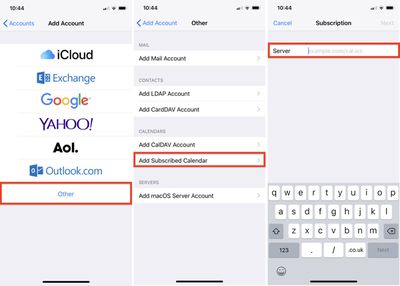
  4. Tap Other.
  5. Under Calendars, tap Add Subscribed Calendar.
  6. Type in your calendar link in the Server field; to paste in a copied link, tap and hold the field and select Paste.
    how to subscribe calendar ios 2

  7. Tap Next.
  8. Use the Description field to give the calendar an easily recognizable name.
  9. Enter a server username and password if required (most users will be able to skip this step).
  10. Tap Save.

How to Remove a Calendar Subscription in iOS 11

  1. Launch the Settings app on your iPhone or iPad.
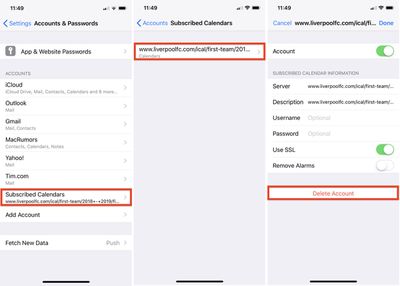
  2. Tap Accounts & Passwords.
  3. Tap Subscribed Calendars.
    how to unsubscribe calendar ios

  4. Tap the calendar subscription you want to remove.
  5. Tap Delete Account.

Top Rated Comments

Onexy Avatar
99 months ago
What calendars is everyone subscribing too?
Work calendars for teams.
Score: 1 Votes (Like | Disagree)
99 months ago
Very detailed steps; thank you. Wonder why it is so unintuitive?
Score: 1 Votes (Like | Disagree)

Popular Stories

iOS 26

iOS 26.4 Adds Two New Features to CarPlay

Tuesday March 24, 2026 1:55 pm PDT by
iOS 26.4 was released today, and it includes a couple of new features for CarPlay: an Ambient Music widget and support for voice-based chatbot apps. To update your iPhone 11 or newer to iOS 26.4, open the Settings app and tap on General → Software Update. CarPlay will automatically offer the new features so long as the iPhone connected to your vehicle is running iOS 26.4 or later....
Apple Business hero

Apple Unveils 'Apple Business' All-in-One Platform

Tuesday March 24, 2026 8:53 am PDT by
Apple today announced Apple Business, a new all-in-one platform that unifies device management, productivity tools, and customer outreach features. The service is designed to be a consolidated replacement for several of Apple's existing business-focused offerings, including Apple Business Essentials, Apple Business Manager, and Apple Business Connect. It provides organizations with a single...
AirPods Pro Firmware Feature

Apple Releases New Firmware for AirPods Pro 3, AirPods Pro 2 and AirPods 4

Tuesday March 24, 2026 12:31 pm PDT by
Apple today released new firmware for the AirPods Pro 2, AirPods Pro 3, and the AirPods 4. The firmware has a version number of 8B39, up from 8B34 on the AirPods Pro 3, 8B28 on the AirPods Pro 2, and 8B21 on the AirPods 4. There is no word on what's included in the firmware, but Apple has a support document with limited notes. Most updates are limited to bug fixes and performance...