Apple's iPhone 16 and iPhone 16 Plus now feature the programmable Action button that replaces the traditional ring/silent switch above the volume buttons. The Action button was previously only available on iPhone 15 Pro devices, but has expanded across the latest iPhone 16 lineup to be included on all models.
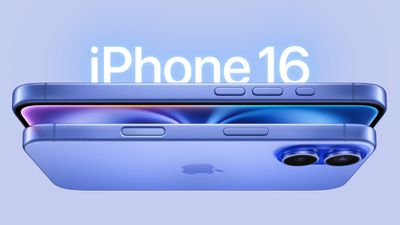
iphone 16 design
The Action button can be programmed to perform several different functions, but don't worry – the ability to switch between Silent and Ring mode has not gone away. They are simply activated differently.

By default, the Action button is assigned to mute and unmute your ringer, just like the traditional mute switch. Fine-tuned haptic feedback and visual cues in the Dynamic Island accompany every press, ensuring you'll know that it is launching the intended action.

To turn on mute right out of the box, simply follow these steps:

  • Long-press the Action button to mute your device (you should feel the haptic feedback emit three pulses).
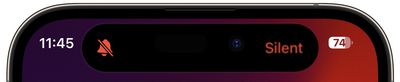
  • To confirm that your iPhone 16 is silenced, short press the Action Button. A "Silent" icon will appear in the Dynamic Island to signal the change.
    silent

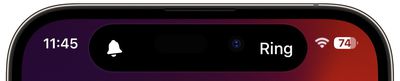
  • Long press again to unmute your device. You should feel a single haptic pulse and see a "Ring" icon appear in the Dynamic Island.
    Ring

That's all there is to it. Of course, if you're feeling adventurous you can customize the Action button to perform another function, and if you change your mind afterwards, you can always change it back to its original ring/silent setting.

Switch Silent Mode Off in Control Center

On iPhone models with the Action button, Apple also includes an additional button in the Control Center that you can use to quickly switch between Mute/Silent and Ringer mode. Simply swipe diagonally down from the upper left corner of the screen to invoke Control center, then tap the Silent/Ringer button.
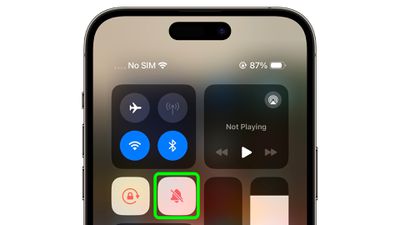
control center
You have probably noticed that when Silent mode is active, a crossed-out bell icon appears next to the time in the Status bar. If you don't appreciate this being a permanent feature on your screen, you can disable it: Go to Settings -> Sounds & Haptics, and under the "Silent Mode" section, toggle off the switch next to Show in Status Bar.


Popular Stories

wwdc sans text feature

Apple Rumored to Announce New Product on February 19

Thursday February 5, 2026 12:22 pm PST by
Apple plans to announce the iPhone 17e on Thursday, February 19, according to Macwelt, the German equivalent of Macworld. The report, citing industry sources, is available in English on Macworld. Apple announced the iPhone 16e on Wednesday, February 19 last year, so the iPhone 17e would be unveiled exactly one year later if this rumor is accurate. It is quite uncommon for Apple to unveil...
Apple Logo Zoomed

Tim Cook Teases Plans for Apple's Upcoming 50th Anniversary

Thursday February 5, 2026 12:54 pm PST by
Apple turns 50 this year, and its CEO Tim Cook has promised to celebrate the milestone. The big day falls on April 1, 2026. "I've been unusually reflective lately about Apple because we have been working on what do we do to mark this moment," Cook told employees today, according to Bloomberg's Mark Gurman. "When you really stop and pause and think about the last 50 years, it makes your heart ...
maxresdefault

Apple Shows Off a Key Reason to Upgrade to the iPhone 17

Saturday February 7, 2026 9:26 am PST by
Apple today shared an ad that shows how the upgraded Center Stage front camera on the latest iPhones improves the process of taking a group selfie. "Watch how the new front facing camera on iPhone 17 Pro takes group selfies that automatically expand and rotate as more people come into frame," says Apple. While the ad is focused on the iPhone 17 Pro and iPhone 17 Pro Max, the regular iPhone...
Finder Siri Feature

Why Apple's iOS 26.4 Siri Upgrade Will Be Bigger Than Originally Promised

Friday February 6, 2026 3:06 pm PST by
In the iOS 26.4 update that's coming this spring, Apple will introduce a new version of Siri that's going to overhaul how we interact with the personal assistant and what it's able to do. The iOS 26.4 version of Siri won't work like ChatGPT or Claude, but it will rely on large language models (LLMs) and has been updated from the ground up. Upgraded Architecture The next-generation...
iOS 26

iOS 26.3 and iOS 26.4 Will Add These New Features to Your iPhone

Tuesday February 3, 2026 7:47 am PST by
While the iOS 26.3 Release Candidate is now available ahead of a public release, the first iOS 26.4 beta is likely still at least a week away. Following beta testing, iOS 26.4 will likely be released to the general public in March or April. Below, we have recapped known or rumored iOS 26.3 and iOS 26.4 features so far. iOS 26.3 iPhone to Android Transfer Tool iOS 26.3 makes it easier...