

In iOS 16, Apple introduced some major changes to its mobile operating system, including a total overhaul of the Lock Screen.
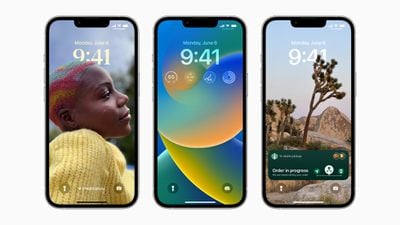
On an iPhone running iOS 16 or later, it's possible to customize the Lock Screen in ways that were simply not possible before, thanks to new options to apply unique fonts, colors, filters, and, for the first time, add widgets.
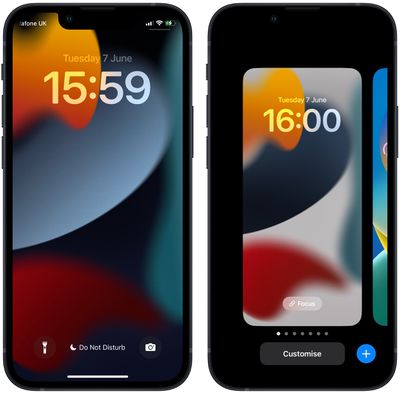
Recognizing that users might like to create multiple Lock Screens to switch between from time to time, Apple has included a Lock Screen wallpaper gallery that will look familiar to anyone with an Apple Watch, since it's very similar to the way watch face customization works.
The wallpaper gallery allows you to switch up your Lock Screen on the fly, without even entering your iPhone's Home Screen. The steps below show you how it's done.
- Unlock your iPhone with Face ID or Touch ID.
- Press and hold on the Lock Screen.

- In the gallery view, swipe left or right to preview your Lock Screen wallpapers.
- Simply tap on the wallpaper you'd like to switch to, and it will immediately be adopted as your active Lock Screen.
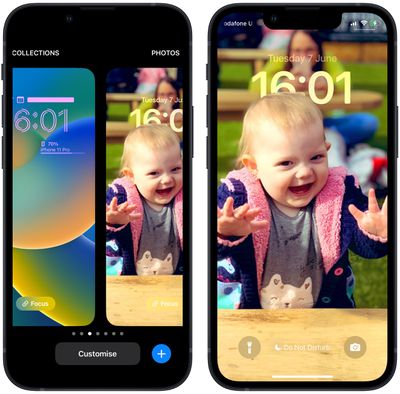
Wallpaper gallery looking a little sparse? Fortunately, Apple has created a variety of customizable Lock Screen wallpaper types that you can add to your gallery, including shuffling photos, Emoji backgrounds, Apple Collections, and Colors, as well as dynamic Weather and Astronomy screens that reflect real-time data. For instructions on creating a new Lock Screen, check out our dedicated how-to.
























![Apple Pulls Keynote, Pages and Numbers From App Store [Update: Back]](https://images.macrumors.com/t/Okb7kitB_gNr6qe5Pex9nQIysD8=/112x112/article-new/2026/01/Apple-Creator-Studio-iWork-suite.jpg)





















