How to Set Up a System-Wide Word Count Service on Your Mac - MacRumors
Skip to Content

How to Set Up a System-Wide Word Count Service on Your Mac

by

In this article, we're going to show you how to create a system-wide service that enables you to get an immediate word count and character count in TextEdit, Safari, Mail, or indeed any app on your Mac that lets you highlight text. It offers a handy home-made solution if you often find yourself pasting into a blank Word or Pages document for no other reason than to find out how many words are in a text selection.
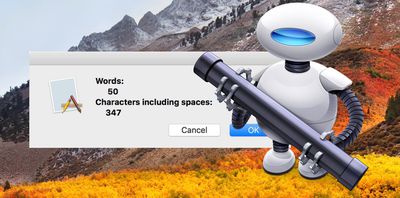
word count automator service 2
The steps below will guide you through the process of creating your own word count service using the macOS Automator app. It's a simple procedure to follow and should only take five minutes, but if you'd rather use a third-party solution, then check out WordCounter, a free Mac menu bar utility from Onekerato.

How to Create a Word Count Service in Automator

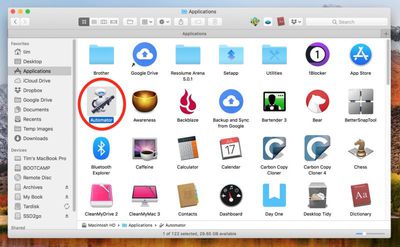
  1. Launch Automator from the Applications folder.
    1 Automator

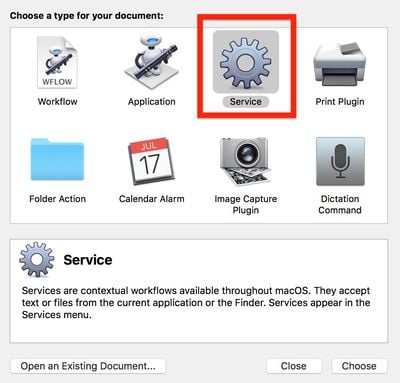
  2. Click New Document.

  3. Choose Service as the type of your document.
    2 Automator document type

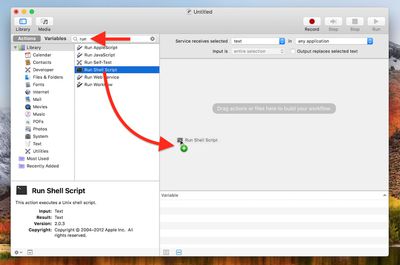
  4. Type "run" into the Library search field at the top of the Automator sidebar, then drag the Run Shell Script action into the empty workflow area.
    automator drag shell script

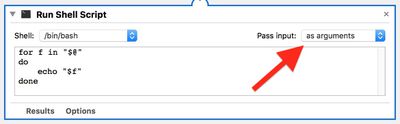
  5. In the Run Shell Script action window, change the Pass Input: option to as arguments using the dropdown menu.
    automator run shell script

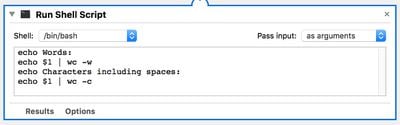
  6. Clear the text in the shell script box (highlight the text with your mouse cursor and hit Backspace) then copy and paste the following text into the same area:

    echo Words:

    echo $1 | wc -w

    echo Characters including spaces:

    echo $1 | wc -c
    automator word count script

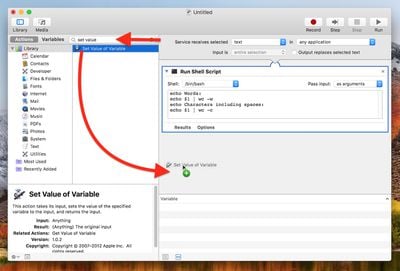
  7. Clear the Library search field at the top of the Automator sidebar and type "set value", then drag the Set Value of Variable action into the workflow area.
    automator set value of variable

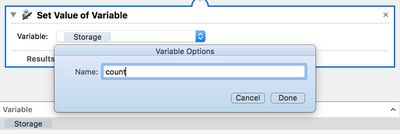
  8. Click the Variable: dropdown menu and select New Variable....

  9. In the blue dialog that appears, click inside the Name: input field. It may default to "storage", but you can rename it – we'll call it "count". Click Done, and you should now see "count" (or whichever name you used) appear in the variable list below the workflow area.
    automator variable name

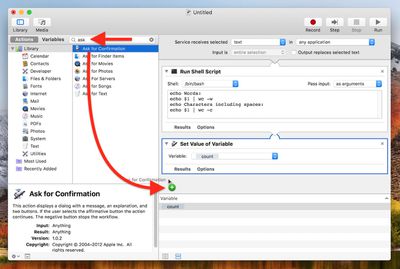
  10. Clear the Library search field at the top of the Automator sidebar again, and this time type "ask", then drag the Ask for Confirmation action into the workflow area.
    drag ask for confirm

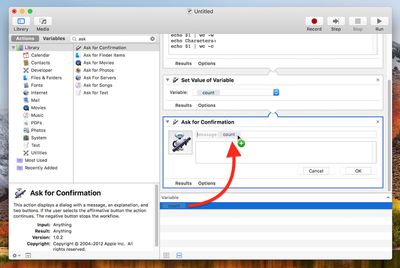
  11. Now, drag your "count" variable from the variable list up to the "Message" title in the Ask for Confirmation action.
    drag count variable

  12. In the Automator menu bar, select File -> Save..., call your new service "Word Count", and click Save.
Next time you want to get a word count and/or character count for some text you've highlighted, simply right-click (or Ctrl-click) on the text and select Services -> Word Count from the contextual dropdown menu.
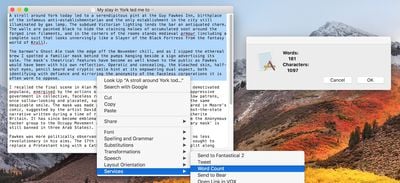
word count
You can assign a key shortcut to it for even faster access. To do so, launch System Preferences, select the Keyboard pane, and click the Shortcuts tab. Select Services from the sidebar and you should find Word Count near the bottom of the list. Just click it, select Add Shortcut, and finally, enter your custom key combination.
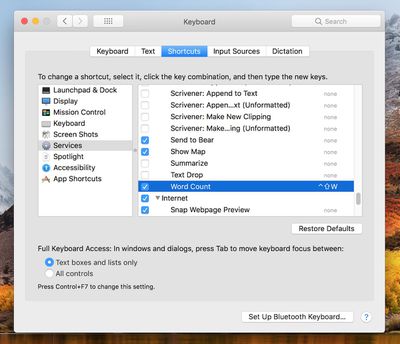

word count shortcut

Top Rated Comments

110 months ago
Srsly guys... I don't think I'll need this. But you rock! Keep these guides and tutorials coming!!! They are MUCH appreciated!

Score: 11 Votes (Like | Disagree)
110 months ago
Srsly guys... I don't think I'll need this. But you rock! Keep these guides and tutorials coming!!! They are MUCH appreciated!
Was gonna say exactly this till I saw your post. Reminds me of MacOXSHints.
[doublepost=1526030048][/doublepost]
Or get WordService for free from the App Store to give you text stats and so much more:
https://itunes.apple.com/app/wordservice/id899972312?mt=12
Maybe but this also teaches you stuff.
Score: 6 Votes (Like | Disagree)
fairuz Avatar
110 months ago
Automator is one of the many amazing productivity features in macOS that few know about. It's saved me so much time.
Score: 2 Votes (Like | Disagree)
IJ Reilly Avatar
110 months ago
Or get WordService for free from the App Store to give you text stats and so much more:
https://itunes.apple.com/app/wordservice/id899972312?mt=12
Beat me to it. I've used this indispensable collection of services for over 15 years. Can also be downloaded here:

https://www.macupdate.com/app/mac/10523/wordservice
[doublepost=1526061714][/doublepost]
Maybe but this also teaches you stuff.
I learned that I don't have to do it myself. ;)
Score: 2 Votes (Like | Disagree)
99 months ago
Has anyone actually checked how exact this is? I'm testing it now and the "characters including spaces" count seems to always be one more than it should be, regardless of the text or the program that I'm using the action in (e.g. safari, textedit, etc). Can anyone confirm if it's working 100% properly or not on their mac?

I know it's not a 'huge deal', and I can just manually deduct 1 myself, but it'd be interesting to know if anyone else is experiencing this and if so, if there's a way to get it exact. The exact character count is what I'm using this function for, because I use sites which limit titles & descriptions to exact character counts; and some sites, for some reason, don't actually tell you how many characters you've entered, just that you've "exceeded the maximum number of characters".

Thanks
Score: 1 Votes (Like | Disagree)
ArtOfWarfare Avatar
110 months ago
There are definitely existing Sublime plugins for word count. I'm using this one ('https://github.com/titoBouzout/WordCount')and it's great.

Of course. There's plenty of plugins for Sublime for anything lots of people need to do.

I was saying that, more generally, I write plugins for Sublime when I regularly need to do something with text in some specific way. As opposed to writing a MacOS service, where it'll only work on Macs.
Score: 1 Votes (Like | Disagree)

Popular Stories

M5 MacBook Pro

RIP, MacBook Ultra

Monday October 19, 2026 9:37 am PDT by
Apple today sent out invites for an experience in Los Angeles on Wednesday, October 28, and the "Pro and tell" tagline on the invitation likely means that the rumored MacBook models with touch-enabled OLED displays will stick with MacBook Pro branding instead of the once-rumored "MacBook Ultra" name. The long-rumored "iPhone Ultra" ended up being named iPhone Duo, so speculation that Apple...
iPhone Duo Trio

Here's What Apple's Apps Look Like on the iPhone Duo

Tuesday October 20, 2026 11:12 am PDT by
With just three days to go until the iPhone Duo is released, Apple is getting ready for the launch. Behind the scenes, the App Store now has screenshots of Apple's built-in apps running on the Duo. We've seen some apps in marketing materials, but images of the ones we haven't seen give us an idea of what it will be like using the iPhone Duo day to day. Many apps are shown in landscape...
apple pro tell logo

Apple Announcing New Products Next Week: 'Pro and Tell'

Monday October 19, 2026 9:05 am PDT by
Apple's Greg Joswiak today hinted at new product announcements coming next week, sharing a social media post that says "Can't wait to pro and tell next week." Rumors suggest Apple is planning to debut the new MacBook Pro with an OLED touchscreen display, an M6 entry-level MacBook Pro, an M6 iMac, an iPad mini with an OLED display. Can't wait to pro and tell next week....
Latest Stories
Giant iPhone Duo Displays Coming to Four Apple Stores
52 minutes ago
Apple Pulls Keynote, Pages and Numbers From App Store
2 hours ago
Apple Updates More Apps With iPhone Duo Support
2 hours ago
Apple Will Label Apps 'Made for iPhone Duo' in App Store
5 hours ago
Amazon Takes $49 Off iPad With Prices Starting at $399.99
6 hours ago
F1 on Apple TV Now Available in Dolby Atmos
6 hours ago
Apple Reveals More Than 50 Apps That Will Be Updated for iPhone Duo
7 hours ago
Apple Blocks Certificates That Could Help Attackers Fake Websites
8 hours ago
Giant iPhone Duo Installations Spotted at Apple Fifth Avenue
9 hours ago
iPhone Duo 2 Prototypes Include Under-Display Face ID
9 hours ago
Tesla App Gains iPad and iPhone Duo Support
13 hours ago
Apple Reportedly Boosts iPhone Duo Orders by 44%
13 hours ago
Fortnite Returning to Australian App Store After Court Ruling
14 hours ago
Apple Ordered to Open iPhone to Rival App Stores in Australia
14 hours ago
Apple Suppliers Face Hurdles Cutting Circuit Board Emissions
14 hours ago
Things Updated for iPhone Duo With Adaptive Layout
15 hours ago
Simplicity and Siri AI Are HomeView's Killer Features, Apple Says
15 hours ago
iPhone Duo Reviewers Really Miss Face ID
20 hours ago
Does the iPhone Duo Run Hot? Here's What Reviews Found
22 hours ago
Apple Music's New Look is Now Live on Apple's Website
22 hours ago
Anthropic Launches Claude Duet, a Proactive AI Agent
23 hours ago
What 32,000 Folds Did to the iPhone Duo's Hinge
1 day ago
iPhone Duo's Hidden FaceTime Camera Takes 'Trash' Photos
1 day ago
iPhone Duo Has 'Edge Light' Feature That Debuted on Macs Last Year
1 day ago
Apple Support App Updated for iPhone Duo's Larger Display
1 day ago
Amazon Sweetens the Deal on Entry-Level 16-Inch MacBook Pro With $570 Off
1 day ago
iPhone Duo Tips Over on MagSafe Stands When Unfolded
1 day ago
Apple Music's New Look Officially Announced
1 day ago
iPhone Duo Supports Apple Pencil Starting With iOS 27.2
1 day ago
iPhone Duo Accessories Roundup: Cases and Screen Protectors From OtterBox, ZAGG, and More
1 day ago