Take a Hearing Test With AirPods Pro 2 - GeekWebGuides
Skip to Content

Take a Hearing Test With AirPods Pro 2

by

If you're concerned about hearing loss and own AirPods Pro 2, Apple offers a convenient clinical-grade Hearing Test that's easy to use. Here's everything you need to know about checking your hearing health with this new feature.
airpods pro voice isolation
Apple on December 11 released iOS 18.2, which expands the Hearing Test feature on the AirPods Pro 2 to nine additional countries, including Cyprus, Czechia, France, Italy, Luxembourg, Romania, Spain, the United Arab Emirates, and the United Kingdom. The feature first launched in the U.S. and select other countries in late October with iOS 18.1.

Note that Apple's Hearing Test feature is not available in all regions due to differing regulatory laws. Apple maintains a list on its website of regions and territories where the test is available. If your location isn't on the list, you can still take the test – see the last section of this article for details.

What You Need

  • AirPods Pro 2 updated with the latest firmware
  • iPhone or iPad running iOS/iPadOS 18.1 or later
  • A quiet environment
  • About 5 minutes of uninterrupted time

The Hearing Test requires that you listen for a comprehensive range of tones at different and sometimes very low volumes. For this reason, it's important to take the test in a quiet environment for the full duration of the test, free from intermittent noise, people talking, or loud air conditioning or fan systems nearby.

Taking the Hearing Test

Make sure your AirPods Pro 2 are sufficiently charged before taking the test.

  1. Put your AirPods Pro 2 in your ears.
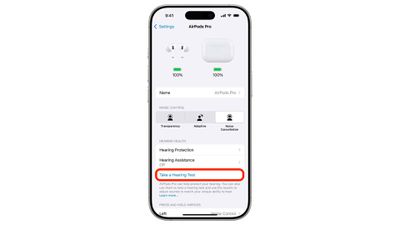
  2. Open Settings on your iPhone.
  3. Tap your AirPods Pro name at the top of Settings.
  4. Under "Hearing Health," tap Take a Hearing Test.
    settings

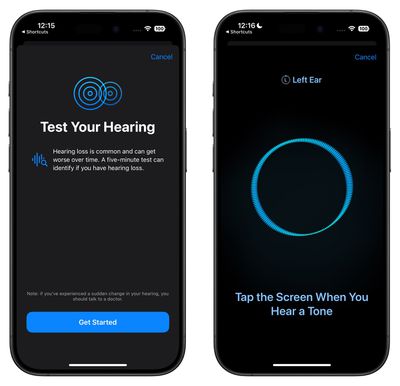
  5. Answer the preliminary questions about your age and recent loud noise exposure.
  6. Follow the fit test to ensure your ear tips create a proper seal.
  7. When the test begins, tap the screen each time you hear a tone.
  8. Complete the test for both ears (the test will automatically switch sides).
    hearing test

Understanding Your Results

The test measures your hearing in dBHL (decibel hearing level) and provides an easy-to-read classification:

  • Up to 25 dBHL: Little to no hearing loss - can hear normal conversation easily
  • 26-40 dBHL: Mild hearing loss - can hear normal speech at close range
  • 41-60 dBHL: Moderate hearing loss - requires raised voices to understand speech
  • 61-80 dBHL: Severe hearing loss - can only hear very loud speech or shouting

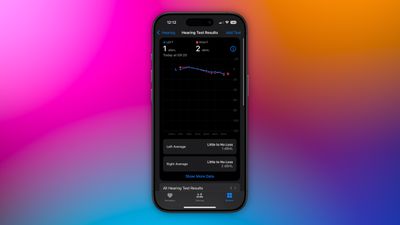
Tap "Show Details" to see a frequency-by-frequency breakdown of your hearing ability. This graph shows how well you hear different pitches, from low (250 Hz) to high (8 kHz). This detailed view can help identify specific types of hearing loss and is the same format audiologists use, making it easy to share with healthcare providers.
health
You can access your test results anytime in the Health app. Tap Browse ➝ Hearing, then tap Hearing Test Results to view your history. To share your results with healthcare providers, tap Export PDF at the bottom, or tap the Share button to email or save the audiogram.

After the Test

The results of your test can be used to unlock additional AirPods Pro 2 features and options including Media Assist and Hearing Aid mode.

Media Assist

If mild to moderate hearing loss is detected, you can enable Media Assist to optimize audio for your hearing profile:

  1. Go to Settings ➝ your AirPods Pro
  2. Scroll down to Hearing Health
  3. Tap Media Assist.
  4. Toggle Media Assist on.
  5. Choose Use Hearing Test Results to apply your recent test data, or Custom Setup to manually adjust settings.

Media Assist will then automatically adjust music, videos, and calls to enhance frequencies you have trouble hearing.

Hearing Aid Mode
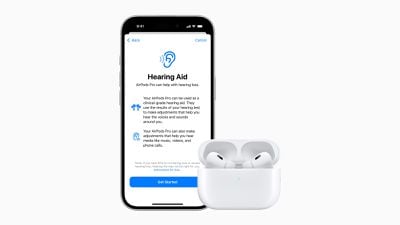
airpods pro 2 hearing aids
Your AirPods Pro 2 can function as basic hearing aids, amplifying conversations and environmental sounds. You can enable this feature in the Settings app under Accessibility ➝ Hearing Devices.

Bear in mind that the Hearing Aid feature isn't available everywhere. Apple maintains a list of regions and territories in which the feature can be accessed.

Taking the Hearing Test in Unsupported Regions

As we mentioned at the top of this article, Apple's Hearing Test feature isn't available in all regions and territories at the time of writing this, but that doesn't mean you can't take the test.

Instead, you can use the following deep link to directly access the test in the Health app: x-apple-health://HearingAppPlugin.healthplugin/HearingTest – tap the link or paste it into Safari on your iPhone or iPad and you will be taken straight to the test (thanks to Reddit user Special_Lake240). Alternatively, download this Apple Hearing Test shortcut, grab your AirPods Pro 2, then run the shortcut on your device to take the test.
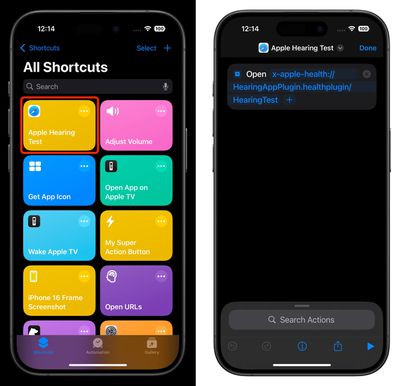
hearing test shortcut
After taking the test using this method, your results will be available in the Health app. Just bear in mind that you won't be able to access Apple's other hearing health features like Media Assist and Hearing Test unless they are officially available in your region.


Related Roundup: AirPods Pro 3
Buyer's Guide: AirPods Pro (Neutral)
Related Forum: AirPods

Top Rated Comments

DailySlow Avatar
24 months ago
I've run it three times and it's almost a perfect match to my audiologist's printout - done regularly over 6 years.

Score: 3 Votes (Like | Disagree)
Kirkster Avatar
24 months ago

This is only on AirPods Pro 2 with USB-C (with updated H2 chip, meaning those with lightning AirPods Pro 2 are out of luck?)
Works fine on My lightning AirPod Pro2s…. 🤷🏼‍♂️
Score: 2 Votes (Like | Disagree)
houttbe Avatar
24 months ago
The link for unsupported regions doesn’t seem to work.
Score: 2 Votes (Like | Disagree)
alexandr Avatar
24 months ago
Finally got around to running this test — pretty damn accurate!
Score: 1 Votes (Like | Disagree)
24 months ago
Good to see that there is an unofficial way to access this outside the supported regions. Easy too. Hopefully Apple makes it officially available in all other regions. Would have been great if the normal AirPods too had support for this feature.
Score: 1 Votes (Like | Disagree)
Treq Avatar
24 months ago

This is only on AirPods Pro 2 with USB-C (with updated H2 chip, meaning those with lightning AirPods Pro 2 are out of luck?)
Incorrect. I have the lightning version and took the test. Works fine.
Score: 1 Votes (Like | Disagree)

Popular Stories

M5 MacBook Pro

RIP, MacBook Ultra

Monday October 19, 2026 9:37 am PDT by
Apple today sent out invites for an experience in Los Angeles on Wednesday, October 28, and the "Pro and tell" tagline on the invitation likely means that the rumored MacBook models with touch-enabled OLED displays will stick with MacBook Pro branding instead of the once-rumored "MacBook Ultra" name. The long-rumored "iPhone Ultra" ended up being named iPhone Duo, so speculation that Apple...
iPhone Duo Trio

Here's What Apple's Apps Look Like on the iPhone Duo

Tuesday October 20, 2026 11:12 am PDT by
With just three days to go until the iPhone Duo is released, Apple is getting ready for the launch. Behind the scenes, the App Store now has screenshots of Apple's built-in apps running on the Duo. We've seen some apps in marketing materials, but images of the ones we haven't seen give us an idea of what it will be like using the iPhone Duo day to day. Many apps are shown in landscape...
apple pro tell logo

Apple Announcing New Products Next Week: 'Pro and Tell'

Monday October 19, 2026 9:05 am PDT by
Apple's Greg Joswiak today hinted at new product announcements coming next week, sharing a social media post that says "Can't wait to pro and tell next week." Rumors suggest Apple is planning to debut the new MacBook Pro with an OLED touchscreen display, an M6 entry-level MacBook Pro, an M6 iMac, an iPad mini with an OLED display. Can't wait to pro and tell next week....
Latest Stories
Apple Pulls Keynote, Pages and Numbers From App Store
8 minutes ago
Apple Updates More Apps With iPhone Duo Support
38 minutes ago
Apple Will Label Apps 'Made for iPhone Duo' in App Store
3 hours ago
Amazon Takes $49 Off iPad With Prices Starting at $399.99
4 hours ago
F1 on Apple TV Now Available in Dolby Atmos
5 hours ago
Apple Reveals More Than 50 Apps That Will Be Updated for iPhone Duo
5 hours ago
Apple Blocks Certificates That Could Help Attackers Fake Websites
6 hours ago
Giant iPhone Duo Installations Spotted at Apple Fifth Avenue
7 hours ago
iPhone Duo 2 Prototypes Include Under-Display Face ID
7 hours ago
Tesla App Gains iPad and iPhone Duo Support
11 hours ago
Apple Reportedly Boosts iPhone Duo Orders by 44%
12 hours ago
Fortnite Returning to Australian App Store After Court Ruling
12 hours ago
Apple Ordered to Open iPhone to Rival App Stores in Australia
12 hours ago
Apple Suppliers Face Hurdles Cutting Circuit Board Emissions
13 hours ago
Things Updated for iPhone Duo With Adaptive Layout
13 hours ago
Simplicity and Siri AI Are HomeView's Killer Features, Apple Says
14 hours ago
iPhone Duo Reviewers Really Miss Face ID
19 hours ago
Does the iPhone Duo Run Hot? Here's What Reviews Found
20 hours ago
Apple Music's New Look is Now Live on Apple's Website
21 hours ago
Anthropic Launches Claude Duet, a Proactive AI Agent
21 hours ago
What 32,000 Folds Did to the iPhone Duo's Hinge
22 hours ago
iPhone Duo's Hidden FaceTime Camera Takes 'Trash' Photos
1 day ago
iPhone Duo Has 'Edge Light' Feature That Debuted on Macs Last Year
1 day ago
Apple Support App Updated for iPhone Duo's Larger Display
1 day ago
Amazon Sweetens the Deal on Entry-Level 16-Inch MacBook Pro With $570 Off
1 day ago
iPhone Duo Tips Over on MagSafe Stands When Unfolded
1 day ago
Apple Music's New Look Officially Announced
1 day ago
iPhone Duo Supports Apple Pencil Starting With iOS 27.2
1 day ago
iPhone Duo Accessories Roundup: Cases and Screen Protectors From OtterBox, ZAGG, and More
1 day ago
Apple Stores Will Have 'Limited' Availability of iPhone Duo for Walk-In Customers
1 day ago