
In macOS Mojave, Apple has introduced a screen capture interface that unifies the screenshot and screen recording features on Mac, making accessing them easier from one place.

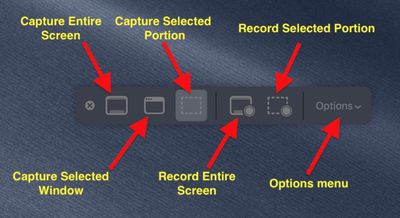
A new floating palette brings the traditional Mac screen capture functions together under a single menu. You can access it by hitting Command-Shift-5. Let's take a closer look at what's on offer.
mojave screenshots menu explained
The three buttons to the left of the first menu divider provide you with options to take a screenshot of the entire screen, a selected window, or a selected portion of the screen.

Note that the keyboard shortcuts for these actions still function as before in macOS. Taking a screenshot is as easy as hitting Shift-Command-3 to capture the whole screen, or Shift-Command-4 to capture a portion of the screen using the mouse cursor as a crosshair selection tool (a tap of the spacebar also turns it into a camera for capturing windows).

Meanwhile, on the right of the palette's first divider are two buttons to begin a screen recording – taking in the whole screen or just a portion of the action. These actions were previously only accessible in the macOS Grab utility.
mojave screenshot window capture
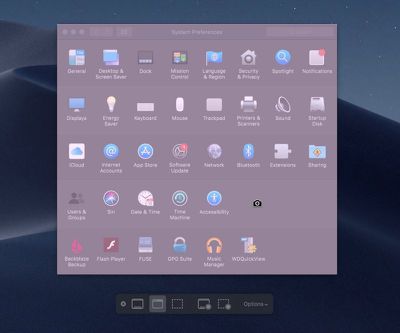
If you choose to capture a window, hover your mouse cursor over it: The window will be highlighted and your cursor will change to a camera. Simply click your mouse button to take the capture.

If you're capturing a selected portion of the screen, use the mouse cursor crosshairs to select the area you want to capture. When you take a screen recording, a button will appear in the menu bar for you to click when you're ready to end the recording.

You can click the rightmost button on the palette to reveal an additional menu of options for controlling other variables, like where you want your captures to be saved (Desktop, Documents, Clipboard, and so on) and whether to include a 5 or 10-second delay before the capture takes place, giving you time to get your screen in order.
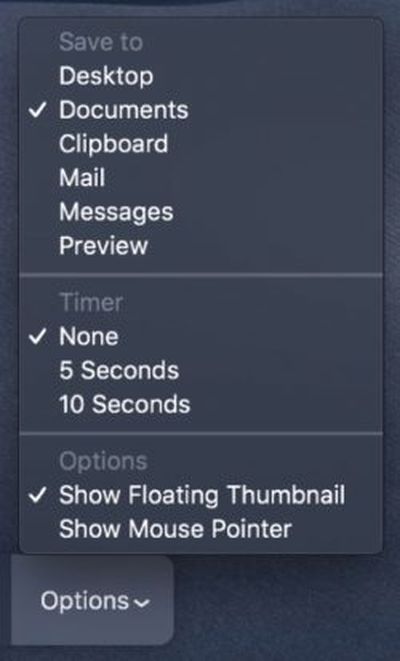
mojave screenshot optionsAs you'd expect, unchecking the Show Mouse Pointer option ensures the mouse cursor doesn't appear in your capture. The Show Floating Thumbnail option takes a little more explaining.

When you take a screenshot or screen recording in Mojave, a floating thumbnail appears in the bottom corner of the screen, just like it does when you take a screenshot on an iOS device running iOS 11 or later.

Clicking on the thumbnail opens the capture in a window, which includes image Markup tools, or a clip trimming option in the case of recordings, as well as options to share the image/recording or delete it if it didn't turn out like you wanted.

If you're taking multiple screenshots in sequence, you probably won't want the floating thumbnail showing up in subsequent captures, which is why the option to turn it off exists.

Read additional tips on controlling the behavior of screenshots using keyboard shortcuts.

Related Forum: macOS Mojave

Top Rated Comments

Starfyre Avatar
99 months ago
Is this eliminating the need for screen recording software like Camtasia? Can this record sound that is played from the system itself and not just what the microphone picks up?
Score: 5 Votes (Like | Disagree)
bluecoast Avatar
99 months ago
I hope that Apple will make this more discoverable.

If it’s part of the finder I hope that we get an entry in one of its menus and a toolbar button.

If it’s system level hopefully we’ll get an entry somewhere in preferences to activate a menu bar item for it, or something.
Score: 2 Votes (Like | Disagree)
PowerBook-G5 Avatar
99 months ago
It’s too bad that there isn’t an option to save screenshots to the Photos app. I guess I’ll just have to keep using my AppleScript and folder actions setup in Mojave ¯\_(ツ)_/¯

Hopefully they’ll add “Save to Photos” as an option in the future. That’d help streamline things a lot!
Score: 2 Votes (Like | Disagree)
Robert_123 Avatar
99 months ago
[doublepost=1530694117][/doublepost]Have Apple sorted out the frequent problem of recording sound in screen-shot movies that has required Soundflower in many apps? i.e. it records what is coming out of the speakers without a lot of mucking around...
Score: 2 Votes (Like | Disagree)
12dylan34 Avatar
99 months ago
Easier? I mapped that utility to two function keys years ago. I just tap the key and I’m done. Can’t get easier than that. The only frustration has been that getting a screen capture of a video often results in a grey box. So I’ve had to resort to third party apps in that case.
It’s only more difficult if you already know the key combos to take screenshots. The current key-combo-only screenshot method isn’t discoverable at all - you just have to know how to do it or look it up.

I’ll continue to use the key combos myself, but for new users, or users who don’t take screenshots often and forget the combos, this is a valuable feature.
Score: 1 Votes (Like | Disagree)
EndersShadow Avatar
99 months ago
Is there a way to record the screen with the sound?

I can only record as a video without sound and wonder whether it is just me or it is how it already is.
I use quicktime and soundflower to record the screen and internal sound. Works like a charm.
Score: 1 Votes (Like | Disagree)

Popular Stories

Apple Logo Zoomed

Tim Cook Teases Plans for Apple's Upcoming 50th Anniversary

Thursday February 5, 2026 12:54 pm PST by
Apple turns 50 this year, and its CEO Tim Cook has promised to celebrate the milestone. The big day falls on April 1, 2026. "I've been unusually reflective lately about Apple because we have been working on what do we do to mark this moment," Cook told employees today, according to Bloomberg's Mark Gurman. "When you really stop and pause and think about the last 50 years, it makes your heart ...
iOS 26

iOS 26.3 and iOS 26.4 Will Add These New Features to Your iPhone

Tuesday February 3, 2026 7:47 am PST by
While the iOS 26.3 Release Candidate is now available ahead of a public release, the first iOS 26.4 beta is likely still at least a week away. Following beta testing, iOS 26.4 will likely be released to the general public in March or April. Below, we have recapped known or rumored iOS 26.3 and iOS 26.4 features so far. iOS 26.3 iPhone to Android Transfer Tool iOS 26.3 makes it easier...
imac video apple feature

Apple Makes Its Second-Biggest Acquisition Ever

Tuesday February 3, 2026 12:45 pm PST by
Apple recently acquired Israeli startup Q.ai for close to $2 billion, according to Financial Times sources. That would make this Apple's second-biggest acquisition ever, after it paid $3 billion for the popular headphone maker Beats in 2014. This is also the largest known Apple acquisition since the company purchased Intel's smartphone modem business and patents for $1 billion in 2019....
wwdc sans text feature

Apple Rumored to Announce New Product on February 19

Thursday February 5, 2026 12:22 pm PST by
Apple plans to announce the iPhone 17e on Thursday, February 19, according to Macwelt, the German equivalent of Macworld. The report, citing industry sources, is available in English on Macworld. Apple announced the iPhone 16e on Wednesday, February 19 last year, so the iPhone 17e would be unveiled exactly one year later if this rumor is accurate. It is quite uncommon for Apple to unveil...
Finder Siri Feature

Why Apple's iOS 26.4 Siri Upgrade Will Be Bigger Than Originally Promised

Friday February 6, 2026 3:06 pm PST by
In the iOS 26.4 update that's coming this spring, Apple will introduce a new version of Siri that's going to overhaul how we interact with the personal assistant and what it's able to do. The iOS 26.4 version of Siri won't work like ChatGPT or Claude, but it will rely on large language models (LLMs) and has been updated from the ground up. Upgraded Architecture The next-generation...
















