How to Take a Screenshot of Your Mac's Touch Bar - MacRumors
Skip to Content

How to Take a Screenshot of Your Mac's Touch Bar

by

Most Mac users know how to take standard screenshots on their Mac, but not many MacBook Pro owners will know how to take screenshots of the Touch Bar that runs along the top of the keyboard on some models.
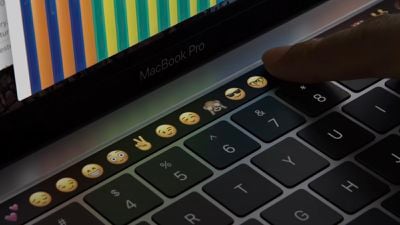
touch bar close up
Why would you want to take a screen grab of your Mac's Touch Bar? Perhaps you've customized its layout using System Settings -> Keyboard -> Touch Bar Settings... and want to share it with someone or use the same layout on another Mac. Or maybe you have a Touch Bar game installed that you want to take pictures of. Either way, here's how it's done.

The keyboard shortcut for taking a screenshot of the Touch Bar is closely associated with the other shortcuts for taking standard screenshots. Simply press Command-Shift-6 and an image of the current state of the Touch Bar will be saved to your desktop.
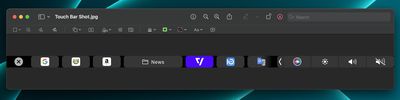
Touch Bar
Bear in mind that the screenshot may look unusually thin and wide, but that's because the Touch Bar's resolution is 2170x60 pixels. If you want, you could always crop it using the Preview app's image editing tools.


Popular Stories

iOS 26

iOS 26.4 Adds Two New Features to CarPlay

Tuesday March 24, 2026 1:55 pm PDT by
iOS 26.4 was released today, and it includes a couple of new features for CarPlay: an Ambient Music widget and support for voice-based chatbot apps. To update your iPhone 11 or newer to iOS 26.4, open the Settings app and tap on General → Software Update. CarPlay will automatically offer the new features so long as the iPhone connected to your vehicle is running iOS 26.4 or later....
Apple Business hero

Apple Unveils 'Apple Business' All-in-One Platform

Tuesday March 24, 2026 8:53 am PDT by
Apple today announced Apple Business, a new all-in-one platform that unifies device management, productivity tools, and customer outreach features. The service is designed to be a consolidated replacement for several of Apple's existing business-focused offerings, including Apple Business Essentials, Apple Business Manager, and Apple Business Connect. It provides organizations with a single...
AirPods Pro Firmware Feature

Apple Releases New Firmware for AirPods Pro 3, AirPods Pro 2 and AirPods 4

Tuesday March 24, 2026 12:31 pm PDT by
Apple today released new firmware for the AirPods Pro 2, AirPods Pro 3, and the AirPods 4. The firmware has a version number of 8B39, up from 8B34 on the AirPods Pro 3, 8B28 on the AirPods Pro 2, and 8B21 on the AirPods 4. There is no word on what's included in the firmware, but Apple has a support document with limited notes. Most updates are limited to bug fixes and performance...