

In iOS 17, Apple in the Health app has added the ability to track your emotions on a daily basis to give you an overall picture of mental wellbeing.
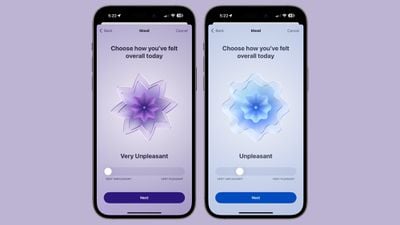
Through Health app notifications or the Apple Watch, you can log your mood at different times throughout the day and input an overall mood for the day.
Logging a mood presents a slider bar with options ranging from Very Unpleasant to Neutral to Pleasant. The options are color coded (very unpleasant is purple, neutral is blue, and very pleasant is orange), and the idea is to drag the slider to the closest representation of your current mood.
From there, Apple asks you what best describes the feeling, and presents a list of adjectives related to the mood that you can select from. The "Very Pleasant" mood, for example, has options like Amazed, Peaceful, Joyful, and Calm. The "Very Unpleasant" mood includes Angry, Sad, Drained, and Stressed, while Neutral moods include Peaceful, Indifferent, and Content. You cannot input your own adjective, and must use one of the suggestions from Apple. There are a few dozen total options, so the idea is just to choose the closest match.
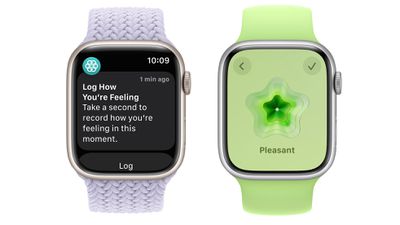
After you've selected a mood and an accompanying adjective for it, Apple asks what's causing the mood. Options include health, fitness, family, friends, partner, dating, weather, money, and current events, but again, you have to choose from Apple's list. You can, however, add context in this section, so you can write down details on why you've chosen a specific category.
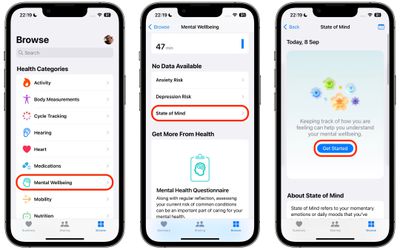
To create your first log of your emotional state or mood in iOS 17, follow the steps below.
- In the Health app, select the Browse tab, then under "Health Categories," tap Mental Wellbeing.
- Under "No Data Available," tap State of Mind.
- Tap Get Started.

- Choose to log How you feel right now, or How you've felt overall today, then tap Next.
- Use the slider to log your emotion or mood on a spectrum from Very Unpleasant to Very Pleasant, then tap Next.
- Choose a word that best describes this feeling, then tap Next.
- Choose from the options what's having the biggest impact on you, then tap Done.
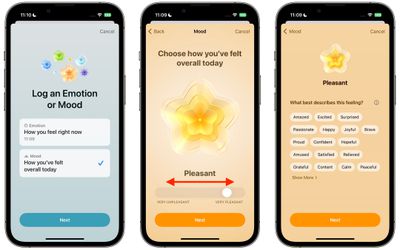
That's all there it to it. All your logs can be viewed at any time using the State of Mind card in the Mental Wellbeing section of the Health app.
Get Reminders to Log Your State of Mind
At the bottom of the State of Mind section is an Options menu that includes toggles that you can enable to get reminders to log your emotional state or mood during your day or at the end of the day.
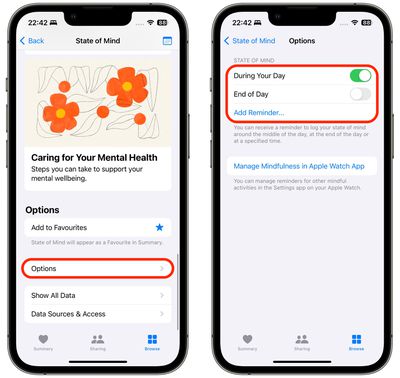
For added customization, an Add Reminder... option also lets you add a specific time each day to get your reminder, which is useful if you know when certain triggers tend to occur during your day.




















