
If you've got a new iPhone 13 to replace your current ‌iPhone‌, there are a few ways you can migrate your data across to the new device. You can restore your apps, data, and settings from your most recent iCloud backup, restore from a backup on your computer, or you can use device-to-device migration to transfer your data directly from your previous ‌iPhone‌ to your new one. There are currently known issues with restoring your data from a backup, so this article focuses on how to perform a wireless device-to-device migration.
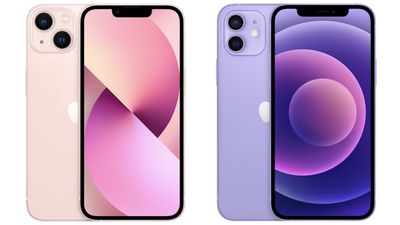
iphone 13 vs iphone 12
Without doubt, device-to-device migration will be the most convenient option for most owners of a new ‌iPhone‌ 13. It transfers over information like photos, app data, login credentials, device preferences and settings, and more. As with an ‌‌iCloud‌‌ backup, apps themselves are downloaded directly from the App Store rather than from your existing ‌‌iPhone‌‌. It may take a little longer than restoring from a backup, but the time saved from not having to log into all your apps again makes it worth the wait, which is why this process trumps the other transfer methods.

The following steps outline the Quick Start process that you can use to perform a wireless device-to-device migration. As always when transferring data between devices, make sure you have made a backup of your current ‌iPhone‌, just in case anything untoward happens during the migration process.

It's also worth noting that if your current ‌iPhone‌ has an eSim plan, you'll be asked to "Transfer Cellular Plan" while setting up your ‌iPhone‌ 13: You can either select the numbers you want to transfer or opt to Decide Later to complete the plan transfer after you've set up your ‌iPhone‌.

  1. Plug both iPhones into a power outlet, turn on your new ‌iPhone‌ 13 and place it near your current ‌iPhone‌, which needs to be running iOS 12.4 or later for the transfer to work. The Quick Start screen will appear on your current ‌iPhone‌ and offer the option of using your Apple ID to set up your new device. Make sure that it's the ‌Apple ID‌ that you want to use, then tap Continue.
  2. Hold up your current ‌iPhone‌ and center the camera's viewfinder over the animation that appears on your ‌iPhone‌ 13. Wait for a message that says "Finish on New ‌iPhone‌."
    set up iphone 13

  3. When prompted, enter your current passcode on your new ‌iPhone‌ 13.
  4. Follow the instructions to set up Face ID on your ‌iPhone‌ 13.
  5. Tap Transfer from ‌iPhone‌ to start transferring your data to your ‌iPhone‌ 13. You should be given the choice of whether to transfer some additional settings, such as Apple Pay and Siri, to your new ‌iPhone‌.
  6. If you have an Apple Watch paired to your current ‌iPhone‌, you'll be asked if you want to transfer your Apple Watch data and settings.
  7. Keep the two iPhones near each other and plugged into power until the data migration process is finished.
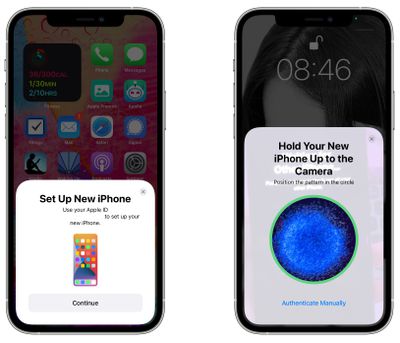
The amount of time that it takes to transfer data from one ‌‌iPhone‌‌ to another will vary based on what's on the existing ‌‌iPhone‌‌, but Apple provides a data transfer estimate on the main data transfer screen.

If the wireless network you're relying on is too slow, you can perform the data migration using a wired connection, but for that you'll need a Lightning to USB 3 Camera Adaptor and a Lightning to USB Cable. Connect the Camera Adaptor into your current ‌iPhone‌, then plug the Lightning to USB Cable into your ‌iPhone‌ 13 and the other end into the adaptor. You'll then be able to follow the steps outlined above.

If you plan to sell or trade in your old ‌iPhone‌ to get a bit of extra cash, make sure to adequately erase everything on it to get it ready for its next owner.


Related Forum: iPhone

Top Rated Comments

bmodi Avatar
57 months ago
Also a restore is a "clean install". I think most misunderstand a "data transfer".
What it does is not to directly send everything from the old to the new. Just the settings get overtaken, which apps you had and so on. However all apps everything gets downloaded from the App Store like you would do it in case you do a manual setup. No difference. But overtaking it from the old Iphone will save you a lot of time!
Score: 8 Votes (Like | Disagree)
DC101 Avatar
57 months ago
So at what stage do you swap the sim over?
Score: 5 Votes (Like | Disagree)
wyarp Avatar
57 months ago
First time I experienced the 'device to device' migration by just holding the 2 phones next 2 each other 2 years ago with the iPhone 11Pro. By far the easiest most straightforward data transfer I've ever had. So much better than all the faff we used to have to endure backing everything up, plugging everything in etc.
Score: 4 Votes (Like | Disagree)
R Kenny Avatar
57 months ago
One great outcome for me was that the side-by-side transfer method allowed all of my music to be transferred - even the albums/songs I had ripped from CDs. Previously I had to use a third party app (e.g. iMazing) to transfer the music from a backup on my MacBook. The whole process took 45 minutes and was seamless. Well done Apple.
Score: 3 Votes (Like | Disagree)
RealMonster Avatar
57 months ago

I’m just going with a clean install. It’s slower overall but at least I get to control the order so the things I need are there first.
The only problem with clean installs is things like stickers or apps that aren't available anymore won't be available, even if you still use them on your current device. If you transfer, it keeps them. That might not be an issue for you, but I was bummed when I found some of the stuff that I was using didn't show up on my fresh install.
Score: 2 Votes (Like | Disagree)
Abazigal Avatar
57 months ago
Daringfireball recommends restoring wirelessly from your older phone.

https://daringfireball.net/linked/2021/09/24/how-to-set-up-a-new-iphone-or-ipad
Score: 2 Votes (Like | Disagree)

Popular Stories

Apple Logo Zoomed

Tim Cook Teases Plans for Apple's Upcoming 50th Anniversary

Thursday February 5, 2026 12:54 pm PST by
Apple turns 50 this year, and its CEO Tim Cook has promised to celebrate the milestone. The big day falls on April 1, 2026. "I've been unusually reflective lately about Apple because we have been working on what do we do to mark this moment," Cook told employees today, according to Bloomberg's Mark Gurman. "When you really stop and pause and think about the last 50 years, it makes your heart ...
wwdc sans text feature

Apple Rumored to Announce New Product on February 19

Thursday February 5, 2026 12:22 pm PST by
Apple plans to announce the iPhone 17e on Thursday, February 19, according to Macwelt, the German equivalent of Macworld. The report, citing industry sources, is available in English on Macworld. Apple announced the iPhone 16e on Wednesday, February 19 last year, so the iPhone 17e would be unveiled exactly one year later if this rumor is accurate. It is quite uncommon for Apple to unveil...
Finder Siri Feature

Why Apple's iOS 26.4 Siri Upgrade Will Be Bigger Than Originally Promised

Friday February 6, 2026 3:06 pm PST by
In the iOS 26.4 update that's coming this spring, Apple will introduce a new version of Siri that's going to overhaul how we interact with the personal assistant and what it's able to do. The iOS 26.4 version of Siri won't work like ChatGPT or Claude, but it will rely on large language models (LLMs) and has been updated from the ground up. Upgraded Architecture The next-generation...
iOS 26

iOS 26.3 and iOS 26.4 Will Add These New Features to Your iPhone

Tuesday February 3, 2026 7:47 am PST by
While the iOS 26.3 Release Candidate is now available ahead of a public release, the first iOS 26.4 beta is likely still at least a week away. Following beta testing, iOS 26.4 will likely be released to the general public in March or April. Below, we have recapped known or rumored iOS 26.3 and iOS 26.4 features so far. iOS 26.3 iPhone to Android Transfer Tool iOS 26.3 makes it easier...
iphone 17 pro dark blue 1

iPhone 18 Pro Max Rumored to Deliver Next-Level Battery Life

Friday February 6, 2026 5:14 am PST by
The iPhone 18 Pro Max will feature a bigger battery for continued best-in-class battery life, according to a known Weibo leaker. Citing supply chain information, the Weibo user known as "Digital Chat Station" said that the iPhone 18 Pro Max will have a battery capacity of 5,100 to 5,200 mAh. Combined with the efficiency improvements of the A20 Pro chip, made with TSMC's 2nm process, the...















