

 In iOS 14, Apple introduced a new Translate app that's designed to give real-time translations for 11 different languages. It can translate to and from Arabic, mainland Chinese, English (US and UK), French, German, Italian, Japanese, Korean, Portuguese, Russian, and Spanish.
The Translate app has an easy-to-use interface that allows you to select languages to translate to and from, and then type (or paste) the text that you want to be translated. The app can even speak translations out loud so that you can get the proper pronunciation or play the translation to someone who speaks a different language.
How to Translate Text in Apple's Translate App
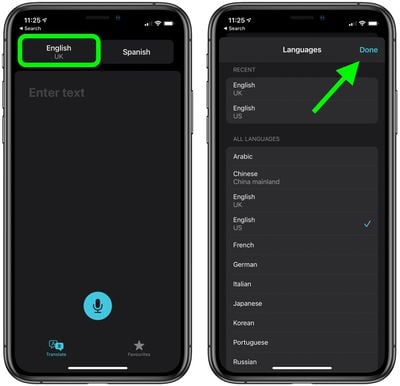
- Launch the Translate app on your iPhone or iPad.
- Tap the top-left button and select the language of the text that you want translated.
- Tap Done.

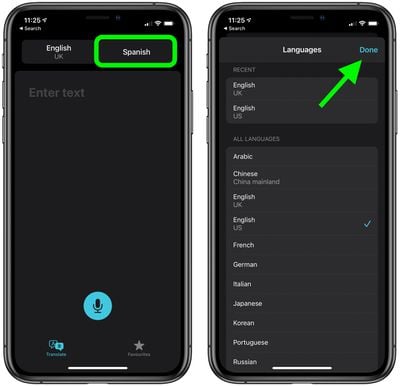
- Tap the top-right button and select the language that you want the text translated into.
- Tap Done.
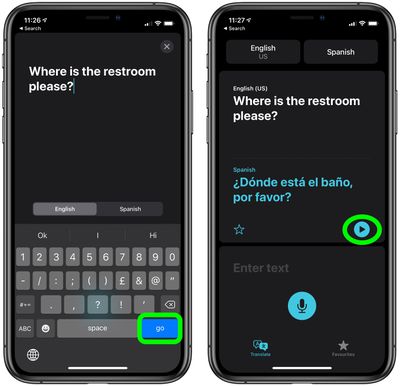
- Tap the large input area below the top buttons to bring up the onscreen keyboard.
- Now type (or paste) the text that you want translated.
- Tap Go to get your text translation. Translations are shown in large text, with the original phrase in black and the translation shown in blue.
- To hear the translated text out loud, tap the blue play button.
Alternately, you can say the words or phrases you want to know in another language, and the Translate app will translate what it hears. For more on the Translate app, be sure to check our comprehensive guide.




















