

In iOS 17, Apple overhauled its entire selection of ringtones and text tones, offering more than 20 new sounds that can be used for phone calls, texts, alarms, and more. Here's how to check them out.
Compared to the old ringtones, many of the new ringtones are longer in length and sound more modern.
They include Arpeggio, Breaking, Canopy, Chalet, Chirp, Daybreak, Departure, Dollop, Journey, Kettle, Mercury, Milky Way, Quad, Radial, Scavenger, Seedling, Shelter, Sprinkles, Steps, Storytime, Tease, Tilt, Unfold, and Valley. Reflection continues to be the default ringtone option.
There are also more than 10 new text tones that can be used for incoming text messages, voicemails, incoming mail alerts, reminder alerts, and more.
To get access to the new ringtones and text tones, first of all, make sure your iPhone is updated to iOS 17 or later. You can do this by going into Settings ➝ General ➝ Software Update.
If your iPhone is all up-to-date, follow these steps:
- Open Settings.
- Tap Sounds & Haptics.
- Tap Ringtone or Text Tone.
- Tap a tone to listen to it. If you like it, it's already selected and there's nothing else you need to do. Otherwise, re-select the tone you were already using.
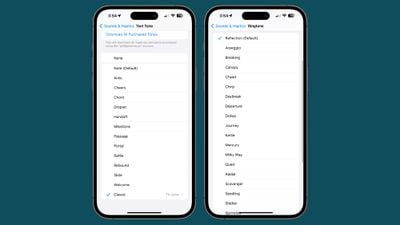 Note that Apple has moved all of the prior ringtones to the "Classic" section at the bottom of the list, so they are still accessible for those who prefer options like Illuminate, Night Owl, Constellation, and Twinkle.


















