
Most iPhone users are familiar with Apple's Live Photos, which capture 1.5 seconds of video before and after you take a picture, with the aim of adding a little bit of life and movement to still images. What some users might not know is that you can also make a Live Photo bounce back and forth like a boomerang.
icloud photos
If you're familiar with Instagram, you probably know what a boomerang is. Since introducing ‌Live Photos‌ in 2015, Apple has added some effects to its Photos app that let you turn them into fun animated clips, and the Bounce effect is basically the same thing as a boomerang. It rewinds the action backward and forward. Here's how to make one of your own on ‌iPhone‌.

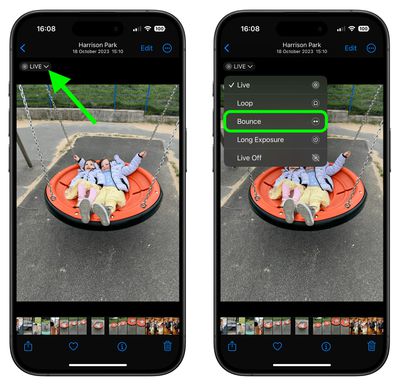
  1. Open the ‌Photos‌ app and select a Live Photo. (If you look under "Media Types" in the Albums section, you'll find all of your ‌Live Photos‌ collated in a folder of the same name.)
  2. With the Live Photo open, tap the LIVE icon in the top-left corner of the interface.
  3. From the dropdown menu that appears, choose Bounce.
Live Photos

The effect you choose will be applied immediately, ready for you to share it using the Share icon in the bottom-left corner of the screen. Note that there are two other effects that you can try in ‌Photos‌: Loop repeats the action in a continuous looping video, and Long Exposure simulates a DSLR-like long exposure effect by blurring motion.

Did you know that it you get a blurry Live Photo image, you can open it up and see if other frames you captured are clearer, and then select a replacement "key photo" for it. Click the link to learn how it's done.


Top Rated Comments

RickDEGH Avatar
23 months ago
We already got Apple/iOS 17.5 doing Boomerang with deleted pictures.
Score: 8 Votes (Like | Disagree)
orev Avatar
23 months ago

Most iPhone users are familiar with Apple's Live Photos
No, they aren't. Most iPhone users have no idea that every photo they take is capturing a few seconds of audio and video, and since the default is to keep turning live photos back on, they're also unaware why their phone/iCloud storage keeps getting used up.

The fact that Apple included this feature and clearly has it set to keep using more storage space despite the user's expectation is a clear consequence of them charging money for storage space. It gives them incentives to do shady things like this so storage gets used unexpectedly.

The fact that disabling this requires digging into the Camera settings and then another level deep to find a completely counter-intuitive setting is just more proof of this, and is not at all reasonable "solution" to this.
Score: 4 Votes (Like | Disagree)
truthsteve Avatar
23 months ago
no thank you. this is the worst effect
Score: 1 Votes (Like | Disagree)
svish Avatar
23 months ago
The different options allow to have fun with the photos to some extent.
Score: 1 Votes (Like | Disagree)
tonie walker Avatar
23 months ago
hah! i thought an old probably deleted MR article resurface, similar to iCloud deleted photos. Thanks for reminding us though about this feature.
Score: 1 Votes (Like | Disagree)
orev Avatar
23 months ago

I just don't understand why ”bounce” seems to skip some frames that are there if you just ”live” watch the photo.
Most video compression algorithms assume that the video will be played forward, and they only save the changes between frames in the forward direction. Going backwards is more complicated as it needs to try to reconstruct the frame using the "forward" information but going in the "backward" direction.
Score: 1 Votes (Like | Disagree)

Popular Stories

Apple Logo Zoomed

Tim Cook Teases Plans for Apple's Upcoming 50th Anniversary

Thursday February 5, 2026 12:54 pm PST by
Apple turns 50 this year, and its CEO Tim Cook has promised to celebrate the milestone. The big day falls on April 1, 2026. "I've been unusually reflective lately about Apple because we have been working on what do we do to mark this moment," Cook told employees today, according to Bloomberg's Mark Gurman. "When you really stop and pause and think about the last 50 years, it makes your heart ...
wwdc sans text feature

Apple Rumored to Announce New Product on February 19

Thursday February 5, 2026 12:22 pm PST by
Apple plans to announce the iPhone 17e on Thursday, February 19, according to Macwelt, the German equivalent of Macworld. The report, citing industry sources, is available in English on Macworld. Apple announced the iPhone 16e on Wednesday, February 19 last year, so the iPhone 17e would be unveiled exactly one year later if this rumor is accurate. It is quite uncommon for Apple to unveil...
Finder Siri Feature

Why Apple's iOS 26.4 Siri Upgrade Will Be Bigger Than Originally Promised

Friday February 6, 2026 3:06 pm PST by
In the iOS 26.4 update that's coming this spring, Apple will introduce a new version of Siri that's going to overhaul how we interact with the personal assistant and what it's able to do. The iOS 26.4 version of Siri won't work like ChatGPT or Claude, but it will rely on large language models (LLMs) and has been updated from the ground up. Upgraded Architecture The next-generation...
maxresdefault

Apple Shows Off a Key Reason to Upgrade to the iPhone 17

Saturday February 7, 2026 9:26 am PST by
Apple today shared an ad that shows how the upgraded Center Stage front camera on the latest iPhones improves the process of taking a group selfie. "Watch how the new front facing camera on iPhone 17 Pro takes group selfies that automatically expand and rotate as more people come into frame," says Apple. While the ad is focused on the iPhone 17 Pro and iPhone 17 Pro Max, the regular iPhone...
iOS 26

iOS 26.3 and iOS 26.4 Will Add These New Features to Your iPhone

Tuesday February 3, 2026 7:47 am PST by
While the iOS 26.3 Release Candidate is now available ahead of a public release, the first iOS 26.4 beta is likely still at least a week away. Following beta testing, iOS 26.4 will likely be released to the general public in March or April. Below, we have recapped known or rumored iOS 26.3 and iOS 26.4 features so far. iOS 26.3 iPhone to Android Transfer Tool iOS 26.3 makes it easier...















