In iOS and iPadOS, Apple includes a built-in screenshot feature that also provides you with the ability to capture an entire webpage on your iPhone or iPad that you can then save or share with someone as a PDF document.

safari macos icon banner
By converting full‑page screenshots into PDFs directly within Safari, you can preserve the exact layout and content of lengthy articles, receipts, or social media threads in a single, shareable file. Using the feature also eliminates the need to stitch together multiple images or rely on third‑party apps, plus the text remains searchable and any images stay crisp.

Here's how the feature works.

  1. Launch Safari and navigate to the webpage that you wish to capture.
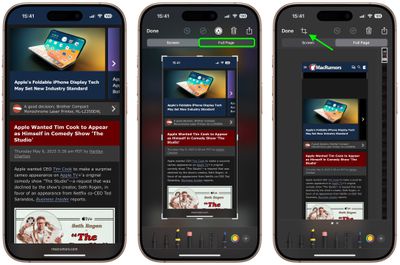
  2. If your device lacks a Home button, press the power button located at the top of the device and the volume up button located on the right of the device at the same time to take a screenshot. Otherwise, press the Home button and the Sleep/Wake button simultaneously to capture a screenshot.
  3. A preview of the screenshot will pop up in the lower left of the display. Tap it to open up the Instant Markup interface. You'll have about five seconds before it disappears.
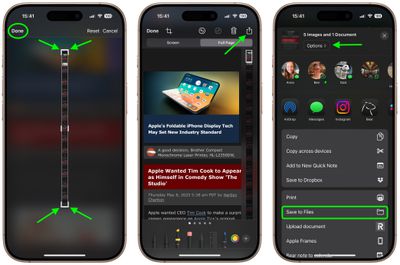
  4. Tap the Full Page tab in the upper right corner of the Markup interface, then tap the Crop icon at the top.
    safari

  5. Use the frame around the webpage to select what to capture by dragging the corners with your finger, then tap Done.
  6. Tap the Share sheet icon (the square with an arrow pointing out) to bring up a panel of share options and actions.
  7. From here, you can either share the captured webpage as a PDF document using the top two rows of icons, or save it somewhere (Save to Files, for example) using the Action menu options below. You can also use the Options button to name the file.
    safari

Note that you can always use the Markup tools to edit your PDF before saving or sharing it.

Tag: Safari

Top Rated Comments

Hank001 Avatar
10 months ago

('https://www.geekwebguides.com/how-to/turn-long-webpage-pdf-single-iphone-screenshot/')

... press the power button located at the top of the device and the volume up button located on the right...
Actually they moved the power button from the top to the right side...just the other day. And the volume buttons have always been on the left side.
Score: 11 Votes (Like | Disagree)
ignatius345 Avatar
10 months ago
Love this feature. As insane as the thumbnail looks, the resulting document is very easy to read on mobile. I do wish News supported the same thing.
Score: 6 Votes (Like | Disagree)
It’s always something Avatar
10 months ago

Now, if we can only get a save as photo option. If you’re sending someone a screenshot in a text, you don’t want to send them a PDF. It’s not a job application.
You can do this two ways with the full page: the Done menu gives you the choice to save the full page screenshot to Photos (from where you can then share it). Or, in the Share menu, tap Options and choose Single Image before sending it in a text.
Score: 4 Votes (Like | Disagree)
russell_314 Avatar
10 months ago
Now, if we can only get a save as photo option. If you’re sending someone a screenshot in a text, you don’t want to send them a PDF. It’s not a job application.
Score: 4 Votes (Like | Disagree)
cateye Avatar
10 months ago
This is one of those weird little features that I was like, "but why, tho?" when it debuted, and then I ended up using it all the time. It's super handy.
Score: 4 Votes (Like | Disagree)
sza Avatar
10 months ago
This feature is incompatible with some websites due to intentional design choices that prevent its functionality.
Score: 3 Votes (Like | Disagree)

Popular Stories

Apple Logo Zoomed

Tim Cook Teases Plans for Apple's Upcoming 50th Anniversary

Thursday February 5, 2026 12:54 pm PST by
Apple turns 50 this year, and its CEO Tim Cook has promised to celebrate the milestone. The big day falls on April 1, 2026. "I've been unusually reflective lately about Apple because we have been working on what do we do to mark this moment," Cook told employees today, according to Bloomberg's Mark Gurman. "When you really stop and pause and think about the last 50 years, it makes your heart ...
iOS 26

iOS 26.3 and iOS 26.4 Will Add These New Features to Your iPhone

Tuesday February 3, 2026 7:47 am PST by
While the iOS 26.3 Release Candidate is now available ahead of a public release, the first iOS 26.4 beta is likely still at least a week away. Following beta testing, iOS 26.4 will likely be released to the general public in March or April. Below, we have recapped known or rumored iOS 26.3 and iOS 26.4 features so far. iOS 26.3 iPhone to Android Transfer Tool iOS 26.3 makes it easier...
imac video apple feature

Apple Makes Its Second-Biggest Acquisition Ever

Tuesday February 3, 2026 12:45 pm PST by
Apple recently acquired Israeli startup Q.ai for close to $2 billion, according to Financial Times sources. That would make this Apple's second-biggest acquisition ever, after it paid $3 billion for the popular headphone maker Beats in 2014. This is also the largest known Apple acquisition since the company purchased Intel's smartphone modem business and patents for $1 billion in 2019....
wwdc sans text feature

Apple Rumored to Announce New Product on February 19

Thursday February 5, 2026 12:22 pm PST by
Apple plans to announce the iPhone 17e on Thursday, February 19, according to Macwelt, the German equivalent of Macworld. The report, citing industry sources, is available in English on Macworld. Apple announced the iPhone 16e on Wednesday, February 19 last year, so the iPhone 17e would be unveiled exactly one year later if this rumor is accurate. It is quite uncommon for Apple to unveil...
Finder Siri Feature

Why Apple's iOS 26.4 Siri Upgrade Will Be Bigger Than Originally Promised

Friday February 6, 2026 3:06 pm PST by
In the iOS 26.4 update that's coming this spring, Apple will introduce a new version of Siri that's going to overhaul how we interact with the personal assistant and what it's able to do. The iOS 26.4 version of Siri won't work like ChatGPT or Claude, but it will rely on large language models (LLMs) and has been updated from the ground up. Upgraded Architecture The next-generation...