Turn a Long Webpage into a PDF with a Single iPhone Screenshot - MacRumors
Skip to Content

Turn a Long Webpage into a PDF with a Single iPhone Screenshot

by

In iOS and iPadOS, Apple includes a built-in screenshot feature that also provides you with the ability to capture an entire webpage on your iPhone or iPad that you can then save or share with someone as a PDF document.

safari macos icon banner
By converting full‑page screenshots into PDFs directly within Safari, you can preserve the exact layout and content of lengthy articles, receipts, or social media threads in a single, shareable file. Using the feature also eliminates the need to stitch together multiple images or rely on third‑party apps, plus the text remains searchable and any images stay crisp.

Here's how the feature works.

  1. Launch Safari and navigate to the webpage that you wish to capture.
  2. If your device lacks a Home button, press the power button located at the top of the device and the volume up button located on the right of the device at the same time to take a screenshot. Otherwise, press the Home button and the Sleep/Wake button simultaneously to capture a screenshot.
  3. A preview of the screenshot will pop up in the lower left of the display. Tap it to open up the Instant Markup interface. You'll have about five seconds before it disappears.
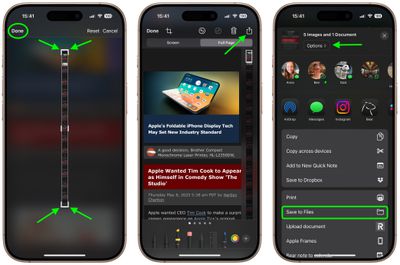
  4. Tap the Full Page tab in the upper right corner of the Markup interface, then tap the Crop icon at the top.
    safari

  5. Use the frame around the webpage to select what to capture by dragging the corners with your finger, then tap Done.
  6. Tap the Share sheet icon (the square with an arrow pointing out) to bring up a panel of share options and actions.
  7. From here, you can either share the captured webpage as a PDF document using the top two rows of icons, or save it somewhere (Save to Files, for example) using the Action menu options below. You can also use the Options button to name the file.

    safari

Note that you can always use the Markup tools to edit your PDF before saving or sharing it.

Tag: Safari

Top Rated Comments

19 months ago

... press the power button located at the top of the device and the volume up button located on the right...
Actually they moved the power button from the top to the right side...just the other day. And the volume buttons have always been on the left side.
Score: 11 Votes (Like | Disagree)
19 months ago
Love this feature. As insane as the thumbnail looks, the resulting document is very easy to read on mobile. I do wish News supported the same thing.
Score: 6 Votes (Like | Disagree)
It’s always something Avatar
19 months ago

Now, if we can only get a save as photo option. If you’re sending someone a screenshot in a text, you don’t want to send them a PDF. It’s not a job application.
You can do this two ways with the full page: the Done menu gives you the choice to save the full page screenshot to Photos (from where you can then share it). Or, in the Share menu, tap Options and choose Single Image before sending it in a text.
Score: 4 Votes (Like | Disagree)
cateye Avatar
19 months ago
This is one of those weird little features that I was like, "but why, tho?" when it debuted, and then I ended up using it all the time. It's super handy.
Score: 4 Votes (Like | Disagree)
russell_314 Avatar
19 months ago
Now, if we can only get a save as photo option. If you’re sending someone a screenshot in a text, you don’t want to send them a PDF. It’s not a job application.
Score: 4 Votes (Like | Disagree)
russell_314 Avatar
19 months ago

I'm just here to say that I love those small iOS and macOS tip posts!
Absolutely! I learned something from this thread
Score: 3 Votes (Like | Disagree)

Popular Stories

Switch to Safari

Apple Explains Why Chrome Users Should 'Switch to Safari'

Tuesday October 13, 2026 5:29 am PDT by
Apple has launched a new "Switch to Safari" marketing campaign that encourages Chrome users to switch to Safari as their web browser of choice on the Mac. "Safari is a more powerful and private browser than Chrome," says Apple. Apple has a new "Switch to Safari" page on its website that outlines more than 10 reasons that Chrome users should switch to Safari, including faster performance...
iPhone Duo Trio

Here's What Apple's Apps Look Like on the iPhone Duo

Tuesday October 20, 2026 11:12 am PDT by
With just three days to go until the iPhone Duo is released, Apple is getting ready for the launch. Behind the scenes, the App Store now has screenshots of Apple's built-in apps running on the Duo. We've seen some apps in marketing materials, but images of the ones we haven't seen give us an idea of what it will be like using the iPhone Duo day to day. Many apps are shown in landscape...
Apple Creator Studio iWork suite

Apple Pulls Keynote, Pages and Numbers From App Store [Update: Back]

Thursday October 22, 2026 11:01 am PDT by
Apple has temporarily removed Keynote, Pages, and Numbers from the App Store, just after releasing an update that added iPhone Duo support and a new Intelligent Assistant. It is not clear if the apps were removed intentionally, or if it is a bug. Apple has not said when the apps will be reinstated, but if it was in error, they should return soon. Update: The Mac versions are back without...
Latest Stories
iPhone Duo Launch Begins as First Orders Reach Customers
5 hours ago
1Password for Agents Keeps Your Passwords Hidden From AI
6 hours ago
iPhone Duo 24 Hours Later: Your Questions Answered
6 hours ago
Apple's iWork Apps Get 'Intelligent Assistant' and iPhone Duo Support
7 hours ago
Apple is Apparently Considering a Slightly Larger iPhone Duo
7 hours ago
Giant iPhone Duo Displays Coming to Four Apple Stores
8 hours ago
Apple Pulls Keynote, Pages and Numbers From App Store [Update: Back]
9 hours ago
Apple Updates More Apps With iPhone Duo Support
10 hours ago
Apple Will Label Apps 'Made for iPhone Duo' in App Store
13 hours ago
Amazon Takes $49 Off iPad With Prices Starting at $399.99
13 hours ago
F1 on Apple TV Now Available in Dolby Atmos
14 hours ago
Apple Reveals More Than 50 Apps That Will Be Updated for iPhone Duo
14 hours ago
Apple Blocks Certificates That Could Help Attackers Fake Websites
15 hours ago
Giant iPhone Duo Installations Spotted at Apple Fifth Avenue
16 hours ago
iPhone Duo 2 Prototypes Include Under-Display Face ID
16 hours ago
Tesla App Gains iPad and iPhone Duo Support
20 hours ago
Apple Reportedly Boosts iPhone Duo Orders by 44%
21 hours ago
Fortnite Returning to Australian App Store After Court Ruling
21 hours ago
Apple Ordered to Open iPhone to Rival App Stores in Australia
21 hours ago
Apple Suppliers Face Hurdles Cutting Circuit Board Emissions
22 hours ago
Things Updated for iPhone Duo With Adaptive Layout
22 hours ago
Simplicity and Siri AI Are HomeView's Killer Features, Apple Says
23 hours ago
iPhone Duo Reviewers Really Miss Face ID
1 day ago
Does the iPhone Duo Run Hot? Here's What Reviews Found
1 day ago
Apple Music's New Look is Now Live on Apple's Website
1 day ago
Anthropic Launches Claude Duet, a Proactive AI Agent
1 day ago
What 32,000 Folds Did to the iPhone Duo's Hinge
1 day ago
iPhone Duo's Hidden FaceTime Camera Takes 'Trash' Photos
1 day ago
iPhone Duo Has 'Edge Light' Feature That Debuted on Macs Last Year
1 day ago
Apple Support App Updated for iPhone Duo's Larger Display
1 day ago