
How to Turn Off FaceTime on iPhone, iPad, and Mac - GeekWebGuides
Skip to Content

How to Turn Off FaceTime on iPhone, iPad, and Mac

by

There's a serious bug affecting FaceTime right now, which lets someone who calls you hear the audio on your iPhone, iPad, or Mac even if you don't answer the call.

There does not appear to be any way to avoid getting these unwanted calls, short of turning off FaceTime. Luckily, it's easy to do.
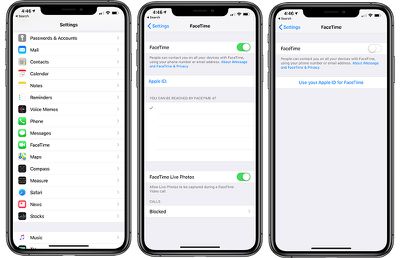
facetimehowtodisable

How to Turn Off FaceTime on Your iPhone and iPad

  1. Open the Settings app.
  2. Scroll down to ‌FaceTime‌.
  3. Click on the toggle next to "‌FaceTime‌."

This will turn off ‌FaceTime‌ on your specific device, but you will need to deactivate ‌FaceTime‌ on all of your iPhones and iPads to avoid unwanted spy calls if you use ‌FaceTime‌ connection methods other than a phone number.

How to Turn Off FaceTime on macOS

  1. Open up the ‌FaceTime‌ app.
  2. Click on "‌FaceTime‌" in the menu bar.
  3. Select "Turn ‌FaceTime‌ Off."

You can also choose "Preferences" and deselect "Enable this account to deactivate ‌FaceTime‌.

With ‌FaceTime‌ disabled, no one will be able to secretly ‌FaceTime‌ call you to listen to your audio. With ‌FaceTime‌ enabled, anyone can exploit a Group FaceTime bug to place a call to you that will allow them to listen to your audio even if you don't accept the ‌FaceTime‌ call.

Top Rated Comments

101 months ago
I'm still on iOS 10. Looks like I'm still enjoying the best iOS version.
Some would stay that would be iOS 6. ;)
Score: 2 Votes (Like | Disagree)
zorinlynx Avatar
101 months ago
The big downside to this is most people will probably turn off FaceTime and never turn it back on, even after the bug is fixed.

I like being able to call people with FaceTime audio, because the sound quality is far better than a cellular call. This may prove less reliable in the future.
Score: 2 Votes (Like | Disagree)
arn Avatar
101 months ago
This doesn’t work between my wife’s iPhone 8 (11.4.1) and my ip7+ (12.1.3) both devices must have to be on iOS 12.
I think that's b/c Group FaceTime was an iOS 12 feature.
Score: 2 Votes (Like | Disagree)
-BigMac- Avatar
101 months ago
How to turn off Facetime.

Click “Turn off Facetime”.

The more you know;)
Score: 2 Votes (Like | Disagree)
AZMecha Avatar
101 months ago
I'm still on iOS 10. Looks like I'm still enjoying the best iOS version.
Not :p:p:p
Score: 1 Votes (Like | Disagree)
101 months ago
[doublepost=1548735503][/doublepost]Of if you get a call from anyone you dont trust, just power off your phone immediately.
Seems like overkill. If someone was actually worried about a FaceTime attack of this kind, easy enough to decline the call and that ends the whole thing right there.
Score: 1 Votes (Like | Disagree)

Popular Stories

iphone duo facetime

iPhone Duo's Hidden FaceTime Camera Takes 'Trash' Photos

Wednesday October 21, 2026 11:36 am PDT by
The iPhone Duo's inner screen has an under-display front camera that's largely hidden from view. It's the first time we've seen an under-display camera on an iPhone, and it turns out there's a reason Apple hasn't used the technology before. Apple said the camera offers 1080p video recording, but didn't mention photo quality. Gizmodo said it's a 4-megapixel camera and described the photos as...
iPhone Duo Trio

Here's What Apple's Apps Look Like on the iPhone Duo

Tuesday October 20, 2026 11:12 am PDT by
With just three days to go until the iPhone Duo is released, Apple is getting ready for the launch. Behind the scenes, the App Store now has screenshots of Apple's built-in apps running on the Duo. We've seen some apps in marketing materials, but images of the ones we haven't seen give us an idea of what it will be like using the iPhone Duo day to day. Many apps are shown in landscape...
Apple Creator Studio iWork suite

Apple Pulls Keynote, Pages and Numbers From App Store [Update: Back]

Thursday October 22, 2026 11:01 am PDT by
Apple has temporarily removed Keynote, Pages, and Numbers from the App Store, just after releasing an update that added iPhone Duo support and a new Intelligent Assistant. It is not clear if the apps were removed intentionally, or if it is a bug. Apple has not said when the apps will be reinstated, but if it was in error, they should return soon. Update: The Mac versions are back without...
Latest Stories
MacBook Neo Helps Apple Outpace Rivals as Market Declines
2 hours ago
Happy 25th Anniversary, iPod
2 hours ago
iPhone Duo Demand Reportedly Exceeds Apple's Expectations
5 hours ago
iPhone Duo Launch Begins as First Orders Reach Customers
11 hours ago
1Password for Agents Keeps Your Passwords Hidden From AI
12 hours ago
iPhone Duo 24 Hours Later: Your Questions Answered
12 hours ago
Apple's iWork Apps Get 'Intelligent Assistant' and iPhone Duo Support
13 hours ago
Apple is Apparently Considering a Slightly Larger iPhone Duo
13 hours ago
Giant iPhone Duo Displays Coming to Four Apple Stores
14 hours ago
Apple Pulls Keynote, Pages and Numbers From App Store [Update: Back]
15 hours ago
Apple Updates More Apps With iPhone Duo Support
16 hours ago
Apple Will Label Apps 'Made for iPhone Duo' in App Store
19 hours ago
Amazon Takes $49 Off iPad With Prices Starting at $399.99
19 hours ago
F1 on Apple TV Now Available in Dolby Atmos
20 hours ago
Apple Reveals More Than 50 Apps That Will Be Updated for iPhone Duo
20 hours ago
Apple Blocks Certificates That Could Help Attackers Fake Websites
22 hours ago
Giant iPhone Duo Installations Spotted at Apple Fifth Avenue
22 hours ago
iPhone Duo 2 Prototypes Include Under-Display Face ID
23 hours ago
Tesla App Gains iPad and iPhone Duo Support
1 day ago
Apple Reportedly Boosts iPhone Duo Orders by 44%
1 day ago
Fortnite Returning to Australian App Store After Court Ruling
1 day ago
Apple Ordered to Open iPhone to Rival App Stores in Australia
1 day ago
Apple Suppliers Face Hurdles Cutting Circuit Board Emissions
1 day ago
Things Updated for iPhone Duo With Adaptive Layout
1 day ago
Simplicity and Siri AI Are HomeView's Killer Features, Apple Says
1 day ago
iPhone Duo Reviewers Really Miss Face ID
1 day ago
Does the iPhone Duo Run Hot? Here's What Reviews Found
1 day ago
Apple Music's New Look is Now Live on Apple's Website
2 days ago
Anthropic Launches Claude Duet, a Proactive AI Agent
2 days ago
What 32,000 Folds Did to the iPhone Duo's Hinge
2 days ago










































