

Apple's Shortcuts app is a great part of iOS because it includes tools that allow you to automate almost any action you can think of. But there is one aspect of it that has often annoyed users, and that's the lack of a setting that turns off notifications.
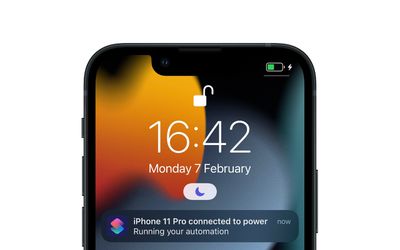
Whenever Shortcuts runs an automation (let's say, disable rotation lock when a particular app is opened) it does so in the background. Therefore it's likely that, from a security perspective, Apple initially felt it was good practice to send you a notification to indicate the action was being carried out. But if you regularly have familiar automations set up, the last thing you want your device to do is notify you every time it runs them.
In iOS 15.3, there was no easy way to disable these notifications. Fortunately, however, Apple has handily added a toggle in the latest iOS 15.4 update (currently in beta) that lets you turn notifications off for individual automations. The following steps show you how it's done.
- Open the Shortcuts app.
- Tap the Automation tab at the bottom of the screen.
- Select the automation for which you want to disable notifications.
- In the Edit Automation screen, toggle off the switch next to Ask Before Running.

- In the prompt that appears, tap Don't Ask.
- Now that Ask Before Running is disabled, you should see a new Notify When Run switch below it. To turn off notifications for this automation, toggle off this Notify When Run toggle.
- Tap Done in the top-right corner of the screen to save your changes.
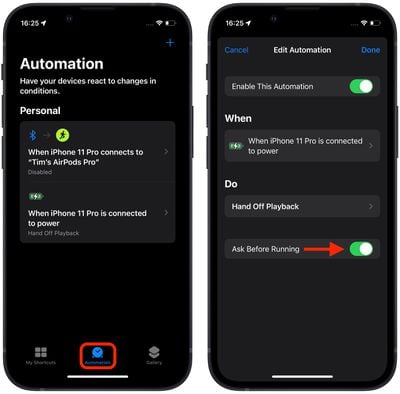
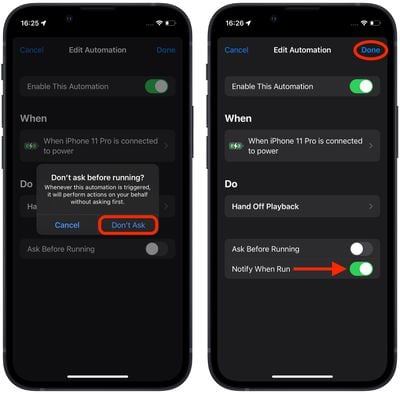
You will no longer receive a notification for the selected automation when it runs. Note that you'll need to manually repeat the above steps for each automation that you don't want to receive notifications for – there is currently no global setting turn off all notifications in Shortcuts.




















![Apple Pulls Keynote, Pages and Numbers From App Store [Update: Back]](https://images.macrumors.com/t/Okb7kitB_gNr6qe5Pex9nQIysD8=/112x112/article-new/2026/01/Apple-Creator-Studio-iWork-suite.jpg)



























