Last year, Apple brought a display feature called True Tone to its flagship iPhone line-up for the first time, following the technology's debut in 2016 with the 9.7-inch iPad Pro.

True Tone works by adjusting the color temperature of a device's screen to match the surrounding ambient light, so that images on the display appear more natural and are less apt to contribute to eyestrain.
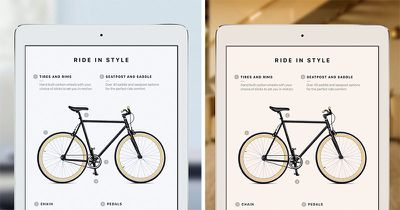
iPhone 8 true tone display
If you stand in a dimly lit room illuminated by a table lamp, for instance, a True Tone display appears warmer and yellower, much like a piece of paper would in the same light. Stand outside on an overcast day, however, and the same display looks cooler and bluer, as would the same piece of paper.

In this article, we'll run through how to quickly enable or disable True Tone from within Control Center as well as via the Settings app. We'll also explain how to tweak your device's color settings to help acclimatize you to True Tone's warmer extremes, which some users find too intense under certain conditions.

Apple Devices With True Tone Displays

  • iPhone X

  • iPhone 8

  • iPhone 8 Plus

  • iPad Pro 12.9-inch (2nd generation)

  • iPad Pro 10.5-inch

  • iPad Pro (9.7-inch)

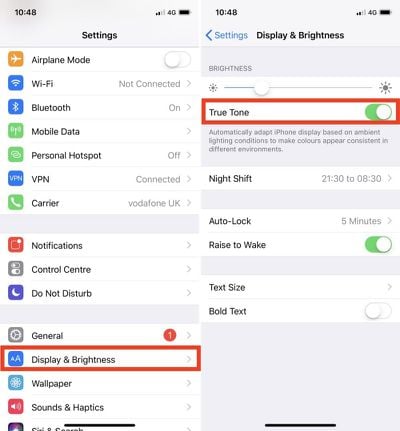
How to Control True Tone From iOS Settings

  1. Launch the Settings app on your iOS device.

  2. Tap Display & Brightness.

  3. Toggle the True Tone switch on or off.
    True Tone Settings

How to Control True Tone From Control Center

  1. Launch the Control Center on your iOS device in the following manner: On iPad, double-tap the Home button; on iPhone 8 or earlier, swipe up from the bottom of the screen; or on iPhone X, swipe down from the upper right "ear".

  2. Depending on your device, either firmly press (for 3D Touch) or long press on the Brightness slider.

  3. Tap the True Tone button to turn it on or off.
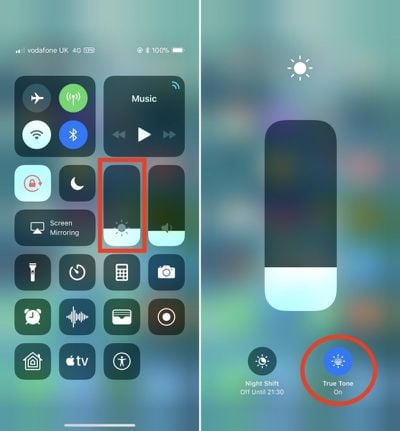
    True Tone Control Center

How to Cool the Warm End of the True Tone Spectrum

Some users dislike True Tone because under certain conditions it can make the screen seem too warm or yellow to them. If that sounds like your experience, it's probably worth trying Night Shift set at a low color temperature level instead (Settings -> Display & Brightness -> Night Shift). But if you want to give True Tone one more go, this time try adjusting the display tint to make it look more natural under low light conditions.

  1. Enable True Tone on your iOS device using one of the methods described above.

  2. Launch the Settings app.

  3. Tap General.

  4. Tap Accessibility.

  5. Tap Display Accommodations.

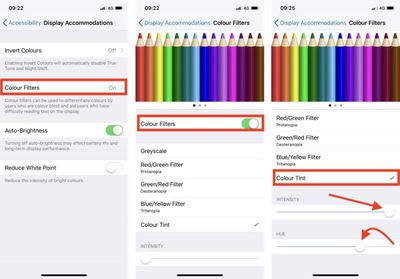
  6. Switch on the Color Filters toggle.
    true tone color filter adjust 1

  7. Tap Color Tint to check it.

  8. Drag the Intensity and Hue sliders all the way to the right.

  9. Now, gradually drag the Hue slider leftwards so that the display turns a purplish color (just past red and towards blue).

  10. Now drag the Intensity slider all the way to the left again. With a little luck, you have reduced the warmer screen tone with a more natural look that's to your liking. If it still doesn't look right, carry out the previous two steps and try leaving the Hue slider at a slightly deeper purple tint (closer to blue than red).
Some will argue that messing with Color Filters defeats the purpose of True Tone. But tweaking the screen tint in this way can help accustom you to True Tone's warmer cast if you gradually dial down the color adjustment over time.

Just bear in mind that it may cause your True Tone display to look overly blue in an environment that normally elicits a bluish cast. Also, remember that you'll need to turn off Color Filters separately if you end up disabling True Tone, otherwise your screen will almost certainly look off color.


Related Roundup: iPad Pro
Buyer's Guide: iPad Pro (Buy Now)
Related Forums: iOS 11, iPhone

Top Rated Comments

TL24 Avatar
104 months ago
True Tone was excellent on my 8 Plus but not on my X. Made the screen too yellow for my taste regardless of lighting so I decided to turn it off.
Score: 4 Votes (Like | Disagree)
Nozuka Avatar
104 months ago
sadly had to turn it off on my iphone. i keep switching between different devices through out the day and then it's just weird to have a different color profile on one device...
Score: 4 Votes (Like | Disagree)
BMcCoy Avatar
104 months ago
It’s an interesting feature, certainly. But I’m still not sure I understand it fully. I go between switching it off and on on my iPad, and whilst it makes a visible difference, I’m undecided if I prefer it or not.

There would be an easy counter argument that a quality display should maintain colour accuracy, despite the environmental colour light falling on the display, so the colour adjusts slightly in the opposite direction to the ambient light, in order to maintain a consistent visual colour appearance on the display.

So that would be opposite to how TruTone works.
And might make eye-strain worse.
So probably the way they have it is correct for functional use, even if it is incorrect for colour accuracy.
Score: 2 Votes (Like | Disagree)
dumoore Avatar
104 months ago
If Apple was truly concerned with eye strain they wouldn’t be doing glossy screens standard on the macs. Remember when they were an option?

I get eye fatigue after 2 hours on a glossy screen, can work indefinitely on a glossy screen.
So you can work for 2 hours on a glossy screen but also you can work indefinitely on a glossy screen...
Score: 1 Votes (Like | Disagree)
Marconelly Avatar
104 months ago
Here is the best approach to True Tone. Leave it on. Don’t monkey around with settings like this article suggests, you’re defeating the point.

Leave it on for 2 weeks on every device that’s capable. Your eyes adjust to white balance remarkably well if you let them. Just pretend like True Tone doesn’t exist and this is simply how the screen looks.

After 2 weeks, every other display will now look too blue and hard to look at.
That entirely depends on how much you use each screen - because your brain keeps compensating for what it knows is supposed to be white. The only thing that's really jarring is when none of your screens look similar, which is ironically the case if I keep true tone enabled on iphone x, ipad pro and use Macbook without it, as it doesn't have it.
Score: 1 Votes (Like | Disagree)

Popular Stories

wwdc sans text feature

Apple Rumored to Announce New Product on February 19

Thursday February 5, 2026 12:22 pm PST by
Apple plans to announce the iPhone 17e on Thursday, February 19, according to Macwelt, the German equivalent of Macworld. The report, citing industry sources, is available in English on Macworld. Apple announced the iPhone 16e on Wednesday, February 19 last year, so the iPhone 17e would be unveiled exactly one year later if this rumor is accurate. It is quite uncommon for Apple to unveil...
Apple Logo Zoomed

Tim Cook Teases Plans for Apple's Upcoming 50th Anniversary

Thursday February 5, 2026 12:54 pm PST by
Apple turns 50 this year, and its CEO Tim Cook has promised to celebrate the milestone. The big day falls on April 1, 2026. "I've been unusually reflective lately about Apple because we have been working on what do we do to mark this moment," Cook told employees today, according to Bloomberg's Mark Gurman. "When you really stop and pause and think about the last 50 years, it makes your heart ...
Finder Siri Feature

Why Apple's iOS 26.4 Siri Upgrade Will Be Bigger Than Originally Promised

Friday February 6, 2026 3:06 pm PST by
In the iOS 26.4 update that's coming this spring, Apple will introduce a new version of Siri that's going to overhaul how we interact with the personal assistant and what it's able to do. The iOS 26.4 version of Siri won't work like ChatGPT or Claude, but it will rely on large language models (LLMs) and has been updated from the ground up. Upgraded Architecture The next-generation...
maxresdefault

Apple Shows Off a Key Reason to Upgrade to the iPhone 17

Saturday February 7, 2026 9:26 am PST by
Apple today shared an ad that shows how the upgraded Center Stage front camera on the latest iPhones improves the process of taking a group selfie. "Watch how the new front facing camera on iPhone 17 Pro takes group selfies that automatically expand and rotate as more people come into frame," says Apple. While the ad is focused on the iPhone 17 Pro and iPhone 17 Pro Max, the regular iPhone...
iOS 26

iOS 26.3 and iOS 26.4 Will Add These New Features to Your iPhone

Tuesday February 3, 2026 7:47 am PST by
While the iOS 26.3 Release Candidate is now available ahead of a public release, the first iOS 26.4 beta is likely still at least a week away. Following beta testing, iOS 26.4 will likely be released to the general public in March or April. Below, we have recapped known or rumored iOS 26.3 and iOS 26.4 features so far. iOS 26.3 iPhone to Android Transfer Tool iOS 26.3 makes it easier...