
Twitter in February 2023 announced that text message two-factor authentication (2FA) is set to become a premium feature for Twitter Blue accounts. Here's why the company's logic behind the decision doesn't make any sense from a security perspective, and why you don't need the feature anyway.

Twitter Feature
Twitter has said that it will soon be removing text message-based 2FA from non-paying accounts and turning it into a feature that will only be available to subscribers of its premium Twitter Blue offering, which costs $8 per month. This means that any users who don't pay for a Blue subscription and rely on Twitter to send them an SMS text message code to complete the login process will have the feature turned off and removed from their accounts by March 20. Their account password will become the only barrier to access.

Aside from purely financial reasons (presumably it costs Twitter to send you a text), making text-based 2FA a paid-for perk is an odd decision on Twitter's part.

Twitter has justified the policy change by saying, rightly, that SMS 2FA can be abused by bad actors. And there have indeed been "SIM swap attacks" where hackers convinced cell providers to assign a victim's phone number to a device they control, and by taking control of a person's phone number, the hacker can impersonate the victim, as well as receive text message codes to their account. But making SMS 2FA available only to Twitter Blue subscribers simply makes them more susceptible to attacks of this nature.

Twitter says that it is "committed to keeping people safe and secure on Twitter," and it's true that SMS 2FA is better than no 2FA at all, but its policy does nothing to encourage users to switch to a more secure form of 2FA – perhaps because doing so means paying Twitter absolutely nothing.

Switching to App-Based 2FA is the Solution

Rather than rely on SMS-based 2FA, Twitter users should be using a mobile authentication app, like Duo, Authy, or Google Authenticator, or the password authenticator built-in to iOS. App-based 2FA is a far more secure alternative, as it never leaves your device and doesn't involve you receiving a code sent to your phone via text message.

To use this method to secure your Twitter account, first ensure that you have your authenticator app of choice installed on your iPhone. Then follow these steps:

  1. Launch the Twitter app or log in to the Twitter website.
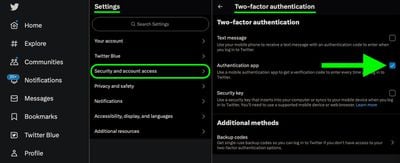
  2. Go to your account's Settings and privacy, found in the Settings and Support dropdown menu.
  3. Select Security and account access -> Security.
  4. Select Two-factor authentication.
  5. Check the mark next to Authentication app.
  6. Follow the prompts, entering your account password when requested.
twitter 2fa

When you've completed the above steps, you should be able to log in to your Twitter account using your password, accompanied by a code generated by your authenticator app. Just be sure to keep a backup of your codes – if you don't have one and you lose your phone, you'll find it a lot harder to access your 2FA accounts.


Tag: Twitter

Top Rated Comments

contacos Avatar
39 months ago
I kept mine secure by deleting it. You should try it sometime. It’s also great for one’s mental health (sounds more serious than it is). I used to engage with strangers, which always put me in a bad mood afterwards. Now that I deleted it, I am like why did I care what strangers were thinking! So silly
Score: 36 Votes (Like | Disagree)
senttoschool Avatar
39 months ago

I kept mine secure by deleting it. You should try it sometime. It’s also great for one’s mental health (sounds more serious than it is). I used to engage with strangers, which always put me in a bad mood afterwards. Now that I deleted it, I am like why did I care what strangers were thinking! So silly
Now you spend that time engaging with strangers on Macrumors.
Score: 18 Votes (Like | Disagree)
marcinsf Avatar
39 months ago
much easier solution - don't use twitter.
It's free and doesn't cost anything to not use twitter :)
Score: 11 Votes (Like | Disagree)
judgeFire Avatar
39 months ago
In recent OS releases, the Settings > Passwords options include setting up Keychain based 2FA without the need for a third party app. It can also pop up the code when required, if it senses the field in question is for that. The SMS autofill is more consistent, tho
Score: 10 Votes (Like | Disagree)
adammusic Avatar
39 months ago
I feel like nobody knows about iOS built in 2fa.
Score: 9 Votes (Like | Disagree)
andrewxgx Avatar
39 months ago
the fact that twitter is looking at cutting cost of sending auth SMSes is telling you a lot of how bad things are up there
they basically look for spare change between couch cushions
Score: 7 Votes (Like | Disagree)

Popular Stories

Apple Logo Zoomed

Tim Cook Teases Plans for Apple's Upcoming 50th Anniversary

Thursday February 5, 2026 12:54 pm PST by
Apple turns 50 this year, and its CEO Tim Cook has promised to celebrate the milestone. The big day falls on April 1, 2026. "I've been unusually reflective lately about Apple because we have been working on what do we do to mark this moment," Cook told employees today, according to Bloomberg's Mark Gurman. "When you really stop and pause and think about the last 50 years, it makes your heart ...
wwdc sans text feature

Apple Rumored to Announce New Product on February 19

Thursday February 5, 2026 12:22 pm PST by
Apple plans to announce the iPhone 17e on Thursday, February 19, according to Macwelt, the German equivalent of Macworld. The report, citing industry sources, is available in English on Macworld. Apple announced the iPhone 16e on Wednesday, February 19 last year, so the iPhone 17e would be unveiled exactly one year later if this rumor is accurate. It is quite uncommon for Apple to unveil...
Finder Siri Feature

Why Apple's iOS 26.4 Siri Upgrade Will Be Bigger Than Originally Promised

Friday February 6, 2026 3:06 pm PST by
In the iOS 26.4 update that's coming this spring, Apple will introduce a new version of Siri that's going to overhaul how we interact with the personal assistant and what it's able to do. The iOS 26.4 version of Siri won't work like ChatGPT or Claude, but it will rely on large language models (LLMs) and has been updated from the ground up. Upgraded Architecture The next-generation...
iOS 26

iOS 26.3 and iOS 26.4 Will Add These New Features to Your iPhone

Tuesday February 3, 2026 7:47 am PST by
While the iOS 26.3 Release Candidate is now available ahead of a public release, the first iOS 26.4 beta is likely still at least a week away. Following beta testing, iOS 26.4 will likely be released to the general public in March or April. Below, we have recapped known or rumored iOS 26.3 and iOS 26.4 features so far. iOS 26.3 iPhone to Android Transfer Tool iOS 26.3 makes it easier...
iphone 17 pro dark blue 1

iPhone 18 Pro Max Rumored to Deliver Next-Level Battery Life

Friday February 6, 2026 5:14 am PST by
The iPhone 18 Pro Max will feature a bigger battery for continued best-in-class battery life, according to a known Weibo leaker. Citing supply chain information, the Weibo user known as "Digital Chat Station" said that the iPhone 18 Pro Max will have a battery capacity of 5,100 to 5,200 mAh. Combined with the efficiency improvements of the A20 Pro chip, made with TSMC's 2nm process, the...















