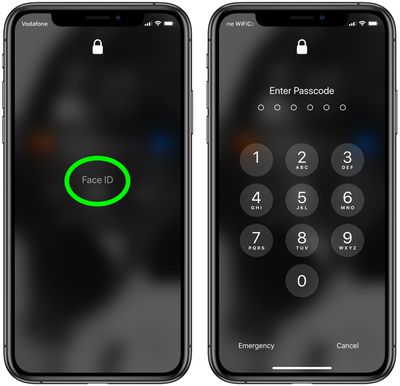
In the current health climate, many people are wearing masks that cover their faces when going outside, visiting stores, and other tasks, and Apple's iPhones that use Face ID do not unlock when the user's face is obscured by a mask.
iphone11faceid
With this in mind, in iOS 13.5, Apple has streamlined the speed with which the passcode pops up when a mask on the face is detected, making it easier to get into an iPhone with a passcode when ‌Face ID‌ fails.

So when you swipe upwards on the Lock screen to unlock the ‌‌iPhone‌‌, this action immediately brings up the passcode interface if your face is covered by a mask.

If you haven't updated to iOS 13.5 yet (and you really should) here's the quickest way to get into your ‌iPhone‌ or iPad Pro when wearing a face mask.

Quickly Get to Passcode Screen

If you're using a version of iOS that's earlier than iOS 13.5, you can actually get to the passcode screen faster when you swipe up to unlock your ‌iPhone‌.

passcode lock
Tap the ‌Face ID‌ text in the center of the screen and you won't have to wait for it to scan your face and fail – you'll immediately be prompted for the passcode instead.

Other than updating your device's software, the only other way to use an ‌iPhone‌ with a mask is simply to turn off ‌Face ID‌ altogether and use a passcode instead. The following steps show you how to disable ‌Face ID‌ for just unlocking your ‌iPhone‌.

How to Turn Off Face ID for Unlocking Only

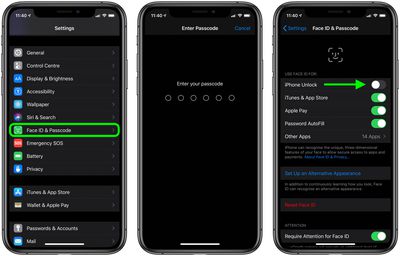
  1. Launch the Settings app on your ‌iPhone‌.
  2. Tap Face ID & Passcode.
  3. Enter your passcode when prompted.
  4. Under Use Face ID For, switch off the toggle next to iPhone Unlock, and any of the other use cases listed that you don't want to use ‌Face ID‌ with.
    face id off

After carrying out the steps above, you'll be able to unlock your ‌iPhone‌ immediately using your passcode.

Top Rated Comments

manhattanboy Avatar
75 months ago
My secret is to just grab the face mask and pull it down. Works every time.
Score: 13 Votes (Like | Disagree)
gutefahrt Avatar
75 months ago
This isn’t just a “current health climate” for many Apple customers. I, and many coworkers, wear surgical masks for many hours every work day. We are hanging onto our 8+ iPhones and will not upgrade until TouchID is reintroduced. Unlocking, passwords, and ApplePay use make FaceID a non-starter for many of us. I hope Apple is listening to this market potential.
Score: 7 Votes (Like | Disagree)
WilliamG Avatar
75 months ago
Good tip on tapping the words “Face ID.” I had no idea you could do that.
Score: 7 Votes (Like | Disagree)
CarlJ Avatar
75 months ago
How to Quickly Unlock Your iPhone When Wearing a Face Mask

Put your thumb on the Home button.

(Since the title didn’t specify which iPhone - this method likely works on a larger percentage of iPhones in use than the method specified in the article.)

Also, the article assumes/demonstrates a 6-digit numeric passcode. If you’re using TouchID or FaceID, your alternate password really ought to be 15+ alphanumeric characters - 6 digits is too simple.
Score: 6 Votes (Like | Disagree)
justperry Avatar
75 months ago
Simple if you have a four digit password, mine is 15 characters long, similar to " n$63%24*57#(35G "...:eek:
Score: 6 Votes (Like | Disagree)
arnoz Avatar
75 months ago

My secret is to just grab the face mask and pull it down. Works every time.
I just cut holes in the mask that I re-use everyday. Flawless logic.
Score: 6 Votes (Like | Disagree)

Popular Stories

Apple Logo Zoomed

Tim Cook Teases Plans for Apple's Upcoming 50th Anniversary

Thursday February 5, 2026 12:54 pm PST by
Apple turns 50 this year, and its CEO Tim Cook has promised to celebrate the milestone. The big day falls on April 1, 2026. "I've been unusually reflective lately about Apple because we have been working on what do we do to mark this moment," Cook told employees today, according to Bloomberg's Mark Gurman. "When you really stop and pause and think about the last 50 years, it makes your heart ...
iOS 26

iOS 26.3 and iOS 26.4 Will Add These New Features to Your iPhone

Tuesday February 3, 2026 7:47 am PST by
While the iOS 26.3 Release Candidate is now available ahead of a public release, the first iOS 26.4 beta is likely still at least a week away. Following beta testing, iOS 26.4 will likely be released to the general public in March or April. Below, we have recapped known or rumored iOS 26.3 and iOS 26.4 features so far. iOS 26.3 iPhone to Android Transfer Tool iOS 26.3 makes it easier...
imac video apple feature

Apple Makes Its Second-Biggest Acquisition Ever

Tuesday February 3, 2026 12:45 pm PST by
Apple recently acquired Israeli startup Q.ai for close to $2 billion, according to Financial Times sources. That would make this Apple's second-biggest acquisition ever, after it paid $3 billion for the popular headphone maker Beats in 2014. This is also the largest known Apple acquisition since the company purchased Intel's smartphone modem business and patents for $1 billion in 2019....
wwdc sans text feature

Apple Rumored to Announce New Product on February 19

Thursday February 5, 2026 12:22 pm PST by
Apple plans to announce the iPhone 17e on Thursday, February 19, according to Macwelt, the German equivalent of Macworld. The report, citing industry sources, is available in English on Macworld. Apple announced the iPhone 16e on Wednesday, February 19 last year, so the iPhone 17e would be unveiled exactly one year later if this rumor is accurate. It is quite uncommon for Apple to unveil...
Finder Siri Feature

Why Apple's iOS 26.4 Siri Upgrade Will Be Bigger Than Originally Promised

Friday February 6, 2026 3:06 pm PST by
In the iOS 26.4 update that's coming this spring, Apple will introduce a new version of Siri that's going to overhaul how we interact with the personal assistant and what it's able to do. The iOS 26.4 version of Siri won't work like ChatGPT or Claude, but it will rely on large language models (LLMs) and has been updated from the ground up. Upgraded Architecture The next-generation...