
watchOS is the operating system that runs on the Apple Watch, powering its fitness tracking capabilities, apps, communication features, time-keeping abilities, and more. Apple plans to push regular updates to fix watchOS bugs, refine performance, and introduce new features, and the release of watchOS 2 alongside iOS 9 later today is a major uprade for the platform. (Update: Apple has delayed the public release of watchOS 2.)
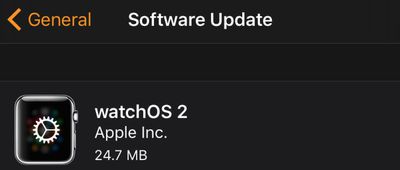
watchos_2_install
watchOS updates are installed in a unique way that differs from how we install iPhone and Mac updates, so we've crafted a quick tutorial to remind users how to get the latest version of watchOS on their Apple Watches so they're ready for watchOS 2.

Before You Start

Before you try to download and install the new version of watchOS, make sure of the following:

  1. Your iPhone has been updated to iOS 9.
  2. Your iPhone and Apple Watch are within range of each other.
  3. Your Apple Watch has at least a 50 percent charge.
  4. Your Apple Watch is connected to its charger.
How to install software on apple watch 2
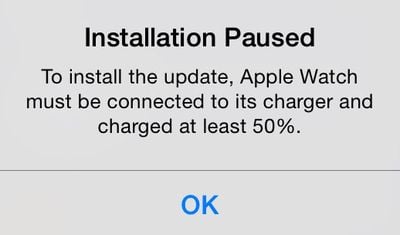
The last two requirements are important. You will be able to download the new version of watchOS without a 50 percent charge or Apple Watch resting on its charger, but you won't be able to install it. During the installation step, you will instead see a message that the installation is paused and won't continue until Apple Watch is connected to the charger with at least a 50 percent charge.

Downloading and Installing the Update

  1. Open the Apple Watch app on your iPhone and select the My Watch tab if necessary.
  2. Tap General, then tap Software Update.
  3. Tap Download and Install to begin the process.
  4. Enter your four-digit passcode on Apple Watch when prompted.
  5. The Apple logo and progress bar will appear when the software is installing. When finished, Apple Watch will restart.

If Something Goes Wrong
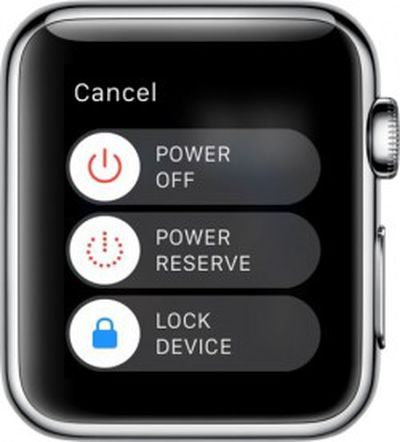
Apple Watch Power OffIf, for some reason, the download freezes up or you can't get the software to install on Apple Watch, you can try restarting the device.

Restarting

  1. Hold down the Side button until the Power Off slider appears.
  2. Slide the bar to shut off Apple Watch.
  3. Hold down the Side button until the Apple logo appears.
  4. Wait for Apple Watch to restart.
  5. Enter your passcode when prompted.

Hard Reset
If powering down Apple Watch does not work, you can also try a hard reset. This forces the device to shut off. It usually takes a bit longer to restart Apple Watch when you perform a hard reset.

  1. Hold both the Side button and Digital Crown down at the same time.
  2. The screen will go blank, and then the Apple logo will appear.
  3. Wait for Apple Watch to restart.
  4. Enter your passcode when prompted.

Apple is rapidly iterating on watchOS, so don't be surprised if we continue to see frequent updates. watchOS arrives just five months after the Apple Watch's debut and brings a host of new features including native third-party apps, so most Apple Watch owners will want to upgrade as soon as possible and begin exploring what's new.


Related Roundup: Apple Watch 11
Buyer's Guide: Apple Watch (Neutral)

Top Rated Comments

WarHeadz Avatar
136 months ago
Thanks for this great article. Will start charging my AW now to be ready . I've ordered pizza and Coca Cola!
You're celebrating a software update with pizza and coke? Hope you don't use Windows 10 or you'd be obese by now.

Edit: Ouch, bet you wish you didn't order that pizza so soon. No software update for the Watch today. :(
Score: 5 Votes (Like | Disagree)
drumcat Avatar
136 months ago
Thanks for this great article. Will start charging my AW now to be ready . I've ordered pizza and Coca Cola!
How's that pizza tasting with the delay? :)
Score: 1 Votes (Like | Disagree)
Michaelgtrusa Avatar
136 months ago
These are some nice tips.
Score: 1 Votes (Like | Disagree)

Popular Stories

Apple Logo Zoomed

Tim Cook Teases Plans for Apple's Upcoming 50th Anniversary

Thursday February 5, 2026 12:54 pm PST by
Apple turns 50 this year, and its CEO Tim Cook has promised to celebrate the milestone. The big day falls on April 1, 2026. "I've been unusually reflective lately about Apple because we have been working on what do we do to mark this moment," Cook told employees today, according to Bloomberg's Mark Gurman. "When you really stop and pause and think about the last 50 years, it makes your heart ...
wwdc sans text feature

Apple Rumored to Announce New Product on February 19

Thursday February 5, 2026 12:22 pm PST by
Apple plans to announce the iPhone 17e on Thursday, February 19, according to Macwelt, the German equivalent of Macworld. The report, citing industry sources, is available in English on Macworld. Apple announced the iPhone 16e on Wednesday, February 19 last year, so the iPhone 17e would be unveiled exactly one year later if this rumor is accurate. It is quite uncommon for Apple to unveil...
Finder Siri Feature

Why Apple's iOS 26.4 Siri Upgrade Will Be Bigger Than Originally Promised

Friday February 6, 2026 3:06 pm PST by
In the iOS 26.4 update that's coming this spring, Apple will introduce a new version of Siri that's going to overhaul how we interact with the personal assistant and what it's able to do. The iOS 26.4 version of Siri won't work like ChatGPT or Claude, but it will rely on large language models (LLMs) and has been updated from the ground up. Upgraded Architecture The next-generation...
iOS 26

iOS 26.3 and iOS 26.4 Will Add These New Features to Your iPhone

Tuesday February 3, 2026 7:47 am PST by
While the iOS 26.3 Release Candidate is now available ahead of a public release, the first iOS 26.4 beta is likely still at least a week away. Following beta testing, iOS 26.4 will likely be released to the general public in March or April. Below, we have recapped known or rumored iOS 26.3 and iOS 26.4 features so far. iOS 26.3 iPhone to Android Transfer Tool iOS 26.3 makes it easier...
iphone 17 pro dark blue 1

iPhone 18 Pro Max Rumored to Deliver Next-Level Battery Life

Friday February 6, 2026 5:14 am PST by
The iPhone 18 Pro Max will feature a bigger battery for continued best-in-class battery life, according to a known Weibo leaker. Citing supply chain information, the Weibo user known as "Digital Chat Station" said that the iPhone 18 Pro Max will have a battery capacity of 5,100 to 5,200 mAh. Combined with the efficiency improvements of the A20 Pro chip, made with TSMC's 2nm process, the...















