How to Use Apple TV's iPhone-Based Color Balance Feature - MacRumors
Skip to Content

How to Use Apple TV's iPhone-Based Color Balance Feature

by

In April, Apple introduced an iPhone-based color balance feature for Apple TV that can improve the overall picture quality of your television set when you're using Apple's set-top box.
apple tv color balance 1
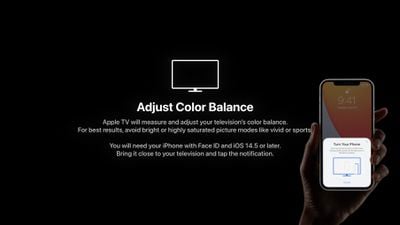
Using the iPhone's light sensor, the feature compares the color balance to industry-standard specifications, and automatically adjusts your ‌Apple TV‌'s video output to deliver more accurate colors and improved contrast.

Follow the steps below to try it out. For best results, Apple suggests avoiding the use of bright or highly saturated picture modes on your TV like "vivid" or "sports."

What You'll Need

  • ‌Apple TV‌ HD (2015) or later
  • iPhone with Face ID (iPhone X or later)
  • tvOS 14.5 or later
  • iOS 14.5 or later

How to Color Balance Apple TV With iPhone

  1. With your iPhone unlocked and nearby, launch the Settings app on your ‌Apple TV‌.
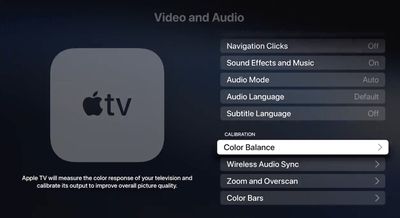
  2. Select the Video and Audio menu.
    Apple TV

  3. Under "Calibration," select Color Balance. If the option says "Not Required," your smart TV doesn't need adjusting. It also is unavailable with Dolby Vision.
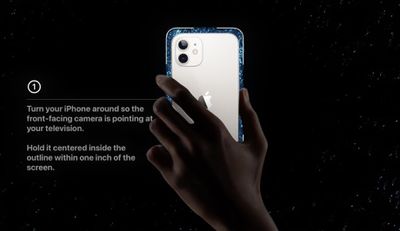
  4. When the notification appears on your iPhone, follow the onscreen instructions: Turn your iPhone around so the front-facing camera is pointing at your TV, hold it centered inside the displayed frame within one inch of the screen, and keep it there until the progress icon fills up (it should only take a few seconds).
    apple tv color balance2

  5. Select View Results to see how your TV has been adjusted.
apple tv color balance
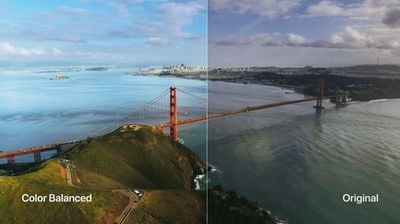
The results show you a side-by-side comparison of the original colors that your TV was displaying and the balance-adjusted colors. The calibrated version should look more natural and perhaps warmer.


Related Roundup: Apple TV
Buyer's Guide: Apple TV (Don't Buy)

Top Rated Comments

Press22 Avatar
64 months ago
Tired of seeing the professional calibrators upset about this feature. It's not for you, its for the masses who use out of the box settings.
This is cool, thanks.
Score: 26 Votes (Like | Disagree)
64 months ago

Anyone that’s serious about calibration won’t touch this.
Maybe not but most people don’t do any form of calibration, so potentially even if it’s not perfect it could be an improvement for the majority.
Score: 18 Votes (Like | Disagree)
boast Avatar
64 months ago
I personally thought this was the coolest part of the presentation. Can't wait to give it a try.
Score: 14 Votes (Like | Disagree)
64 months ago
I’ll have to see this for myself but that color balanced image does not look all that realistic to me. Ya it looks pretty but colors don’t look that perfect in real life. Most people would look at a picture where the colors are way too warm and tell you that looks the best. I hope Apple is going for accuracy here and not personal preference of the masses.
Score: 13 Votes (Like | Disagree)
Apple_Robert Avatar
64 months ago
The color balanced picture in the article looks overly saturated and unnatural.
Score: 12 Votes (Like | Disagree)
64 months ago

I tried the calibration during the normal lighting conditions of when I normally watch TV (don't know if that affects the accuracy) and while I'm certainly by no means a pro at color calibration, the "balanced" outcome looked significantly "warmer" than the original. So much so to the point that it is still jarring after 3 days. I know I can change back, but I've looked around online and of the dozen or so people that have commented on the coloration, probably like 10/12 of them have said there outcome was also "warmer" as a result.

Are "warmer" colors "more accurate" in general?
Yes, absolutely. The whole industry works off the 6500K white point, which is warmer than it is cooler.

It's how practically all media content is mastered, so if your desire is to view things how the creators have intended, you should leave it.

Give it a few days and your eyes will adjust and forget about it in due time.
Score: 11 Votes (Like | Disagree)

Popular Stories

iOS 26

iOS 26.4 Adds Two New Features to CarPlay

Tuesday March 24, 2026 1:55 pm PDT by
iOS 26.4 was released today, and it includes a couple of new features for CarPlay: an Ambient Music widget and support for voice-based chatbot apps. To update your iPhone 11 or newer to iOS 26.4, open the Settings app and tap on General → Software Update. CarPlay will automatically offer the new features so long as the iPhone connected to your vehicle is running iOS 26.4 or later....
Apple Business hero

Apple Unveils 'Apple Business' All-in-One Platform

Tuesday March 24, 2026 8:53 am PDT by
Apple today announced Apple Business, a new all-in-one platform that unifies device management, productivity tools, and customer outreach features. The service is designed to be a consolidated replacement for several of Apple's existing business-focused offerings, including Apple Business Essentials, Apple Business Manager, and Apple Business Connect. It provides organizations with a single...
AirPods Pro Firmware Feature

Apple Releases New Firmware for AirPods Pro 3, AirPods Pro 2 and AirPods 4

Tuesday March 24, 2026 12:31 pm PDT by
Apple today released new firmware for the AirPods Pro 2, AirPods Pro 3, and the AirPods 4. The firmware has a version number of 8B39, up from 8B34 on the AirPods Pro 3, 8B28 on the AirPods Pro 2, and 8B21 on the AirPods 4. There is no word on what's included in the firmware, but Apple has a support document with limited notes. Most updates are limited to bug fixes and performance...