
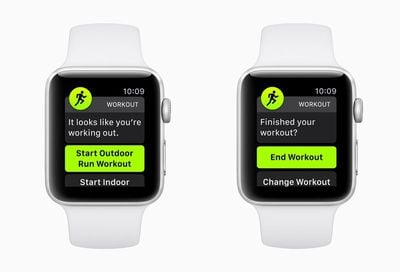
Apple's watchOS 5 update includes a new automatic workout detection feature, which is designed to make sure you never miss out on getting credit for one of your workouts.

Automatic workout detection is a setting that's enabled by default once you upgrade to watchOS 5, but if you don't want the feature, it can be turned off using the Apple Watch app on the iPhone or on the Apple Watch itself.
autodetectworkout

Enabling/Disabling Automatic Workouts on Apple Watch

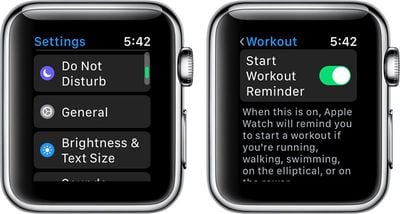
  1. Open the Settings app on Apple Watch.
  2. Choose General.
  3. Select "Workout."
  4. Scroll down to "Start Workout Reminder" and "End Workout Reminder." workoutstartreminder
  5. Set the toggles to your personal preferences.
Enabling/Disabling Automatic Workouts on iPhone

  1. Open up the Watch app on the iPhone.
  2. Choose "Workout" to access the settings for the Workout app.
  3. Scroll down to "Start Workout Reminder" and "End Workout Reminder." automaticworkoutdetection
  4. Set the toggles to your personal preferences.
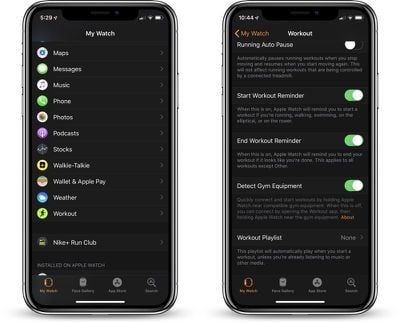
Automatic workout detection for starting a workout and ending a workout are two separate settings, so you can control them individually if so desired.

Start Workout Reminder

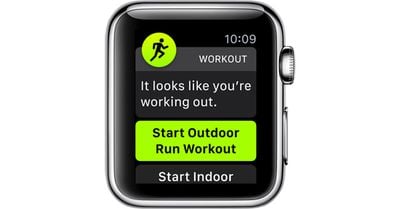
Automatic workout detection is designed to let the Apple Watch remind you to start a workout if you forget to do so, which it will do through a notification that pops up on the Apple Watch asking if you want to begin a workout.
watchos5automaticworkoutdetection
Automatic detection when your workout starts is compatible with running, walking, swimming, elliptical workouts, or rower workouts.

Even if you initially forget to start a workout in watchOS 5, this new workout detection feature will give you credit for the exercise you've already done.

End Workout Reminder

With automatic detection for when a workout ends, which is labeled as "End Workout Reminder" the Apple Watch will remind you to end a workout if it looks like you've finished up. This too works through a notification that directs you to the workout app.

Unlike automatic workout detection for starting a workout, automatic detection for ending one works with all workouts aside from those in the "Other" category.


Related Roundup: Apple Watch 11
Buyer's Guide: Apple Watch (Neutral)

Top Rated Comments

newellj Avatar
96 months ago
My guess? Apple is stuck on their "baby steps" implementing model and those were the only workout types the developers cared about. Next year, if the public seems to like these, they'll add another couple of workout types. Or they'll eliminate the feature completely.
FWIW, I turned this off. I found it turning itself on while I was walking to work, which would be OK, but I generally have at least one hand full of stuff and responding to the alert has an annoyance value that exceeds my interest in recording a walking workout.

Maybe a good feature add would be enabling workouts on a single type basis. For example, yes to running, no for walking.
Score: 3 Votes (Like | Disagree)
inkhorn Avatar
99 months ago
What would be great would be a stop workout on pairing with car Bluetooth / CarPlay, so I don't forget and log vehicle miles onto the route of my workout if I'm driving home.

Especially as there's no way to easily trim the start or end of workouts. :(
Score: 2 Votes (Like | Disagree)
felixen Avatar
96 months ago
I’m so disappointed with this feature. It was probably my most anticipated feature in watchOS 5 but it just doesn’t work well enough. It’s baffeling considering Fitbit has been able to do this with ease for years. Come on, Apple
Score: 2 Votes (Like | Disagree)
pat500000 Avatar
99 months ago
We need a new update that erases everything on the watch except a clock mode.
Score: 1 Votes (Like | Disagree)
JRobinsonJr Avatar
96 months ago
I wonder why automatic workout startup is limited to these modes...
My guess? Apple is stuck on their "baby steps" implementing model and those were the only workout types the developers cared about. Next year, if the public seems to like these, they'll add another couple of workout types. Or they'll eliminate the feature completely.
Score: 1 Votes (Like | Disagree)
Westside guy Avatar
99 months ago
What this new feature really needs is a talking paper-clip!
Score: 1 Votes (Like | Disagree)

Popular Stories

Apple Logo Zoomed

Tim Cook Teases Plans for Apple's Upcoming 50th Anniversary

Thursday February 5, 2026 12:54 pm PST by
Apple turns 50 this year, and its CEO Tim Cook has promised to celebrate the milestone. The big day falls on April 1, 2026. "I've been unusually reflective lately about Apple because we have been working on what do we do to mark this moment," Cook told employees today, according to Bloomberg's Mark Gurman. "When you really stop and pause and think about the last 50 years, it makes your heart ...
wwdc sans text feature

Apple Rumored to Announce New Product on February 19

Thursday February 5, 2026 12:22 pm PST by
Apple plans to announce the iPhone 17e on Thursday, February 19, according to Macwelt, the German equivalent of Macworld. The report, citing industry sources, is available in English on Macworld. Apple announced the iPhone 16e on Wednesday, February 19 last year, so the iPhone 17e would be unveiled exactly one year later if this rumor is accurate. It is quite uncommon for Apple to unveil...
Finder Siri Feature

Why Apple's iOS 26.4 Siri Upgrade Will Be Bigger Than Originally Promised

Friday February 6, 2026 3:06 pm PST by
In the iOS 26.4 update that's coming this spring, Apple will introduce a new version of Siri that's going to overhaul how we interact with the personal assistant and what it's able to do. The iOS 26.4 version of Siri won't work like ChatGPT or Claude, but it will rely on large language models (LLMs) and has been updated from the ground up. Upgraded Architecture The next-generation...
iOS 26

iOS 26.3 and iOS 26.4 Will Add These New Features to Your iPhone

Tuesday February 3, 2026 7:47 am PST by
While the iOS 26.3 Release Candidate is now available ahead of a public release, the first iOS 26.4 beta is likely still at least a week away. Following beta testing, iOS 26.4 will likely be released to the general public in March or April. Below, we have recapped known or rumored iOS 26.3 and iOS 26.4 features so far. iOS 26.3 iPhone to Android Transfer Tool iOS 26.3 makes it easier...
iphone 17 pro dark blue 1

iPhone 18 Pro Max Rumored to Deliver Next-Level Battery Life

Friday February 6, 2026 5:14 am PST by
The iPhone 18 Pro Max will feature a bigger battery for continued best-in-class battery life, according to a known Weibo leaker. Citing supply chain information, the Weibo user known as "Digital Chat Station" said that the iPhone 18 Pro Max will have a battery capacity of 5,100 to 5,200 mAh. Combined with the efficiency improvements of the A20 Pro chip, made with TSMC's 2nm process, the...















