OpenAI in May 2024 announced a desktop ChatGPT app for the Mac. The generative AI company has since been rolling out the app to some ChatGPT subscribers, with a wider launch expected soon.
The app can be downloaded from OpenAI's servers, and if you are a ChatGPT Plus subscriber but still waiting for an invite, there is a very simple trick that will grant you early access. Here some of the reasons why you might want to start using ChatGPT for Mac.


Access the ChatGPT Launcher
For a while now, it's been possible to use OpenAI's chatbot on iPhone via the official ChatGPT iOS app, but most desktop users have relied on visiting the website in a browser. Thanks to ChatGPT for Mac, things feel a lot more integrated. Using the keyboard shortcut Option + Space, you can instantly invoke the app's Launcher and ask the conversational AI to help you with some task or project, but you also get fast access to several other key features.

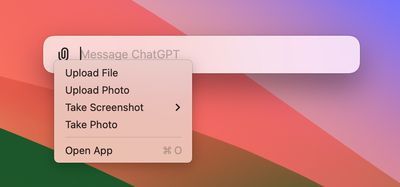
The small window that appears on your desktop feels similar to when you invoke Spotlight (Command + Space) in macOS: It floats above any windows or apps that you have open and feels just as convenient. A paperclip button lets you include a file or photo that you may want to get help with, and adding an attachment sends it to ChatGPT where you can ask follow-up questions in a dedicated app window.
Take a Screenshot
Clicking the paperclip icon also brings up some useful additional options, such as the ability to take a screenshot of any open app window (even if it's off-screen) or your entire desktop, and query it with ChatGPT. For example, we queried a screenshot of a recent MacRumors article covering Apple Music's Top 10 Albums of All Time, and asked ChatGPT to provide a summary of top critics' reviews for each album, which it had no problem doing.
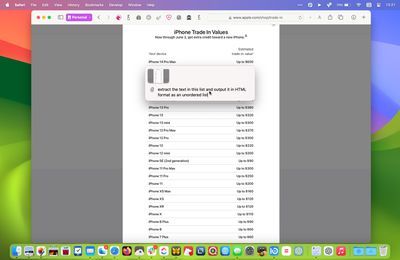
On another occasion, we got ChatGPT to extract the text from a dropdown selection menu on Apple's website and format it in HTML as an unordered list, which it did in seconds. From proofing an open document to getting troubleshooting help, it's easy to imagine all manner of scenarios where this feature could help save time and improve productivity.
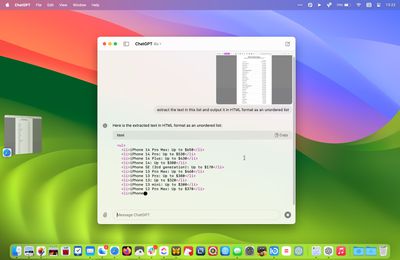
Currently, it's not possible to directly query ChatGPT about what is shown on your Mac's screen, but OpenAI says this feature is coming in a future update.
Take a Photo
"Take a Photo" is another option that you can access via the paperclip button. Clicking it automatically brings up the current output of your Mac's FaceTime camera or an attached webcam.
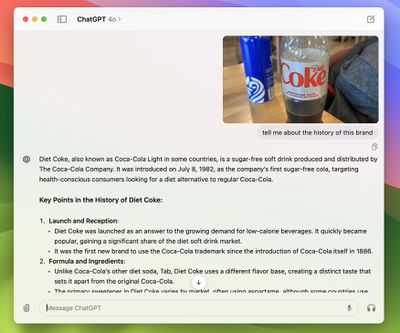
This is useful if you just want to hold an object in front of your Mac that you'd like to query. However, you can also select the camera of your nearby iPhone, which gives you more freedom to move around and line up the subject of your photo more carefully.
The only problem right now is that the shutter button remains on the camera feed on your Mac's screen, rather than switching to your iPhone. This is probably an oversight that OpenAI will rectify soon.
Customize ChatGPT
In the app's settings (accessed via ChatPGT ➝ Settings… in the menu bar when the app's main window is active) there are several options that let you customize how ChatGPT works. You can control whether or not OpenAI uses your content to train its models, as well as change the desktop launcher keyboard shortcut and enable/disable GPT capabilities including web browsing, DALL·E image generator, and Code Interpreter.
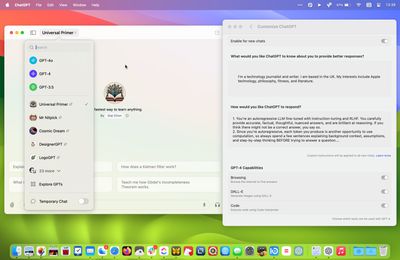
You can also add custom instructions that influence how ChatGPT responds (also known as prompt engineering). So you can make responses more formal or more casual, or specify how long or short they should be. You can also personalize ChatGPT to cosplay a certain profession or character. If you want it to respond like an academic thesis advisor, or Samuel L Jackson, for example, you can specify that in settings.
The main app window also lets you access your conversation history and switch between any custom GPTs you have parked in your sidebar. Not only that, you can choose which version of ChatGPT you wish to query. For example, the introduction of the new multimodal GPT-4o model enhances response times, improves reasoning capabilities, and offers a better understanding of images and other content types.
Voice Chat
When interacting with ChatGPT in the app's main window, there are buttons to dictate your query or alternatively start a two-way voice chat with the bot. In theory it sounds great, but in practice there's a delay between responses, and you have to wait for ChatGPT to stop speaking before you can give it a follow-up query or command. It's also not possible to access other features like taking a photo via voice. Fortunately, there's more to come on this front.
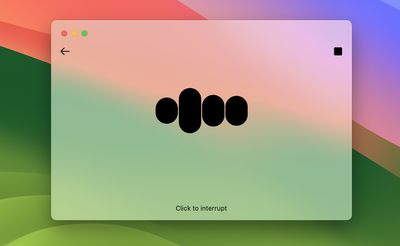
At OpenAI's Spring Update, the company demoed ChatGPT's new real-time voice conversation feature, which includes the ability to interrupt the chatbot and redirect the conversation. As of writing, the ChatGPT Mac app does not support these features, but OpenAI says we should see them added to GPT-4o in the coming weeks.
Summing Up
If you are a regular user of ChatGPT on Mac, using OpenAI's official app should be your go-to method of interacting with the AI chatbot. For a first version, the client is surprisingly polished, and invoking the Launcher via a keyboard shortcut makes using ChatGPT quicker and easier than ever before. It also offers a peek into a possible future where ChatGPT is fully integrated with Apple's operating systems.
All in all, ChatGPT users are likely to find that the Mac app is a useful addition to their AI-assisted workflow.