

 In the latest version of Apple Maps that comes with iOS 13, Apple has added a Favorites feature that lets you search for specific places and then add them to a list. Favorites are meant for places that you visit frequently, and Home and Work are already added by default.
Any place you frequent can be added to the Favorites list, such as a favorite restaurant or coffee shop, or a friend or family member's house. Tapping on one of your Favorites brings up directions to that spot right away. Think of it as a speed dial option for Maps.
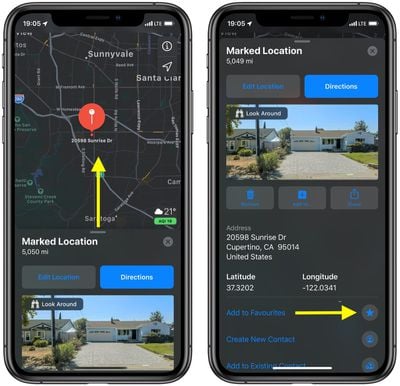
You can add a location to your Favorites any time you drop a pin on the map. Simply tap the place on the map that you want to favorite, then bring the location details up on the screen by swiping up from the drag handle with your finger. You'll see an option further down to Add to Favorites. Tap the starred icon beside it, and the location will be added to your favorite places list.
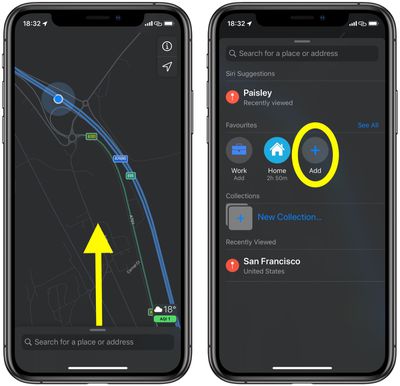
You can also add places to your Favorites by searching for them. The steps below show you how.
- Launch the Apple Maps app on your iPhone or iPad.
- Expand the search input field to encompass the screen by dragging the grab handle upwards with your finger.
- Tap the Add button under the Favorites section.

- Type a location into the search field. When the location appears below in the suggestions, tap the plus (+) button beside it.
- In the Details screen, you can tap the location label to edit it, and also select a Type (Address/Home/Work) to identify it.
- Tap Done in the top-right corner of the screen to finish.
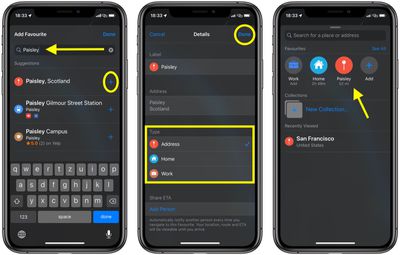
Now you can select the favorited location any time, simply by dragging the grab handle above the Maps app's search field.




















