With the introduction of iOS 15, Apple rebadged its paid iCloud plans to "‌iCloud‌+" to reflect the fact that subscribers now get access to additional privacy features like Private Relay and Hide My Email. This article explains what Hide My Email is and how to use it.
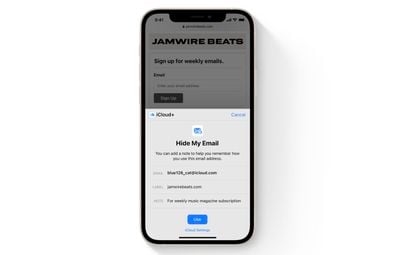
hide my email safari demo
Hide My Email builds on the idea of Sign in With Apple by providing you with unique, random email addresses that forward to your personal inbox whenever you want to keep your personal email address private.

It's especially useful if you suspect that a business you're transacting with is likely to share your email address with ad agencies or other third-parties for marketing purposes. Using a random email address means you can delete the address at any time, ensuring unsolicited emails don't reach your inbox.

How to Create an Email Address Using Hide My Email

The following steps show you how to create a new dummy email address with Hide My Email, for use in Safari and Mail. Make sure your iOS device is running iOS 15 or later.

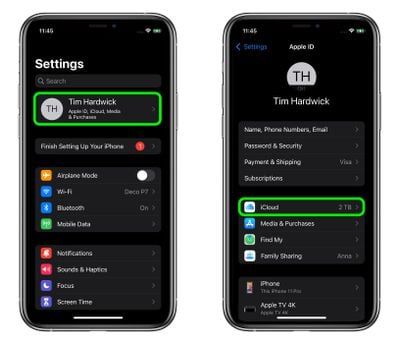
  1. Launch the Settings app on your iPhone or iPad
  2. Tap your Apple ID name at the top of the main settings menu.
  3. Tap iCloud.
    settings

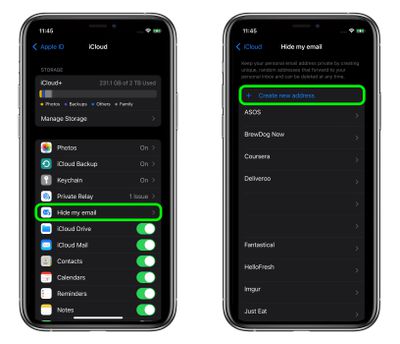
  4. Tap Hide My Email.
  5. Tap Create new address.
    settings

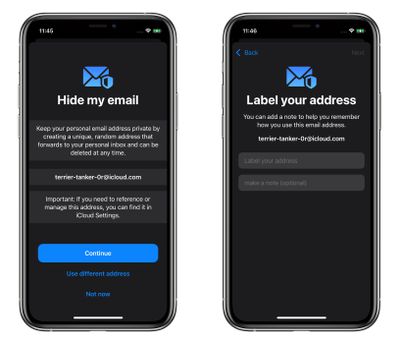
  6. Tap Continue, then give your address an identifying label. You can also optionally make a note about it.

  7. Tap Next, then tap Done.
    settings

You can now use the random email address when you send emails in Mail, or when you're asked to enter your email address on a website in Safari.

How to Deactivate an Address Using Hide My Email

If you aren't currently using a random address generated by Hide My Email, you can temporarily deactivate it so that you don't receive any forwarded email from it.

  1. Launch the Settings app on your ‌iPhone‌ or ‌iPad‌
  2. Tap your ‌Apple ID‌ name at the top of the main settings menu.
  3. Tap iCloud.
    settings

  4. Tap Hide My Email.
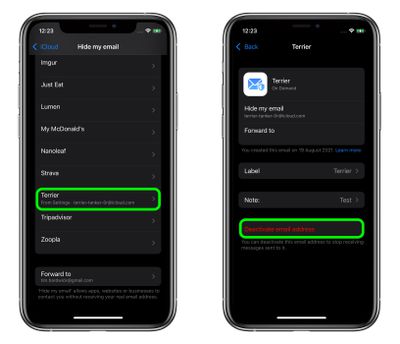
  5. Tap the email address in the list that you want to deactivate.
  6. Tap Deactivate email address.
  7. Tap Deactivate to confirm.
    settings

From now on, you won't receive emails sent to that address anymore. If you want to re-activate the address at any time, you'll find it in an "Inactive addresses" section at the bottom of your active addresses list. Tap the address in question, then tap Reactivate Address. Alternately, you can delete it by selecting Delete Address.

How to Change Your Hide My Email Forwarding Address

You can change the forwarding address for the dummy accounts that Hide My Email randomly generates. Here's how.

  1. Launch the Settings app on your ‌iPhone‌ or ‌iPad‌.
  2. Tap your ‌Apple ID‌ name at the top of the main settings menu.
  3. Tap iCloud.
    settings

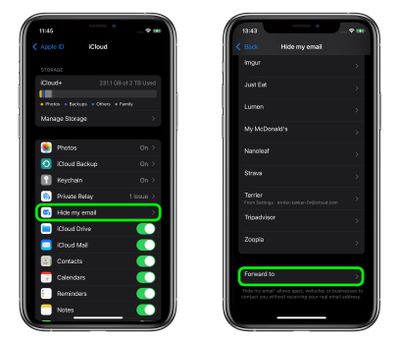
  4. Tap Hide My Email.
  5. Scroll to the bottom of the address list and tap Forward to.
  6. Select one of your email addresses, then tap Done.
    settings

Paid ‌iCloud‌+ plans also include another premium feature called Private Relay, which ensures that all traffic leaving your device is fully encrypted, so that no third party between the website and your device can see the website being viewed. Check out our dedicated how-to for all the details.


Top Rated Comments

meady100 Avatar
59 months ago
Did that just say ‘iCloud’ and ‘additional privacy features’ in the same sentence?
Score: 10 Votes (Like | Disagree)
Jeaz Avatar
59 months ago

Are people really going to willfully install iOS 15 on their iPhone?
Why wouldn't they?
Score: 6 Votes (Like | Disagree)
CarpalMac Avatar
59 months ago

Or you can simply have a secondary email address for all the spam and registrations on websites.
I own a domain and then use a bespoke address for each and all sites which get piped to a single master (catch-all) account. e.g. macrumors@mydomainnamehere.com. That way I can:
1) See who sold my email / has slack security, allowing my address out into the wild (Yes I mean you, ProtectYourBubble, GolfOnline, LinkedIn, Tumblr etc..)
2) Blackhole that address.

Alternatively, with Gmail, you can add a plus and then anything you like, and you will still get it.
E.g. mygmailaccountname+macrumors@gmail.com

Having a bespoke email address is good as well as if bad people get a hold of it, they can't automatically be sure they can login to your account elsewhere, should you make the mistake of reusing a password which lets face, we all have done at some point.


edit: corrected my gmail mistake.
Score: 6 Votes (Like | Disagree)
hagar Avatar
59 months ago

I really love this, but however the limit of just 100 aliases does make it, well, limited and in the end not very useful. Hopefully they increase the limit after beta.
Why is 100 not enough? I don’t see the need to use a different one for every single website I subscribe too.

I would use them mainly for websites I don’t really trust. And even then I could still cluster.
Score: 6 Votes (Like | Disagree)
JonnyBlaze Avatar
59 months ago
Using a different alias for each account login helps identify where the problem has come from if you do start getting spam, or in case the service you have an account with gets hacked. You only have to change that one account email or alias, rather than changing lots of account that use the same one. There might be other reasons too, but this is what I like the idea of this service for.
Score: 6 Votes (Like | Disagree)
Jeaz Avatar
59 months ago

Will this come to macOS?
Yeah, it's already in the current macOS beta.
Score: 5 Votes (Like | Disagree)

Popular Stories

Apple Logo Zoomed

Tim Cook Teases Plans for Apple's Upcoming 50th Anniversary

Thursday February 5, 2026 12:54 pm PST by
Apple turns 50 this year, and its CEO Tim Cook has promised to celebrate the milestone. The big day falls on April 1, 2026. "I've been unusually reflective lately about Apple because we have been working on what do we do to mark this moment," Cook told employees today, according to Bloomberg's Mark Gurman. "When you really stop and pause and think about the last 50 years, it makes your heart ...
wwdc sans text feature

Apple Rumored to Announce New Product on February 19

Thursday February 5, 2026 12:22 pm PST by
Apple plans to announce the iPhone 17e on Thursday, February 19, according to Macwelt, the German equivalent of Macworld. The report, citing industry sources, is available in English on Macworld. Apple announced the iPhone 16e on Wednesday, February 19 last year, so the iPhone 17e would be unveiled exactly one year later if this rumor is accurate. It is quite uncommon for Apple to unveil...
Finder Siri Feature

Why Apple's iOS 26.4 Siri Upgrade Will Be Bigger Than Originally Promised

Friday February 6, 2026 3:06 pm PST by
In the iOS 26.4 update that's coming this spring, Apple will introduce a new version of Siri that's going to overhaul how we interact with the personal assistant and what it's able to do. The iOS 26.4 version of Siri won't work like ChatGPT or Claude, but it will rely on large language models (LLMs) and has been updated from the ground up. Upgraded Architecture The next-generation...
iOS 26

iOS 26.3 and iOS 26.4 Will Add These New Features to Your iPhone

Tuesday February 3, 2026 7:47 am PST by
While the iOS 26.3 Release Candidate is now available ahead of a public release, the first iOS 26.4 beta is likely still at least a week away. Following beta testing, iOS 26.4 will likely be released to the general public in March or April. Below, we have recapped known or rumored iOS 26.3 and iOS 26.4 features so far. iOS 26.3 iPhone to Android Transfer Tool iOS 26.3 makes it easier...
iphone 17 pro dark blue 1

iPhone 18 Pro Max Rumored to Deliver Next-Level Battery Life

Friday February 6, 2026 5:14 am PST by
The iPhone 18 Pro Max will feature a bigger battery for continued best-in-class battery life, according to a known Weibo leaker. Citing supply chain information, the Weibo user known as "Digital Chat Station" said that the iPhone 18 Pro Max will have a battery capacity of 5,100 to 5,200 mAh. Combined with the efficiency improvements of the A20 Pro chip, made with TSMC's 2nm process, the...