If you connect your Mac to an external display, you may find that the Mac's on-screen and keyboard volume controls are disabled. That's because HDMI, DisplayPort, and Thunderbolt connections carry a fixed volume digital audio signal, so the external device (in this case, a monitor) controls the sound level.

mac volume disabled
This can be frustrating if the volume controls on your external display are concealed in the bezel or buried in a fiddly on-screen menu. Fortunately, it is possible to re-enable your Mac's native volume controls and use them to adjust the sound level coming out of your monitor's speakers. The steps below show how it's done, although you will need administrator privileges to follow them.

  1. Download the free SoundFlower extension (v2.0b2) from Github.
    enable mac volume control of external monitor speakers00

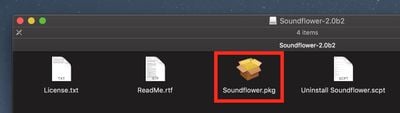
  2. double-click the SoundFlower.dmg file to mount it.

  3. Hold down the Ctrl key and left-click the Soundflower.pkg file, then choose Open from the contextual menu.
    enable mac volume control of external monitor speakers1

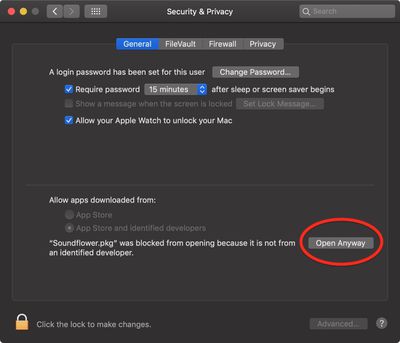
  4. If you see a dialog asking if you're sure you want to open it, click Open. If you see a dialog saying the package can't be opened, click OK, open System Preferences' Security & Privacy pane, and in the General tab click Open Anyway.
    enable mac volume control of monitor speakers 3

  5. Let the Soundflower installer continue and enter your password if necessary.
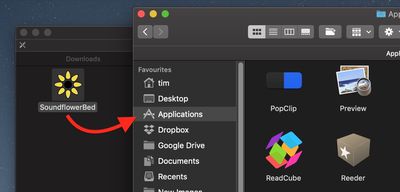
  6. Next, download the SoundflowerBed utility (v2.0), mount the .dmg file, and drag the flower icon to your Applications folder.
    enable mac volume control of external monitor speakers3

  7. Launch the SoundflowerBed utility.
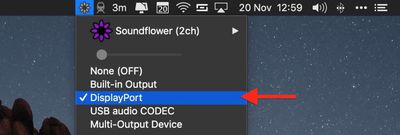
  8. Click the SoundflowerBed icon in the menubar and select DisplayPort, Thunderbolt or HDMI as the output in the (2ch) list.
    enable mac volume control of external monitor speakers04

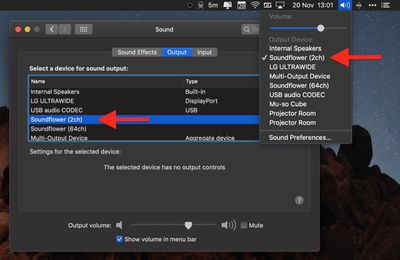
  9. Click the volume icon in the menu bar and choose Soundflower(2ch). You can also make this selection in the Sound System Preference pane.

    enable mac volume control of external monitor speakers5

You should now be able to adjust the volume of the speakers in your HDMI or DisplayPort monitor using the native media controls on your Mac.


Top Rated Comments

ChromeAce Avatar
94 months ago
I installed this once 10 years ago and it conflicted with other audio apps. It took me 5 years to figure out what the problem was and get rid of the driver (by finally doing a clean install). Never again.
Score: 5 Votes (Like | Disagree)
xflashx Avatar
94 months ago
Apple really should add native support for this in macOs. Every other OS (at least Linux and Windows) are able to adjust the volume when audio is delivered over HDMI/DP.
I’m waiting for this functionality to be added since forever...
Score: 4 Votes (Like | Disagree)
Edwards007 Avatar
74 months ago
I used and appreciated Soundflower for years, but it quit working when I upgraded to High Sierra, and it doesn't appear to be supported anymore. I tried something called blackhole, but I couldn't get it to work, so I downloaded the 15 dollar sound control app mentioned by pizzapizza, and it works perfectly with my HDMI display.

Being able to control the sound output from the keyboard controls is so obvious that it is impossible to understand why Apple seems to go out of their way to inhibit this.
Score: 3 Votes (Like | Disagree)
Ohples Avatar
94 months ago
Make sense that because it's a digital signal it would be harder to adjust the "volume" but you would think there would be some CEC ('https://en.wikipedia.org/wiki/Consumer_Electronics_Control') like mechanism so the volume control on the system can adjust the monitor/external device volume.
Score: 3 Votes (Like | Disagree)
Val-kyrie Avatar
94 months ago
I installed this once 10 years ago and it conflicted with other audio apps. It took me 5 years to figure out what the problem was and get rid of the driver (by finally doing a clean install). Never again.
The need for this hack demonstrates Apple's lack of forethought both in its hardware and in its software.

I personally would not bother with this since it can cause more problems than it solves.
Score: 3 Votes (Like | Disagree)
falcn Avatar
92 months ago
And, it works with the standard Mac volume keys. The only thing that's not perfect is the volume range. When it's at the lowest volume, it's not quite as low as I might want it.
Just installed this and it seems to be working well for me. As BobMcBob mentioned the volume control range is not as expansive as I would prefer, but volume control from my keyboard is back, so I am happy.

It is on sale at the moment so I bought a license after downloading and installing the trial version.

Thanks for the tip!
Sorry for late reply, I don't visit macrumors often.
You can go lower than one notch of volume, hold Shift+Option+[your volume key]. It's stock Mac OS feature.

A similar problem is adjusting the brightness on an external monitor. The standard Mac brightness keys don't work. I installed Brightness Slider from the app store. It's not bad, but it doesn't use the normal brightness keys. You can set your own keyboard shortcut, but you can't use the normal brightness keys. Does anyone have a better solution for that?
I use free app called Lunar https://lunarapp.site
It works if your external monitor supports DDC (most of them do)
It mirrors your internal screen brightness level on your external screen, which is great if you have auto-adjust on.
Score: 3 Votes (Like | Disagree)

Popular Stories

wwdc sans text feature

Apple Rumored to Announce New Product on February 19

Thursday February 5, 2026 12:22 pm PST by
Apple plans to announce the iPhone 17e on Thursday, February 19, according to Macwelt, the German equivalent of Macworld. The report, citing industry sources, is available in English on Macworld. Apple announced the iPhone 16e on Wednesday, February 19 last year, so the iPhone 17e would be unveiled exactly one year later if this rumor is accurate. It is quite uncommon for Apple to unveil...
Apple Logo Zoomed

Tim Cook Teases Plans for Apple's Upcoming 50th Anniversary

Thursday February 5, 2026 12:54 pm PST by
Apple turns 50 this year, and its CEO Tim Cook has promised to celebrate the milestone. The big day falls on April 1, 2026. "I've been unusually reflective lately about Apple because we have been working on what do we do to mark this moment," Cook told employees today, according to Bloomberg's Mark Gurman. "When you really stop and pause and think about the last 50 years, it makes your heart ...
Finder Siri Feature

Why Apple's iOS 26.4 Siri Upgrade Will Be Bigger Than Originally Promised

Friday February 6, 2026 3:06 pm PST by
In the iOS 26.4 update that's coming this spring, Apple will introduce a new version of Siri that's going to overhaul how we interact with the personal assistant and what it's able to do. The iOS 26.4 version of Siri won't work like ChatGPT or Claude, but it will rely on large language models (LLMs) and has been updated from the ground up. Upgraded Architecture The next-generation...
maxresdefault

Apple Shows Off a Key Reason to Upgrade to the iPhone 17

Saturday February 7, 2026 9:26 am PST by
Apple today shared an ad that shows how the upgraded Center Stage front camera on the latest iPhones improves the process of taking a group selfie. "Watch how the new front facing camera on iPhone 17 Pro takes group selfies that automatically expand and rotate as more people come into frame," says Apple. While the ad is focused on the iPhone 17 Pro and iPhone 17 Pro Max, the regular iPhone...
iOS 26

iOS 26.3 and iOS 26.4 Will Add These New Features to Your iPhone

Tuesday February 3, 2026 7:47 am PST by
While the iOS 26.3 Release Candidate is now available ahead of a public release, the first iOS 26.4 beta is likely still at least a week away. Following beta testing, iOS 26.4 will likely be released to the general public in March or April. Below, we have recapped known or rumored iOS 26.3 and iOS 26.4 features so far. iOS 26.3 iPhone to Android Transfer Tool iOS 26.3 makes it easier...