watchOS 7: How to Use the New Apple Watch Handwashing Feature - MacRumors
Skip to Content

watchOS 7: How to Use the New Apple Watch Handwashing Feature

by

In watchOS 7 for Apple Watch, Apple introduced handwashing detection, which helps users wash their hands properly to keep viruses and bacteria at bay.
applewatchhandwashing
Washing your hands is one of the most important protections against getting sick and preventing the spread of germs. But only if you do it correctly – and most people don't. One study highlighted by Apple showed that as many as 95 percent of us either wash too fast, use water but no soap, or just don't wash at all.

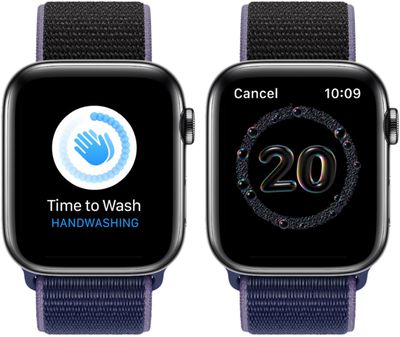
To increase the chances of proper handwashing, your Apple Watch can display a countdown to help you wash your hands for 20 seconds, which is the recommended duration, according to The World Health Organization (WHO). The countdown will relay haptic feedback when it starts and ends, so you don't even need to interact with or look at your Apple Watch to use it.

What's more, the handwashing timer will appear automatically on your wrist whenever you start washing your hands. That's because watchOS 7 can recognize when you rub your hands and will listen out for the accompanying sound of running water and soap being used.

Here's how to enable the Handwashing feature on Apple Watch running watchOS 7 or later.

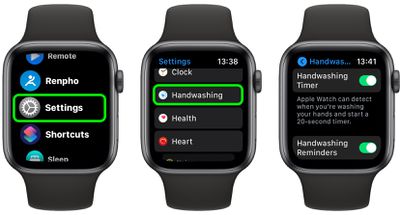
  1. Launch the Settings app on your Apple Watch.
  2. Scroll down and tap Handwashing.
  3. Toggle the switch next to Handwashing Timer to the green ON position.
  4. Do the same on the switch next to Handwashing Reminders, if desired. (When enabled, you'll receive a notification if you haven't washed your hands within a few minutes of returning home.)
    settings

How to View Your Handwashing Stats on iPhone

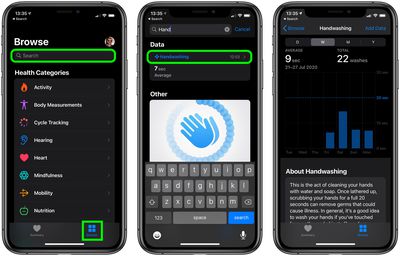
  1. Launch the Health app on your iPhone.
  2. Tap the Browse tab.
  3. Search for Handwashing using the Search field.
  4. Tap the Handwashing result.
    health

Use the tabs above the chart to see your handwashing history over the day, week, month, or year.


Related Roundup: Apple Watch 11
Buyer's Guide: Apple Watch (Neutral)

Top Rated Comments

decypher44 Avatar
74 months ago
If you need an app to wash your hands, you failed at life.
Score: 28 Votes (Like | Disagree)
Apple_Robert Avatar
74 months ago

If you need an app to wash your hands, you failed at life.
What about children and adults with learning disabilities or traumatic brain injury? Are they failures at life because they need a tool like this to assist them in their day to day life?

Are young kids failures at life because they are using this app, along with their parents, to get in the habit of good hygiene?

In my opinion, you need to really stop and think before speaking. What you said is wrong on so many levels.
Score: 23 Votes (Like | Disagree)
dogslobber Avatar
74 months ago
I'm washing my hands of this feature.
Score: 20 Votes (Like | Disagree)
ErikGrim Avatar
74 months ago

It should be noted that this feature seems to only work on series 4 and later watches.
Yup. No washing for dirty series 3 users.
Score: 17 Votes (Like | Disagree)
74 months ago

I don't get this. Can people not count to 20 anymore?
Right? The amount of energy spent on that which could have went to something more innovative. Next up on the innovation list: a “make sure to chew 30 times before you swallow” app that uses EarPods’ accelerometer and a “don’t make that face or it will stick like that” app using facial recognition.
Score: 11 Votes (Like | Disagree)
74 months ago

I'm washing my hands of this feature.
You need to clean up your act.
Score: 11 Votes (Like | Disagree)

Popular Stories

iOS 26

iOS 26.4 Adds Two New Features to CarPlay

Tuesday March 24, 2026 1:55 pm PDT by
iOS 26.4 was released today, and it includes a couple of new features for CarPlay: an Ambient Music widget and support for voice-based chatbot apps. To update your iPhone 11 or newer to iOS 26.4, open the Settings app and tap on General → Software Update. CarPlay will automatically offer the new features so long as the iPhone connected to your vehicle is running iOS 26.4 or later....
Apple Business hero

Apple Unveils 'Apple Business' All-in-One Platform

Tuesday March 24, 2026 8:53 am PDT by
Apple today announced Apple Business, a new all-in-one platform that unifies device management, productivity tools, and customer outreach features. The service is designed to be a consolidated replacement for several of Apple's existing business-focused offerings, including Apple Business Essentials, Apple Business Manager, and Apple Business Connect. It provides organizations with a single...
AirPods Pro Firmware Feature

Apple Releases New Firmware for AirPods Pro 3, AirPods Pro 2 and AirPods 4

Tuesday March 24, 2026 12:31 pm PDT by
Apple today released new firmware for the AirPods Pro 2, AirPods Pro 3, and the AirPods 4. The firmware has a version number of 8B39, up from 8B34 on the AirPods Pro 3, 8B28 on the AirPods Pro 2, and 8B21 on the AirPods 4. There is no word on what's included in the firmware, but Apple has a support document with limited notes. Most updates are limited to bug fixes and performance...